How-to · Workshops & process maps · Miro · Oct 7, 2026
Outline an ops workshop board in Miro before the sticky storm
“Workshop outline” here does not mean an assistant designs your process or decides who owns each step. It means the board opens with outcomes, lanes, and honest blanks — so the 45 minutes you have with the room go to debate, not dragging rectangles around.
Who this is for
Ops leads and facilitators who already run process workshops, retros, or mapping sessions on Miro boards — vendor intake, onboarding, incident handoffs — and spend the first fifteen minutes building structure while the room waits. If your team does not use Miro and the end goal is a formal published flowchart, look at Lucidchart AI first.
How to do it
This page is a how-to. It is not a ranking of whiteboard tools. Product detail and dated pricing live on the Miro AI review. A swimlane is a row on the board for one role or stage, so you can see who does each step.
1. Step 1 — Name the outcomes
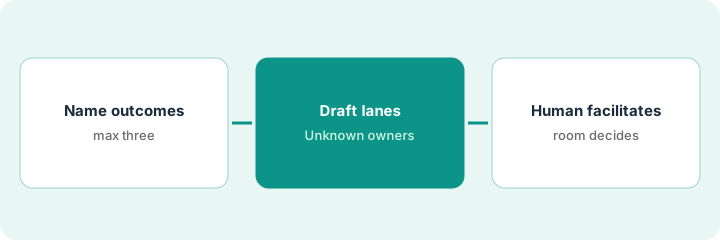
What it is: Before touching the board, write the two or three things the workshop must produce. The outline serves those outcomes — not a generic template.
- One sentence per outcome, phrased as an artifact: “agreed intake steps,” “named owner per step,” “three biggest risks with next actions.”
- Write the rough process as bullets — the way people actually do it today, not the ideal.
- List who will be in the room. Owners on the board can only come from people who are there or who are named in the bullets.
- Decide what is out of scope so the board does not grow a second workshop.
A 45-minute vendor-intake workshop. Outcomes: agreed steps from form to vendor notified, an owner per step, the three biggest risks. Rough bullets: form received → triage → finance policy check → sign-off → notify vendor. Out of scope: picking a new intake tool.
Write at the top of a blank doc: Outcomes (max 3):, Today’s process as bullets:, Who’s in the room:, Out of scope:. Fill all four before you open Miro AI. If you cannot name an outcome, you are not ready to outline.
2. Step 2 — Draft swimlanes and owners
What it is: Paste the bullets into Miro AI and ask for a board outline — swimlanes, one verb per step, owners only where named, and a handful of sticky-note risks. See the Miro AI review for board outlines, swimlanes, and risk stickies.
- Each lane is a role or stage. Each step is one action.
- Owners appear only if the bullets named them. Everything else reads Owner: Unknown — ask in workshop.
- Ask for about five risks (missing owner, handoff drop, audit gap) as stickies for the room to sort.
- Forbid invented service-level promises (how fast a step must happen), tools, or metrics. If a number is not in the bullets, it is not on the board.
Miro AI returns three lanes — Intake (Ops), Approve (Finance + Lead), Close (CS) — with five steps and five risk stickies. It also adds a “48-hour” turnaround promise to the triage step. Nobody has agreed to that; the facilitator deletes it. Two steps show Owner: Unknown, which become the first discussion items.
In Miro AI, paste your Step 1 bullets and ask: Turn this process into a board outline: 3 swimlanes, one-action steps under each, owners only if named (otherwise Owner: Unknown — ask in workshop), and 5 risk stickies. Do not invent deadlines, tools, or metrics.
3. Step 3 — A human facilitates
What it is: The outline is a starting point. The facilitator runs the room, and the room decides owners, order, and which risks matter.
- Open with the outcomes from Step 1, not the AI outline.
- Resolve every Owner: Unknown sticky with a name from the room — or leave it Unknown with a follow-up owner.
- Have the room vote on the three biggest risks; park the rest visibly on the board.
- After the workshop, move the agreed process to wherever SOPs (your written step-by-step procedures) live — a wiki, Notion, or a formal Lucidchart AI map. The board is the workshop record, not the system of record.
The room disagrees about whether Finance or the team lead signs off under a threshold. The facilitator adds a decision sticky rather than letting the outline’s guess stand. Two Unknown owners get names; one stays Unknown with the ops lead owning the follow-up. Three of five risks get next actions; two are parked.
At the end of your next workshop, take a photo or export of the board and write a five-line summary: Steps agreed — owners named — owners still Unknown — three biggest risks + next action — where the final SOP will live. Send it within 24 hours.
Pricing context (October 2026)
This how-to is not a price sheet. Plan detail for Miro AI and Lucidchart AI lives on those reviews. Recheck each vendor’s site before you budget. Dated October 2026.
Checked Oct 7, 2026 on the vendor’s own pricing page: miro.com/pricing lists Free at $0 (3 editable boards, 10 AI credits a month to try AI), Starter at $8 per member per month billed yearly (unlimited boards, 25 AI credits per member per month), Business at $20 per member per month billed yearly, and Enterprise at custom pricing from 30 members. AI credits are pooled across your organization, reset monthly, and do not roll over; extra credit packages are sold on paid plans. Annual billing saves 20% over monthly. Lucidchart was not rechecked for this page — see its review and Lucid’s site.
Uncertainty: AI credit allowances, plan gates, and feature names change. If an invoice and a review disagree, trust the invoice. Do not paste a marketing list price you did not pay. The only prices this site sells here are the optional $9 AI toolkit spreadsheet and $19 AI toolkit audit.
When this helps (honest take)
Useful when Miro is already where your team workshops, the facilitator can write the rough process as bullets beforehand, and someone will move the result into a real SOP afterward.
Not useful when you want the board to decide the process, nobody will facilitate, or the job is a formal, publishable flowchart from day one. For that last case, Lucidchart AI is built for decision diamonds and owner-labeled steps. Paying for two whiteboard tools for the same workshops is worth a look.
Related options (educational)
| Need | Where to look | Why |
|---|---|---|
| Workshop boards, swimlanes, risk stickies | Miro AI | When Miro is already the workshop home |
| Formal process maps with decisions | Lucidchart AI | Publishable flowcharts after the workshop |
| Workshops in the Figma ecosystem | Figma AI | When design and product already use FigJam |
| Where the final SOP lives | Notion AI for ops · Confluence AI | The board is not the system of record |
Related reviews: Miro AI · Lucidchart AI · Figma AI · Notion AI for ops. Related how-to: Stop rewriting the SOP. Capture the clicks once. Free: seat-waste calculator if two whiteboard tools cover the same workshops.
FAQ
Can Miro AI assign owners to steps?
Only where the bullets already named them. Everything else stays Owner: Unknown until the room decides.
Should the board become our SOP?
No. The board records the workshop. Move the agreed process to your wiki or a formal map afterward.
Miro AI or Lucidchart AI?
By artifact: workshop and discovery on a Miro board; a formal, publishable flowchart in Lucidchart. Many teams use one after the other. This page is not a ranking.
Where do dated prices live?
On the Miro AI and Lucidchart AI reviews and the vendor sites. This October 2026 how-to only repeats prices we checked on the vendor’s own pricing page on Oct 7, 2026.
Optional next step
Free reviews stay free. Neither offer is required to use this page. If two whiteboard or diagram seats already cover the same workshops, optional help: $9 AI toolkit spreadsheet (seats, spend, owner, cancel-by, overlap) or $19 AI toolkit audit when you want a written memo.