Tool · Ops & automation · Workshop boards
Miro AI review (Sep 2026): boards for ops workshops and process maps
When Miro AI helps facilitate workshops and process maps for ops — swimlanes, owners, and sticky risks — vs FigJam. Companion to Figma AI and Notion AI for ops reviews.
What Miro AI is (workshop boards for ops)
Miro AI sits on Miro boards to help facilitators turn messy process bullets into outlines — swimlanes, steps, owners, and risk stickies — without pretending the AI owns the process. For ops, the job is workshop facilitation and process mapping when the team already lives in Miro. Compare honestly to FigJam (Figma ecosystem workshops) and design-side assists in Figma AI. Standing SOPs may still live in Notion AI for ops or a Claude Project.
Major features (with how someone uses them)
Examples at a glance: each feature has a concrete ops example plus a short Try this.
1. Board outline from process bullets
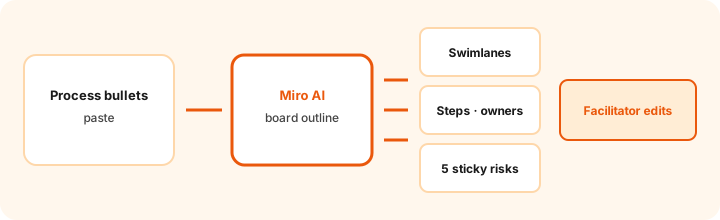
What it is: Paste a rough process list and ask Miro AI for a board outline — lanes, steps, and placeholders — so the workshop starts with structure instead of a blank canvas. Ground the outline in the bullets; mark Unknown where owners are missing.
Primary SoT workflow:
Turn this process bullet list into a board outline: swimlanes, steps, owners, and 5 sticky risks.
2. Swimlanes, steps, and owners
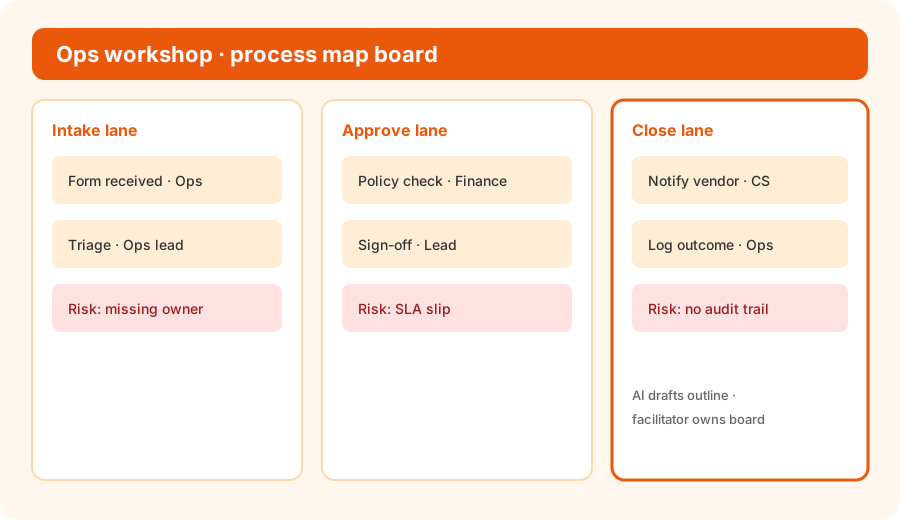
What it is: Structure the map so each lane is a role or stage, each step is a verb, and each owner is named only if the bullets said so. Prefer blanks over invented names — facilitators fill Unknowns live with the room.
Owner honesty:
From this process list only: propose 3 swimlanes, list steps under each, and assign owners only if named. Write Owner: Unknown for blanks. Do not invent SLAs or tools.
3. Sticky risks (facilitator owns the list)
What it is: Ask for about five sticky risks — missing owners, SLA slips, audit gaps, handoff drops — so the workshop debates failure modes early. AI suggests; the room prioritizes.
Risk pass:
List 5 sticky risks for this process map. Each risk: one sentence, who would notice first, and whether it is people / system / policy. Do not invent metrics.
4. Vs FigJam
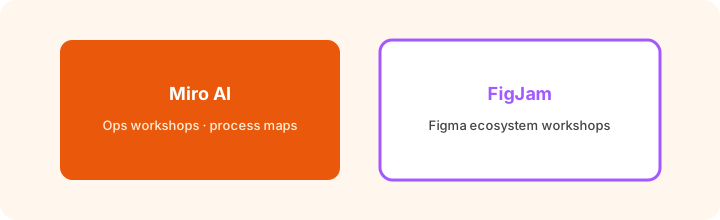
What it is: Educational boundary, not a ranking. Miro AI fits when Miro is already the ops workshop home. FigJam fits when design/product already facilitate in the Figma ecosystem (see Figma AI). Buying both for the same workshop job is usually overlap — pick where the team already boards.
Same bullets in both homes (if you have access):
Run the same process-bullet prompt (swimlanes, steps, owners, 5 sticky risks) in Miro AI and in FigJam (or your current board). Note which outline needs less facilitator cleanup before the workshop.
Pricing context (September 2026)
Public Miro pages (as of September 2026) often list Free, Starter around $8/member/month, and Business around $20/member/month when billed annually (monthly higher), with Enterprise custom. Miro AI usage is typically credit-based by plan (e.g. small Free pool; Starter/Business per-license monthly credits; Enterprise varies). Confirm dollars, credit caps, and AI Workflows entitlements on miro.com/pricing and Miro Help Center AI credit articles before budgeting. FigJam seats are a separate Figma SKU.
Uncertainty: Plan names (including Business + AI Workflows changes), credit refresh rules, and add-ons move. Do not budget from a blog post — use live vendor pages and your admin console.
When Miro AI is useful (honest take)
Useful when ops already runs workshops and process maps in Miro and wants faster board outlines with human facilitation. Less useful when the team already lives in FigJam/Figma, when the real SoR is a wiki or tracker (Notion AI for ops, Linear), or when you only need a one-off text outline in Claude for ops. AI drafts; facilitators own the board.
Paying for Miro AI and a few other AI tools? The $9 AI toolkit spreadsheet lists every AI subscription you have, what each one costs, and how fast it pays for itself, so you can see which ones are worth the money.
Want someone to do it for you? AI toolkit audit — $19
Related options (educational)
| Need | Better home | Why |
|---|---|---|
| Ops workshops already in Miro | Miro AI | Outline + stickies beside existing templates |
| Workshops already in Figma ecosystem | FigJam · Figma AI | Stay where design/product already facilitate |
| Standing SOP wiki | Notion AI for ops | Process text lives in Notion, not a board |
| Private playbook + files | Claude Projects | Text outline before anyone opens a board |
| Issue tracker handoff | Linear AI / Asana | Steps become tickets, not stickies |
FAQ
What is Miro AI for ops?
AI assists on Miro boards for workshop outlines, swimlanes, and risk stickies — useful when ops already facilitates in Miro.
How does Miro AI compare to FigJam?
FigJam fits Figma-centered teams. Miro AI fits Miro-centered ops workshops. Pick the board home you already pay for — not a brand ranking.
Should Miro AI own the process map alone?
No. AI drafts the outline; a facilitator edits owners, SLAs, and risks with the room before the board becomes truth.
What does Miro cost with AI in September 2026?
Confirm on miro.com/pricing. Public pages often list Starter ~$8 and Business ~$20 per member/month billed annually, with AI credits by plan. This review is dated September 2026.
Optional next step (if seats overlap)
If Miro AI would sit beside FigJam, Notion AI, and Claude seats, optional help mapping overlap: $19 AI toolkit audit or $9 AI toolkit spreadsheet. Email Audit $19 or Toolkit spreadsheet $9.
Checkout is live via Stripe. After you pay, we email delivery (spreadsheet) or intake next steps (audit).