How-to · Engineering triage · LogRocket · Oct 13, 2026
Hand one LogRocket Issue to engineering with the Galileo summary and the replay
LogRocket's Galileo can rank issues, summarize sessions, and, in the 2026 Issues beta, send an Issue straight to a coding agent. That's a lot of automation between a user's bad session and a pull request. This page shows a frontend lead or support engineer how to hand one Issue to engineering properly: summary checked against the replay, bug reproduced, and session data checked for personal details before it leaves LogRocket.
Who this is for
Frontend and mobile engineering leads, support engineers, and engineering managers whose team already records sessions in LogRocket on a plan with Galileo (the review says Galileo comes with the Pro plan). The job here is one clean engineering hand-off. If your job is weekly product triage of friction, the Fullstory Opportunities weekly how-to covers that, and Fullstory vs LogRocket explains where each tool leans.
How to do it
This is a how-to, not a ranking of replay tools. Feature detail lives on the LogRocket AI review. Per that review, the Issues experience is labelled 2026 Beta in LogRocket's docs, and Galileo's severity score can't be set by hand. Beta features change, so check your own workspace before you follow the steps exactly.

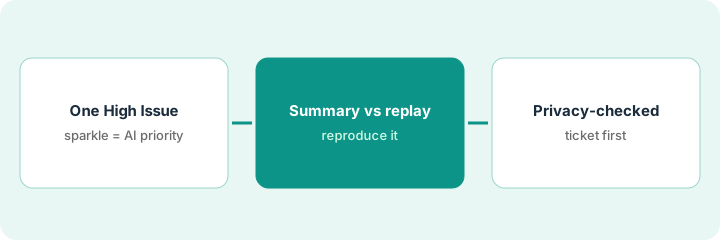
1. Step 1 — Pick one High-priority Issue
What it is: In the Issues beta, a Signal (a JavaScript or network error, rage or dead clicks, an error state, a mobile crash, a slow request) that crosses Galileo's severity threshold becomes an Issue at High priority, with an AI analysis, the number of affected sessions, and AI-generated feature labels. Per the review, AI-set priorities carry a sparkle icon until a person confirms them. Pick one High Issue on a page that matters to users.
- Open the Issues Feed and filter to High priority.
- Prefer an Issue on a key flow (checkout, signup, export) with more than a handful of affected sessions.
- Note the sparkle icon: the priority is Galileo's until someone confirms it.
- Write down the Issue name, the feature label, the affected-session count, and the signal type.
Three High Issues are open. She picks "payment button does nothing on Safari," labelled "Checkout," with 140 affected sessions. The other two (a date picker and a profile image upload) wait.
Copy one High-priority Issue into a hand-off note with four lines: Issue | Feature label | Affected sessions | Signal type. Add a fifth line, "Priority confirmed by: ___," and leave it blank until Step 2 is done.
2. Step 2 — Read the Galileo summary against the replay
What it is: Read Galileo's analysis of the Issue, then open the attached sessions and check it. Galileo Highlights (Pro and Enterprise, per the review) summarizes up to 10 sessions from one user and links each point to that moment in the replay. Jump to the moment, watch it with the network panel open, then reproduce the bug yourself on the same browser or device. Only a reproduced bug becomes a hand-off.
- Mark each claim in the summary "seen in replay" or "not seen."
- Open the network panel at the moment of failure and note the request and status.
- Reproduce on the same browser and device type. Write down exactly what you used.
- If it doesn't reproduce, lower the priority and write one line on why. Galileo's score stays Galileo's, but the priority is now a person's call.
Highlights says the user clicked "Pay" four times and the page showed no response. The replay agrees, and the network panel shows a failed request to the payment endpoint on each click. She reproduces it on her own Safari in five minutes, confirms the priority, and fills in the "Priority confirmed by" line.
Before writing a ticket, list every claim in the Galileo summary and mark it "seen in replay" or "not seen." Hand off only the "seen" claims, plus the browser and device you reproduced on.
3. Step 3 — Hand it off with a privacy check
What it is: Per the review, every Issue in the beta leads with one fix action: create or link a Linear, Jira, or Azure DevOps ticket, or dispatch a Cursor or Claude coding agent that receives a Galileo-generated debug package and opens a pull request. Before either, check what personal data travels with it. LogRocket expects your developers to mark private fields with data-private or a sanitizer; anything not marked can show in the replay or network panel.
- Look at the sessions and network bodies you're about to link. If you can read an email, address, or free-text note, mark it private before the hand-off and link a session that doesn't show it.
- Hand off by ticket first. Include two session links, the reproduction steps, and the "seen in replay" claims only.
- If you dispatch a coding agent, do it by hand on this reproduced Issue, with auto-dispatch left off and the agent's API key scoped to the repositories it needs.
- Treat any agent pull request as a suggestion. The code owner reproduces the bug on the branch, reads every changed line, and a second reviewer approves before it merges.
One linked session shows the customer's billing address in a response body. She swaps it for a session that doesn't, files a Linear ticket with the reproduction steps, and asks the engineer who owns the payment code to add a network sanitizer for that endpoint. The ticket goes to the payments team. No agent is dispatched this week.
Before you click any fix action on an Issue, open every session you plan to link with the network panel visible. If you can read personal data, mark it private or pick a different session, and write "privacy checked by [name]" in the ticket.
Pricing context (October 2026)
This how-to isn't a price sheet. Per the LogRocket AI review, LogRocket's pricing page on 9 October 2026 priced plans by monthly sessions and, at its default of 25,000 sessions a month, showed "Starting at $176 / month based on annual plan savings," with the final price depending on seats, retention, and add-ons. Galileo comes with the Pro plan; Enterprise is quoted; there's a 14-day free trial. Dated October 2026.
Checked Oct 13, 2026 on the vendor’s own pricing page: LogRocket’s pricing page at its default of 25,000 sessions a month showed “Starting at $176 / month based on annual plan savings,” and says the final price depends on seats, retention length, and add-ons such as Streaming Export. Core is for fewer than 100K sessions a month; Pro adds Galileo AI and is “available below 100K sessions at a higher price than Core.” Pro lists 500 free API/MCP credits a month and Enterprise 2,000. A 14-day free trial needs no card.
Uncertainty: The pricing page's slider changes the figure, and our review couldn't tell from a static read whether $176 was the Core or the Pro price. The Issues experience is beta. If your contract and our review disagree, trust your contract. The only prices this site sells here are the optional $9 AI toolkit spreadsheet and $19 AI toolkit audit.
When this helps (honest take)
Useful when you already record sessions, Galileo opens more Issues than the team can look at, and you want every hand-off to carry evidence engineers trust: a checked summary, a reproduced bug, and session links that don't leak personal data.
Not useful when traffic is low (few sessions give Galileo weak patterns), nobody will reproduce bugs before filing them, or private fields haven't been marked yet. Fix the masking first; a hand-off routine doesn't make an unmasked replay safe.
Related options (educational)
| Need | Where to look | Why |
|---|---|---|
| LogRocket AI features | LogRocket AI | Primary path on this page |
| Comparing session tools | Fullstory vs LogRocket | Engineering triage vs product and UX focus; privacy defaults differ |
| Weekly product friction review | Fullstory Opportunities weekly | Same day's how-to; a different job |
| Stack traces and backend errors | Sentry AI | Error monitoring first; humans merge |
| Turning a bug into a sprint decision | Cut a sprint line from Linear issues | Live how-to |
| Replay, analytics, and guidance tools in one view | Stack map for product ops | Spot overlap |
FAQ
Should we turn on auto-dispatch to coding agents?
Not at first. The review suggests leaving it off until the team has watched the manual path for a few weeks, and treating every agent pull request as a suggestion that a code owner and a second reviewer check.
Can I change Galileo's severity score?
Per our review, no. LogRocket's docs say the severity score is owned by Galileo. You can change an Issue's priority, and AI-set priorities show a sparkle icon until a person confirms them.
Where do current prices live?
On LogRocket's pricing page, where a slider sets your session volume. Our review read a starting figure at the default setting; this page doesn't invent figures for other volumes or plans. Our Oct 13, 2026 check of the vendor’s own pricing page is summarized in the pricing section above.
Who confirms an Issue’s priority?
A person who has watched the sessions and reproduced the bug. Until then, an AI-set priority is Galileo’s suggestion.
Optional next step
Free reviews stay free. If you pay for a replay tool, an error monitor, and an AI coding assistant that all explain the same bug, the $9 AI toolkit spreadsheet helps you lay them out, or the $19 AI toolkit audit gets you a written memo.