How-to · Product analytics / UX · Fullstory · Oct 13, 2026
Review three Fullstory Opportunities a week and hand one to an owner
Fullstory's Opportunities list keeps finding friction, and a long list with big estimated revenue numbers is easy to admire and hard to act on. This page shows a product manager or UX lead how to run a short weekly habit: look at three items, check one properly in the sessions behind it, and give that one a single owner and a single ticket.
Who this is for
Product managers, UX researchers, and design leads at companies with enough traffic that nobody can watch the relevant sessions by hand, who already have Fullstory on a paid plan with StoryAI. The job here is weekly product triage: deciding which friction is worth a sprint slot. If the job is handing a reproduced bug to engineering, see the LogRocket Galileo hand-off how-to instead, and the Fullstory vs LogRocket comparison for how the two tools differ.
How to do it
This is a how-to, not a ranking of session tools. Feature detail lives on the Fullstory AI review. Per that review, Opportunities surfaces friction on its own (signals such as dead clicks and errors on key pages) and ranks it by estimated revenue impact. That figure is Fullstory's estimate from your traffic, not money you'll recover. Before StoryAI reads more sessions, make sure your privacy exclusions are set; the review covers Fullstory's private-by-default capture.

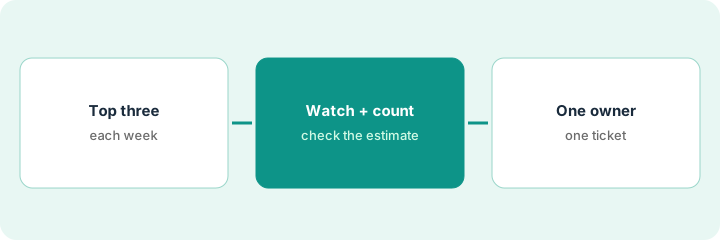
1. Step 1 — Open Opportunities and take only the top three
What it is: A fixed weekly slot (30 minutes is plenty) where one person opens Opportunities and copies the top three items into a short log. Three is the cap. The point is to finish the review every week, not to clear the list.
- Pick the same day each week, before sprint planning if you can.
- Copy each item's name, page, signal type, and the estimated impact, and label the estimate "Fullstory estimate."
- If an item was already in last week's three, note it. Repeat items are often the ones worth checking.
- Skip anything on a page you've already scheduled work for; take the next one instead.
Monday's top three: error clicks on the promo code field, dead clicks on a size-guide link, and rage clicks on a slow filter panel. The promo code item has the largest estimated impact and also appeared last week.
Start a log with these columns: Week | Opportunity | Page | Signal | Fullstory estimate | Checked? (yes/no) | Owner | Ticket. Fill three rows this week and stop.
2. Step 2 — Watch the sessions behind one and check the estimate
What it is: Pick one of the three, usually the repeat item or the largest estimate, and check it two ways. First watch a handful of sessions behind it. Then ask Ask StoryAI (or build a quick segment and use StoryAI Summaries) how many users hit the problem and how many still finished the flow. Compare that with your own order or signup data before you call it a priority.
- Watch five sessions. Note how many actually show the problem and how many show something else, like a user clicking before the page loaded.
- Ask how many users hit it and how many completed the flow anyway. People who retry and succeed still had friction, but they aren't lost revenue.
- Check the count against your own source (orders, signups) for the same date range.
The product manager watches five sessions: four show an error after entering a code, one is a typo. Ask StoryAI says most affected users hit the error with one payment provider's frame. Her order data shows most of them retried and finished checkout, so the real loss is smaller than the estimate. It's still a real bug on a key page, so it stays in.
For this week's chosen item, write two numbers in the log: "users who hit it" and "users who still completed," with the source of each. If you can't get both, mark the item "Unknown" and pick it again next week.
3. Step 3 — One owner, one ticket
What it is: The checked item gets exactly one owner and one ticket, written with the evidence: the session links you watched, the two counts, and the Fullstory estimate labeled as an estimate. The other two items from this week get a one-word outcome: "next week," "already planned," or "not now."
- Name one owner (a person, not a team) who can get the fix into a sprint.
- Write the ticket with two or three session links, the counts from Step 2, and what you saw in the sessions.
- Keep the estimate in the ticket, but label it as Fullstory's, not as expected recovery.
- Next week, check whether last week's ticket was picked up before you add a new one.
The promo code ticket goes to the checkout team's lead with three session links and both counts. The size-guide item is marked "next week," and the filter panel is "already planned." A month later the log shows four tickets, three shipped, and one sent back as "couldn't reproduce."
At the end of each weekly slot, make sure exactly one row has an owner and a ticket link, and the other two have a one-word outcome. If a ticket from last week is still unassigned, don't add a new one.
Pricing context (October 2026)
This how-to isn't a price sheet. Per the Fullstory AI review, Fullstory's pricing page on 8 October 2026 listed FullstoryFree with 30,000 sessions a month, 12 months of data retention, and up to 10 users, and said StoryAI, Dashboards, and higher session limits need a paid plan. Business, Advanced, and Enterprise showed no dollar amounts and route to a demo. Dated October 2026.
Checked Oct 13, 2026 on the vendor’s own pricing page: Fullstory’s pricing page lists FullstoryFree with 30,000 sessions a month and 12 months of analytics retention, free with no credit card. Paid plans show no dollar figures and route to a demo.
Uncertainty: The pricing page lists StoryAI both as a plan add-on and as StoryAI Summaries inside the plan comparison, so confirm which StoryAI features your tier includes. StoryAI Agents were in early access when we checked. If your contract and our review disagree, trust your contract. The only prices this site sells here are the optional $9 AI toolkit spreadsheet and $19 AI toolkit audit.
When this helps (honest take)
Useful when Opportunities produces more items than anyone works through, several teams argue about what users actually experience, and someone can block 30 minutes a week. A three-item cap makes the list something you finish.
Not useful when traffic is low enough to watch the relevant sessions yourself, or when most product questions are chart questions an analytics tool already answers. If nobody can own the resulting tickets, the habit just produces a longer log.
Related options (educational)
| Need | Where to look | Why |
|---|---|---|
| Fullstory AI features | Fullstory AI | Primary path on this page |
| Comparing session tools | Fullstory vs LogRocket | Product and UX focus vs engineering triage |
| Engineering hand-off from replay | LogRocket Galileo hand-off | Same day's how-to; a different job |
| Funnels and cohorts without full replay | Amplitude AI · Mixpanel AI | Chart questions first |
| Analytics, replay, and flags in one tool | PostHog AI | One bill for several product jobs |
| Session, analytics, and guidance tools in one view | Stack map for product ops | Spot overlapping seats |
FAQ
Is the Opportunities revenue figure what we'll get back if we fix it?
No. Per our review, it's Fullstory's estimate from your traffic. Check how many users still completed the flow before you treat it as a business case.
Why only three items a week?
Because the review is only useful if it gets finished. Three items, one properly checked, fits a 30-minute slot and still produces a steady stream of evidence-backed tickets.
Where do current prices live?
With Fullstory. FullstoryFree is published; paid plans were quote-only when our review checked, and this page doesn't invent a figure. Our Oct 13, 2026 check of the vendor’s own pricing page is summarized in the pricing section above.
What if none of the three is worth a ticket?
Log the one-word outcome for each and stop. A week with no ticket is fine; a week with five half-checked tickets isn’t.
Optional next step
Free reviews stay free. If you pay for session replay, an event analytics tool, and an error monitor that all watch the same users, the $9 AI toolkit spreadsheet helps you lay them out, or the $19 AI toolkit audit gets you a written memo.