How-to · Course authoring · iSpring · Oct 18, 2026
Generate quiz questions with iSpring Suite AI, and have the course author check every question
iSpring Suite's AI Assistant drafts quiz questions from course content, and iSpring's own disclaimer says AI quizzes may contain errors and must be verified. An answer key that is slightly wrong teaches the wrong thing with a checkmark. This page shows how to generate one quiz and have the course author check every question before learners see it.
Who this is for
Instructional designers, trainers, and small L&D teams who build training in PowerPoint with iSpring Suite. The job here is checking AI quiz questions. For turning a policy document into a video with Colossyan's Cora and approving every scene before render — a different job — see Colossyan Cora scene approval.
How to do it
This is a how-to, not a ranking of authoring tools. Per the iSpring AI review, the top Suite plan formerly called Suite Max is now iSpring Suite AI, and iSpring Learn is now iSpring LMS. The AI Assistant generates course text, images, and quiz questions; iSpring's AI features disclaimer says outputs, including quizzes, may contain errors and should always be verified, and that you should never submit confidential information or personal data. The ground rule: the course author checks every question and answer key.

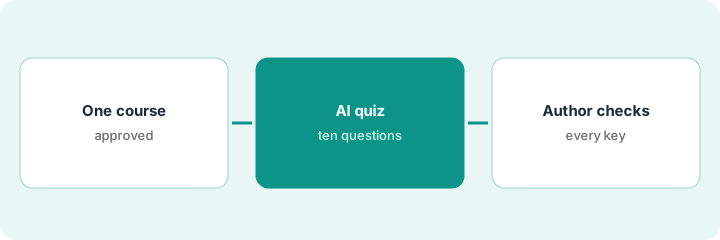
1. Build from one existing PowerPoint course
What it is: Start from a course that already exists and has been approved, so the AI asks about real content rather than inventing its own.
- Pick one approved course built in PowerPoint with iSpring Suite.
- Confirm the slides are current before generating anything.
- Remove any confidential information or personal data from the slides you will use.
- Name the course author who will check the quiz.
- Decide how many questions the course needs, for example ten.
She picks the existing forklift pre-use inspection course, which the safety manager approved last quarter, and plans ten questions.
Write down the course, its approval date, and the author who will check the quiz.
2. Generate the quiz
What it is: Ask the AI Assistant for quiz questions from the course, then set feedback for each question.
- Ask for the number of questions you planned.
- Use the question templates that fit the content.
- Add feedback for each question that explains the course's answer.
- Note which slide each question came from.
- Keep only questions that test something a learner needs on the job.
The AI drafts ten questions. Two ask about trivia from the introduction rather than the inspection steps, so she marks them for replacement.
Write the source slide next to every generated question.
3. Author checks each question and answer key
What it is: The course author checks every question against its slide: is the marked answer right, could a second option also be right, and does the feedback match the course?
- Check each answer key against the slide it came from.
- Look for questions where two options are correct.
- Replace any question that tests trivia instead of the job.
- Check feedback explains the course's answer, not a general one.
- Publish only after the author signs off on all of them.
Checking each one, she finds an answer key that lists tyre pressure as optional (the course says it is required) and one question with two correct options. She fixes the key, rewrites one, replaces the two trivia questions, and publishes.
Have the course author check every answer key against the course before you publish.
Pricing context (October 2026)
This how-to isn't a price sheet. Per the iSpring AI review and iSpring's pricing pages (checked Oct 18, 2026, USD), iSpring Suite is $970, iSpring Suite AI is $1,290, and iSpring Cloud AI is $720 per author per year. iSpring LMS Business is priced per active user — for example $6.91 per user per month at 100 users ($8,286 a year). Confirm which AI features sit in Suite versus Suite AI. Dated October 2026.
Checked Oct 18, 2026 on the vendor’s own pricing page: iSpring’s pricing page lists iSpring Suite at $970, iSpring Suite AI at $1,290, and iSpring Cloud AI at $720 per author per year. iSpring’s LMS pricing page lists Business at $6.91 per user per month at 100 users ($8,286 a year).
Uncertainty: The only prices this site sells here are the optional $9 AI toolkit spreadsheet and $19 AI toolkit audit.
When this helps (honest take)
Useful when your team already builds training in PowerPoint and wants AI to draft quizzes, with authors checking every draft.
Not useful when subject experts will author with no designer involved, you need heavy custom interactions, or no one will check AI quizzes before learners see them.
Related options (educational)
| Need | Where to look | Why |
|---|---|---|
| iSpring AI features | iSpring AI | Primary path |
| Policy doc to video, scene by scene | Colossyan Cora scene approval | A different job |
| Absorb course drafts with a reviewer | Absorb Create reviewer pass | Existing how-to |
| Designer-led authoring suite | Articulate 360 AI | Rise and Storyline |
| Learning ops stack map | Stack map: learning ops | Where iSpring fits |
FAQ
What happened to iSpring Suite Max?
Per our review, iSpring Suite Max became iSpring Suite AI on 29 October 2025, and iSpring Learn became iSpring LMS.
Can iSpring's AI write quiz questions?
Yes. Per our review, the AI Assistant generates quiz questions, and iSpring's own disclaimer says they may contain errors, so check every answer key.
How much does iSpring cost?
iSpring Suite is $970, Suite AI $1,290, and Cloud AI $720 per author per year; iSpring LMS is priced per active user. See the pricing section.
Optional next step
If you want a one-page toolkit map for the tools you already pay for, use the optional $9 AI toolkit spreadsheet. If you want a short review of seat waste and unused tools, use the optional $19 AI toolkit audit. Neither is required to follow this how-to.