How-to · Learning & development · Absorb LMS · Oct 14, 2026
Draft a course with Aura Create and route it through an Absorb reviewer before admins publish
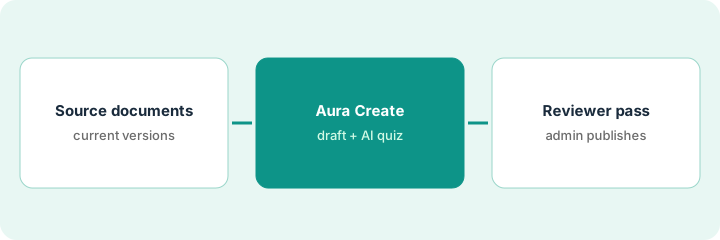
Absorb's Aura Create can draft a course from your documents in a conversation, and Absorb Create already has reviewer and approval features. This page joins the two: the AI drafts, a named reviewer who owns the process checks every lesson and quiz question, and an admin publishes only after approval.
Who this is for
Training managers, LMS admins, and customer-education leads at mid-market companies on Absorb LMS who need courses built faster than their designers can manage. The job here is one course from current documents, reviewed by the process owner. For the learner-facing agents, see the Absorb LMS AI review.
How to do it
This is a how-to, not a ranking of learning platforms. Per the Absorb LMS AI review, Absorb launched Absorb Aura on 19 May 2026, including Aura Create for conversational authoring. Absorb Create, the browser authoring tool, lists AI-generated quizzes, commenting, a reviewer feature, and approval workflows. Older names (Create AI) still appear on some Absorb pages.
1. Step 1 — Gather the current source documents
What it is: Per the review, Aura Create drafts from a document you upload, a prompt, or connected storage such as SharePoint or OneDrive. The draft can only be as current as the source. Confirm each document with the person who owns the process before uploading it.
- Pick one course topic and the documents that cover it.
- Ask the process owner which version is current.
- Remove superseded files from the folder you connect.
- Name the reviewer: the process owner, not another L&D colleague.
The coordinator wants a warehouse onboarding course. The onboarding lead confirms the guide is current except for badge pickup, which moved to the front desk last month. The coordinator notes that change before uploading.
List each source file with "current: yes/no" and the owner's initials. Upload only files marked yes.
2. Step 2 — Aura Create drafts the course and an AI quiz
What it is: Per the review, Aura Create drafts an outline and builds content from what you gave it, and you refine it in chat before launch. Absorb Create adds AI-generated quizzes you can edit. Treat the draft as "ready for review," not ready for learners.
- Refine the outline in chat before building lessons.
- Generate the quiz, then read every answer key yourself first.
- Flag anything the document doesn't say, rather than fixing it from memory.
- Keep a list of open questions for the reviewer.
The draft has five lessons and a quiz. The forklift lesson implies new hires hold a certification they don't get until week three. The coordinator flags it instead of rewriting it herself.
For every quiz question, write the source page next to the answer. Questions without a source go to the reviewer as open questions.
3. Step 3 — Reviewer pass, then the admin publishes
What it is: Per the review, Absorb Create has roles, tasks, commenting, a reviewer feature, and approval workflows. Make the process owner the reviewer, require approval before publishing, and keep the comment thread as the record of what changed and who agreed.
- Assign the process owner as reviewer on the course.
- The reviewer checks each lesson against how the work is done today.
- The reviewer checks every quiz answer.
- You fix each comment; the reviewer approves.
- The admin publishes only approved courses.
The onboarding lead comments on the badge step and the forklift lesson. Both are fixed, he approves in Absorb Create, and the LMS admin publishes the course to new hires the next morning.
Turn on an approval step for AI-drafted courses in Absorb Create. Publish nothing that doesn't show the reviewer's approval.
Pricing context (October 2026)
This how-to isn't a price sheet. Per the Absorb LMS AI review, Absorb publishes no prices or packaging; its pricing page is a quote form that asks how many learners you have. Dated October 2026.
Checked Oct 14, 2026 on the vendor’s own pricing page: Absorb shows no public list price. Absorb’s pricing page is a quote form that asks how many learners you have; no plan prices are shown. This page quotes no Absorb dollar figure; confirm what your contract includes with Absorb or your admin.
Uncertainty: Absorb doesn't say on its public pages which Aura agents or Absorb Create seats are included in a base subscription, so ask for Aura Create and Absorb Create by name in your quote. Some Aura features were marked coming soon in October 2026. The only prices this site sells here are the optional $9 AI toolkit spreadsheet and $19 AI toolkit audit.
When this helps (honest take)
Useful when you train several audiences from one system, your documents have clear owners, and you already use Absorb Create for authoring. The reviewer step uses features you already have.
Not useful when the documents are out of date or ownerless, or the course is mainly a hands-on skill that needs practice rather than reading. A fast draft of an old process is still the old process.
Related options (educational)
| Need | Where to look | Why |
|---|---|---|
| Absorb AI features | Absorb LMS AI | Primary path on this page |
| Comparing enterprise LMS options | Absorb vs Cornerstone | Side-by-side |
| One policy lesson approved by its owner | Docebo Creator lesson | Same day's how-to |
| A course draft signed off by a process owner | Articulate Rise draft | Same day's how-to |
| A whole map of learning tools | Stack map: learning ops | Where Absorb fits |
FAQ
Is Aura Create the same as Create AI?
Absorb's pages use both names and don't say whether they are the same feature renamed. Check which one your account shows.
Can the reviewer edit the course directly?
They can comment; who edits is up to your roles. Many teams keep edits with the builder so the comment thread shows what changed.
Where do current prices live?
With Absorb's sales team. Absorb publishes no prices, and this page doesn't invent any. Our Oct 14, 2026 check of the vendor’s own pricing page is summarized in the pricing section above.
Who should be the reviewer?
The person who owns the process the course teaches, not another L&D colleague. They know what changed since the document was written.
Optional next step
Free reviews stay free. If you pay for an LMS with AI authoring plus a separate course tool that does the same job, the $9 AI toolkit spreadsheet helps you lay them out, or the $19 AI toolkit audit gets you a written memo.