How-to · Learning & development · Articulate · Oct 14, 2026
Build a Rise course draft with Articulate's AI Assistant and get the process owner's sign-off
Articulate's AI Assistant can turn an outline or document into a Rise course and quiz quickly. The designer knows how to build courses; the process owner knows how the work is done. This page shows how to start from the owner's outline, use AI for the draft, and get the owner's sign-off before anything is published.
Who this is for
Instructional designers and small L&D teams who build in Rise, working with a process owner outside L&D (a warehouse supervisor, a support lead, a finance manager). The job here is one accurate course with the owner's sign-off. For tools aimed at non-designers who author themselves, see the Easygenerator AI review.
How to do it
This is a how-to, not a ranking of authoring tools. Per the Articulate AI review, AI Assistant is built into Rise and Storyline and turns a prompt or source document into an outline, a lesson, or a full course draft, and builds quizzes and knowledge checks from your course content.

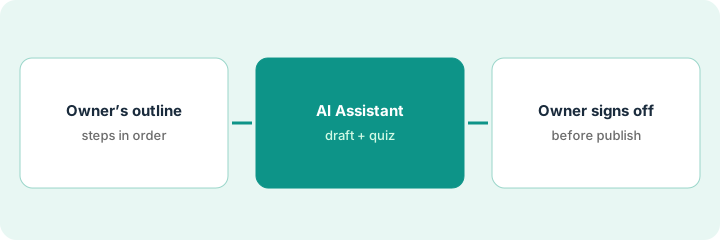
1. Step 1 — Get the outline from the process owner
What it is: Start from the owner's own list of steps rather than a polished document. The owner writes, or tells you, the steps in order and the mistakes new people make. That outline becomes the input for AI Assistant.
- Book 20 minutes with the process owner.
- Ask: "What are the steps, in order? Where do new people go wrong?"
- Attach any existing written procedure, and ask whether it's current.
- Agree when the owner will review the draft.
The dock supervisor lists seven steps for receiving a delivery and two common mistakes: skipping the damaged-pallet photo and signing before counting. He says the written procedure still mentions paper packing slips, which they no longer use.
Write the owner's steps as a numbered list in their words. Add the mistakes at the bottom. That's your source; don't paste in the old procedure without marking what's out of date.
2. Step 2 — AI Assistant drafts the course and quiz
What it is: Give AI Assistant the outline and ask for a short course with a quiz. Per the review, you can set a focus topic or difficulty for the questions. Check generated quiz answers against the owner's outline, not against the draft.
- Paste the outline and ask for a short Rise course.
- Generate a quiz focused on the common mistakes.
- Compare each lesson's steps with the outline order.
- List anything the AI added that the owner didn't say.
The draft adds a step to sign paper packing slips, pulled from general knowledge. One quiz answer reverses the order of counting and signing. The designer lists both for the owner.
Before sending the draft, write next to each lesson the outline step number it covers. Anything without a number is something the AI added.
3. Step 3 — The owner signs off before publish
What it is: The owner reviews a preview link and your list of added items. They mark every step that differs from what happens today. You fix, they sign off, then you publish. If the old written procedure was wrong, get it fixed too, so the next draft doesn't repeat the mistake.
- Send a preview link and the list of AI-added items.
- The owner marks each lesson "matches" or "change."
- You fix and resend changed lessons.
- The owner signs off in writing.
- Publish, and file an update to the old written procedure if needed.
The supervisor removes the paper slip step, adds the photo step, and corrects the quiz order. He signs off by email, and he files an update to the written procedure the same day.
Use a one-line sign-off: "I've checked every lesson and quiz answer against how we do this today. [Name, date]." Publish nothing without it.
Pricing context (October 2026)
This how-to isn't a price sheet. Per the Articulate AI review, Articulate publishes per-seat prices for Articulate 360 AI and a starting price for Frontline, with credits for advanced AI workflows bought separately. Dated October 2026.
Checked Oct 14, 2026 on the vendor’s own pricing page: Articulate’s pricing page lists Articulate 360 AI at $1,749 per seat per year on Teams and Frontline from $500 per year; credits for advanced AI workflows are bought separately.
Uncertainty: Credit use varies by feature, so the cost of avatars and translation depends on your content. Articulate reorganized its products in September 2026; check what your subscription includes. The only prices this site sells here are the optional $9 AI toolkit spreadsheet and $19 AI toolkit audit.
When this helps (honest take)
Useful when you already build in Rise and work with busy process owners who can talk through steps but won't write a document. The owner's outline keeps the AI close to the real job.
Not useful when the process owner can't commit 20 minutes twice, or the content is mostly regulated wording that legal must approve line by line.
Related options (educational)
| Need | Where to look | Why |
|---|---|---|
| Articulate AI features | Articulate AI | Primary path on this page |
| Authoring for non-designers | Easygenerator AI | Expert-led authoring tool |
| A course reviewed in the LMS before publishing | Absorb Aura Create reviewer pass | Same day's how-to |
| A procedure corrected by the doer | Trainual procedure from the doer | Same day's how-to |
| A whole map of learning tools | Stack map: learning ops | Where Articulate fits |
FAQ
Should the owner review in Rise?
A preview link is enough. Their job is accuracy, not layout.
What if the owner wants big changes after sign-off?
Treat it as a new version: update the outline, regenerate or edit the changed lessons, and get a fresh sign-off.
Where do current prices live?
On Articulate's pricing page. Our Oct 14, 2026 check of the vendor’s own pricing page is summarized in the pricing section above.
Should the process owner learn Rise?
No. Send them a preview link and a list of steps to check. Their job is accuracy, not authoring.
Optional next step
Free reviews stay free. If you pay for an authoring suite, an LMS with its own AI authoring, and a general AI chat tool, the $9 AI toolkit spreadsheet helps you lay them out, or the $19 AI toolkit audit gets you a written memo.