How-to · Learning & development · Trainual · Oct 14, 2026
Draft a written procedure in Trainual with AI, then have the person who does the job correct it
Trainual's AI can draft a step-by-step process from a short description. It fills gaps with what is typical, not with what your team does. This page shows an owner how to get the draft, hand it to the person who does the job, and assign only their corrected version.
Who this is for
Owners, operations managers, and office managers at businesses of roughly 25 to 1,000 people, often field service, healthcare, or multi-location teams, where how-to knowledge lives in a few people's heads. The job here is one written procedure that matches how the work is done. If you'd rather record the clicks of a software task, see Capture the clicks once.
How to do it
This is a how-to, not a ranking of training tools. Per the Trainual AI review, Trainual's AI creation turns a description, files, or notes into a step-by-step document you can edit, and the AI assistant answers questions with links to the source.

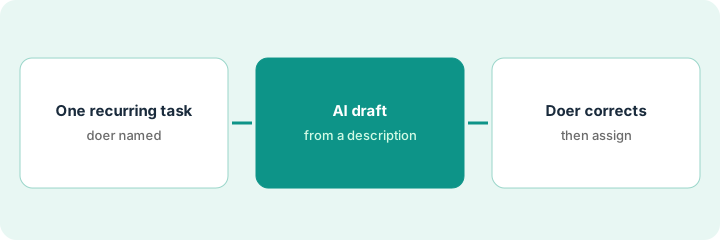
1. Step 1 — Pick one recurring task and the person who does it
What it is: The best first procedure is one nobody has written down but someone does every week. Name the person who does it most often. They are the reviewer, even if they never write documents.
- Pick a task new hires ask about in their first month.
- Name the person who does it most and does it well.
- Write a three-sentence description of the task in plain words.
- Agree a 20-minute slot for the doer to review.
The office manager picks "close out a service call." The senior technician does it every day and agrees to review the draft on Thursday morning.
Write: "Task: [name]. Doer: [person]. Description: [three sentences]." If you can't name the doer, pick a different task.
2. Step 2 — Let Trainual AI draft the procedure
What it is: Per the review, you describe what you need and the AI generates a clear, step-by-step draft you can edit. It can also rewrite, summarize, or expand existing text. Give it your three-sentence description and any notes you have.
- Paste your description and any existing notes.
- Read the draft and highlight anything that sounds generic.
- Don't fix steps from your own memory; leave that for the doer.
- Link any forms or tools the steps mention.
The draft has nine steps, including collecting card payment on site and a photo step in a generic "field app." The office manager highlights both: she isn't sure either matches what technicians do.
Highlight every step that names a tool, form, or payment. Those are where AI drafts most often guess.
3. Step 3 — The doer corrects it; the owner assigns it
What it is: The doer reads every step and corrects it to match the real job, adding the one thing only they know: which supplier, which form, which exception. Per the review, a passed quiz shows someone read the procedure, not that they can do the work, so assign the corrected version and pair it with a ride-along or check-off where it matters.
- Walk through the draft with the doer, step by step.
- Cut steps that don't happen; rewrite ones that happen differently.
- Add missing steps and the exceptions.
- Publish the doer's version and note their name as source.
- The owner assigns it to the roles that need it.
The technician cuts the card payment step (the company invoices later), rewrites the photo step to name the job app they use, and adds leaving the warranty sheet with the customer. Only that version is assigned to new technicians.
Ask the doer to read the draft out loud while describing what they actually do. Every time they say "well, actually," change the step.
Pricing context (October 2026)
This how-to isn't a price sheet. Per the Trainual AI review, Trainual publishes no plan prices; its pricing page lists Core, Pro, Premium, and Enterprise and asks you to book a demo. AI-assisted documentation is on every plan per that review. Dated October 2026.
Checked Oct 14, 2026 on the vendor’s own pricing page: Trainual shows no public plan prices. Trainual’s pricing page lists Core, Pro, Premium, and Enterprise plans with a book-a-demo path; the one public figure is a $1,000 one-time implementation fee for guided setup.
Uncertainty: Trainual's site doesn't say whether AI features use limits or credits, and some AI features depend on the newer Operations suite. Confirm what your plan includes. The only prices this site sells here are the optional $9 AI toolkit spreadsheet and $19 AI toolkit audit.
When this helps (honest take)
Useful when important work lives in a few people's heads and you need it written down without taking them off the job for a day. The AI does the first draft; the doer spends 20 minutes fixing it.
Not useful when the process is changing next month, or nobody actually does it the same way twice. Settle the process first.
Related options (educational)
| Need | Where to look | Why |
|---|---|---|
| Trainual AI features | Trainual AI | Primary path on this page |
| Procedures plus a full LMS | Trainual vs TalentLMS | Side-by-side |
| Software tasks recorded click by click | Capture the clicks once | Live how-to |
| A test checked by an expert | TalentLMS AI test | Same day's how-to |
| A whole map of learning tools | Stack map: learning ops | Where Trainual fits |
FAQ
Can the AI interview the doer for us?
Not in this routine. A 20-minute walkthrough with the person is faster and catches what they'd never think to type.
How often should we revisit the procedure?
When the tool, form, or rule it mentions changes, and at least once a year. Ask the doer to flag changes when they notice them.
Where do current prices live?
With Trainual's sales team, through a demo. Our Oct 14, 2026 check of the vendor’s own pricing page is summarized in the pricing section above.
What if the doer and the manager disagree on a step?
Write both down and let the manager decide, then note the decision in the procedure. The point is that the published version matches how the work is actually done.
Optional next step
Free reviews stay free. If you pay for a procedures tool, an LMS, and a general AI chat tool that all write training, the $9 AI toolkit spreadsheet helps you lay them out, or the $19 AI toolkit audit gets you a written memo.