How-to · Learning & development · TalentLMS · Oct 14, 2026
Generate a TalentLMS AI test from your course, then have a subject expert check every question
TalentLMS can generate a test from a content unit or a prompt in seconds. An AI question with a wrong "correct" answer teaches the mistake to everyone who takes it. This page shows a small team how to get a test fast and still have one subject expert check each question before it goes live.
Who this is for
Owners, HR generalists, and one-person training teams on TalentLMS who need a quiz fast and have no instructional designer. The job here is the test, not the course. For building a whole course with an expert, see a different job: Let an internal expert build a course with 360Learning.
How to do it
This is a how-to, not a ranking of learning platforms. Per the TalentLMS AI review, AI test creation lets the AI "generate tests from content units or prompt," and TalentCraft can create questions from any content section. The review advises checking the answer key first and coverage second.
1. Step 1 — Pick one finished course
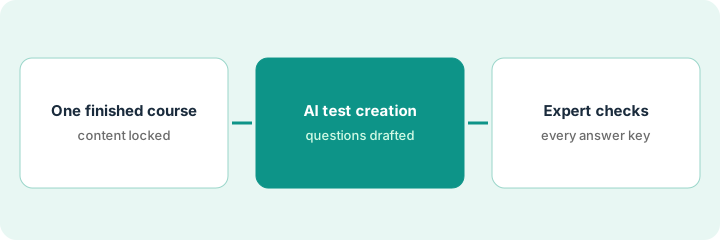
What it is: The test should come from content that is already correct. Generate it from a finished, reviewed course unit, not from a prompt, so every question has a source the expert can check against.
- Choose a course whose content an expert has already approved.
- Lock the content: no edits while the test is being built.
- Name the subject expert who will check the test.
- Decide how many questions you need and which sections they must cover.
The office manager picks the patient-records course the practice owner approved last month. She wants ten questions across all four sections, and the owner agrees to check them.
Write the section names of your course down the left of a page. You'll tick each one as questions are drafted, so you can see coverage at a glance.
2. Step 2 — Let AI test creation draft the questions
What it is: Generate the test from the course units. Read the draft once yourself before it goes to the expert: check that each section is covered and that no question asks about something the course doesn't say.
- Generate questions from the content units, not a free prompt.
- Tick each course section that has at least one question.
- Remove questions about topics the course doesn't cover.
- Mark any question where two answers look right.
The AI drafts twelve questions. Seven cover the first section and none cover the fourth (release requests). One question has two answers that both look correct. She regenerates for section four and flags the ambiguous question.
Count questions per section. If any section has none, generate from that unit again before sending the test to the expert.
3. Step 3 — The expert checks each question and answer key
What it is: The expert reads every question, every answer option, and the marked correct answer against the course. Nothing goes to learners until the expert has checked the full list.
- Send the expert the questions with the marked answers.
- The expert marks each "correct," "fix," or "remove."
- You make the fixes and send the changed ones back.
- Set a modest pass mark for the first round.
- After the first learners finish, review the most-missed questions with the expert.
The practice owner finds one answer key that says records can be released by phone request; the course says written request only. She fixes it and removes the ambiguous question. The test goes live with eleven questions and a modest pass mark.
Ask your expert to mark every question "correct," "fix," or "remove" before you publish. After ten learners finish, look at the two most-missed questions together.
Pricing context (October 2026)
This how-to isn't a price sheet. Per the TalentLMS AI review, TalentLMS publishes its plan prices, which rise by user band, and lists AI features by plan. Dated October 2026.
Checked Oct 17, 2026 on the vendor’s own pricing page: TalentLMS’s pricing page lists Core at $119/month, Grow at $229/month, and Pro at $449/month billed yearly (plus $6 per additional user on Pro), with Enterprise by quote and a free plan for up to 5 users. Today’s page lists AI test creation among the AI features of each paid plan; our Oct 11 review read it as Grow and up, so confirm in your account.
Uncertainty: TalentLMS's pages have disagreed about which plan includes which AI feature, and it doesn't publish how many credits each AI action uses. Check AI test creation in your own account before you plan around it. The only prices this site sells here are the optional $9 AI toolkit spreadsheet and $19 AI toolkit audit.
When this helps (honest take)
Useful when you have approved course content, need a quiz quickly, and have one expert willing to spend half an hour on it. The expert check is short compared with writing the test from scratch.
Not useful when the course itself hasn't been checked, or you want the test to prove someone can do the job. A passed test shows someone read the course, not that they can do the work.
Related options (educational)
| Need | Where to look | Why |
|---|---|---|
| TalentLMS AI features | TalentLMS AI | Primary path on this page |
| Written procedures plus training in one tool | Trainual vs TalentLMS | Side-by-side |
| An expert-built course | 360Learning course builder | A different job |
| A procedure corrected by the person who does it | Trainual procedure from the doer | Same day's how-to |
| A whole map of learning tools | Stack map: learning ops | Where TalentLMS fits |
FAQ
Can learners see the test before the expert checks it?
Not in this routine. Keep the test unpublished or unassigned until every question has been marked.
How many questions should the AI generate?
A few more than you need, so the expert can remove weak ones without leaving a section uncovered.
Where do current prices live?
On TalentLMS's pricing page. Our Oct 17, 2026 check of the vendor’s own pricing page is summarized in the pricing section above.
What pass mark should we set at first?
A modest one. Keep it low until the questions have been through one round of real learners and the expert has fixed any that confused people.
Optional next step
Free reviews stay free. If you pay for an LMS, a quiz tool, and a general AI chat tool that all write questions, the $9 AI toolkit spreadsheet helps you lay them out, or the $19 AI toolkit audit gets you a written memo.