How-to · Customer success · Vitally · Oct 13, 2026
Turn a Vitally meeting brief into tasks the CSM actually accepts
After a customer call, Vitally's AI Meeting Recorder hands you key points and a list of suggested tasks. Some are things the customer asked for. Some are things nobody promised. This page shows a CSM (customer success manager) how to go from one recorded call to a short task list that matches what was agreed, plus a follow-up draft the CSM checks and sends themselves.
Who this is for
CSMs and CS team leads at B2B software companies who run many customer calls a week, keep account plans in Vitally, and have the AI+ add-on with the AI Meeting Recorder (or feed Gong transcripts into Vitally). The job here is accepting tasks from a recorded brief. For writing a follow-up email without a CS platform, see the live follow-up email how-to; for a quarterly business review outline, see Prep a quarterly business review outline in Claude.
How to do it
This is a how-to, not a ranking of CS platforms. Feature detail lives on the Vitally AI review. Per that review, the AI Meeting Recorder is part of the paid AI+ add-on, while AI Copilot (AI Summaries, Ask AI, and AI Actions) is included for all users. Help-center wording changed in every 2026 release, so check current settings in your account.

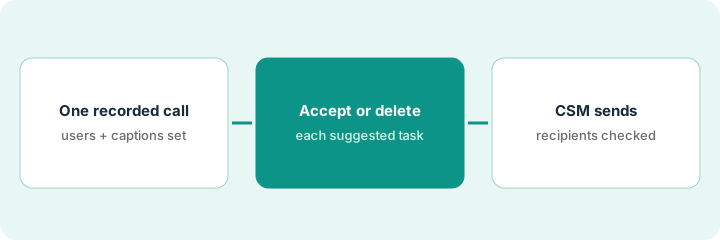
1. Step 1 — Set up one call so the recorder can join
What it is: Per the review, the recorder sends a bot to Zoom, Google Meet, or Microsoft Teams calls with external attendees, records them, and writes a transcript. Two setup facts decide whether it works. The organizer's email and at least one participant's email must exist as user records in Vitally and match the calendar invite exactly, and captions must be enabled on the meeting platform. If the customer hosts, they have to enable captions.
- Pick one upcoming call with one account.
- Check the organizer and at least one attendee exist in Vitally with the exact emails on the invite.
- Check captions are on, or ask the customer's host to turn them on.
- Tell attendees the call is recorded, where the law requires it. Per the review, Vitally relies on each platform's own recording notice, and the host can remove the bot to stop.
- If the team records in Gong, or in Granola or Fireflies, check whether those transcripts already reach the right Vitally meeting. Per the review, Gong transcripts feed the AI, and others can be uploaded through the API.
The customer's operations lead is hosting. The CSM finds his contact record uses a personal email, not the work address on the invite, so she adds the work email and asks him to turn on captions. She opens the call by saying it's recorded for notes.
Before your next customer call, check three things and write them in the account note: "Organizer and one attendee match Vitally users: yes/no. Captions on: yes/no. Recording announced: yes/no." If the first two aren't "yes," the brief won't arrive.
2. Step 2 — Accept or delete each suggested task against the transcript
What it is: After the call, the meeting's Overview tab shows key points, suggested tasks, and a churn analysis, and the Recording tab holds the video and transcript (per the review). Read each suggested task, then find the line in the transcript where someone agreed to it. Per the review, Suggest Follow-up Tasks lists each task with a + to accept or an x to reject, and tasks are only created when someone accepts them.
- For each suggested task, search the transcript for the moment it came from.
- Accept it only if someone on the call agreed to do it. A question isn't a commitment.
- Edit task names that merge two requests or name the wrong owner.
- Check key points the same way. Delete any point nobody said, and fix any that merged two speakers.
The brief lists four suggested tasks, including "send updated pricing by Friday." In the transcript, the customer asked whether pricing might change, and nobody promised anything, so she deletes that task. She accepts "share the reporting roadmap," edits "set up admin training" to name the customer's admin, and accepts the third. One key point merged two people's comments; she splits it.
For your next recorded call, write each suggested task in a list with the transcript time where it was agreed. Accept only tasks with a time next to them. Count how many you deleted.
3. Step 3 — Draft the follow-up; the CSM checks and sends
What it is: Per the review, the AI Action Draft a Follow Up writes an email from the meeting and opens it as a Conversation draft. When you start from an account, Vitally fills the To, CC, and BCC fields from the account's contacts. Vitally's help article tells you to review recipients before sending. This routine adds one more rule: the CSM who owns the account reads every sentence against the transcript and presses send themselves.
- Run Draft a Follow Up from the meeting.
- Compare the To, CC, and BCC lines with the actual attendee list. Remove anyone who wasn't on the call and shouldn't see the notes.
- Check that the email lists only the tasks you accepted in Step 2.
- Cut any sentence that isn't in the transcript, especially dates and feature timelines.
- The CSM sends it. The AI never does.
The draft's CC line includes a finance contact who wasn't on the call. She removes him. The draft also says the reporting feature ships "next month," which nobody said; she replaces it with "we'll share the roadmap by Friday," matching the accepted task. Then she sends it.
Use Draft a Follow Up on your next three meetings. Before sending each one, compare the To, CC, and BCC lines with the attendee list, and check every task in the email is one you accepted. You send it; the AI never does.
Pricing context (October 2026)
This how-to isn't a price sheet. Per the Vitally AI review, Vitally doesn't publish prices: its pricing page on 8 October 2026 listed Tech-Touch, Hybrid-Touch, and High-Touch plans with no dollar amounts. AI Copilot is included for all users; AI+ (the AI Meeting Recorder with five recorder seats, Custom AI Summaries, and all-time history) is a paid add-on with no published price. Dated October 2026.
Checked Oct 13, 2026 on the vendor’s own pricing page: Vitally shows no public list price. Vitally’s pricing page lists Tech-Touch, Hybrid-Touch, and High-Touch plans with the same core features and no dollar figures. This page quotes no Vitally dollar figure; confirm what your contract includes with Vitally or your admin.
Uncertainty: Vitally changed AI features and help-center wording in every 2026 release; check current release notes before relying on a limit. If your contract and our review disagree, trust your contract. The only prices this site sells here are the optional $9 AI toolkit spreadsheet and $19 AI toolkit audit.
When this helps (honest take)
Useful when CSMs run many recorded calls, keep account plans in Vitally, and lose time turning calls into tasks. Checking each task against the transcript keeps the task list honest and stops the follow-up email from promising things nobody agreed to.
Not useful when calls aren't recorded anywhere, attendees aren't set up as Vitally users (the recorder won't join), or your calls already live in Gong and you mostly need a better follow-up habit. Recording also brings consent duties that a platform notice alone may not cover everywhere.
Related options (educational)
| Need | Where to look | Why |
|---|---|---|
| Vitally AI features | Vitally AI | Primary path on this page |
| A customer agent and AI steps in automations | Planhat AI | Pi, Conversation Summary, MCP write permissions |
| An AI knowledge layer over existing tools | Totango AI | Now Odie; read-only Unison MCP |
| AI emails inside automated plays | ChurnZero Review Required | Same day's how-to |
| Call recording and conversation data | Gong | Transcripts Vitally Copilot can read |
| A follow-up without a CS platform | Write the follow-up email from the call | Live how-to |
FAQ
Does Vitally create tasks from a call automatically?
Per our review, suggested tasks appear in the meeting brief, and tasks are only created when someone accepts them. This routine also checks each one against the transcript first.
Why didn't the recorder join my call?
Per our review, a meeting syncs, and the bot joins, only when the organizer and at least one participant exist as Vitally users with emails that match the invite exactly. Captions also need to be on for a transcript.
Where do current prices live?
With Vitally's sales team. Vitally publishes no prices, including for AI+, and this page doesn't invent any. Our Oct 13, 2026 check of the vendor’s own pricing page is summarized in the pricing section above.
Should accepted tasks be assigned to the customer?
Only if the customer agreed to them on the call. Otherwise assign them to the person on your side who said they’d do it.
Optional next step
Free reviews stay free. If you pay for a CS platform recorder, a separate call-intelligence tool, and a note-taker that all summarize the same customer calls, the $9 AI toolkit spreadsheet helps you lay them out, or the $19 AI toolkit audit gets you a written memo.