How-to · Customer success · ChurnZero · Oct 13, 2026
Turn on Review Required for ChurnZero's Send AI Email step before any play goes live
ChurnZero's Send AI Email step lets a play draft a personal email from the live customer record instead of sending a fixed template. That's useful, and it's also a way for an AI-written email to reach an at-risk customer with nobody reading it first. This page shows a CS ops manager how to set one play up so every AI email is read and approved by the account's owner, including the backup email that sends when the AI can't.
Who this is for
CS operations managers, CS team leads, and the admins who build plays in ChurnZero, at B2B subscription companies where CSMs run automated outreach. You have, or are about to add, Send AI Email steps and want a send rule nobody has to remember. If you're comparing platforms, Gainsight vs ChurnZero covers who signs off on AI drafts in each.
How to do it
This is a how-to, not a ranking of CS platforms. Feature detail lives on the ChurnZero AI review. Per that review, Pilot is the agent behind the Send AI Email play step (launched May 2026). You write an email objective, and when a play reaches the step, Pilot drafts an email from the live customer record and the sender's writing profile. ChurnZero's announcement says review is on by default, and admins can switch it off. This routine keeps it on.
1. Step 1 — Pick one play and list its AI email steps
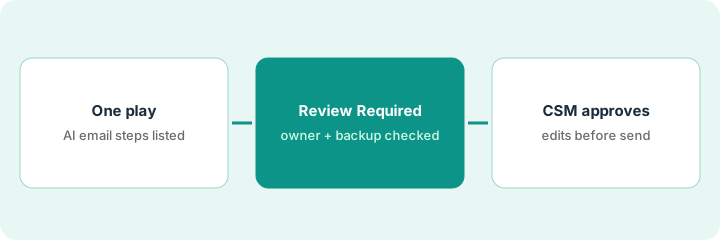
What it is: Start with one play that already has (or will get) a Send AI Email step, ideally one that reaches customers at a sensitive moment, such as a usage drop. List every AI email step in it, who the email goes to, and who the sender is.
- Pick a play the team runs often enough to see ten drafts in a couple of weeks.
- For each Send AI Email step, note the objective text, the sender, and the audience.
- Note whether the step started from ChurnZero's starter library of objectives (added July 2026, per the review). Treat those as drafts of your playbook, not finished copy.
- Name the CS ops person who owns the play's settings.
She picks the "usage drop" play: it fires when an account's usage falls 30% in a month. It has one Send AI Email step, sent as the account's CSM (customer success manager), with an objective asking for a short check-in that names the feature the account stopped using.
Make a short table for one play: Step | Objective (pasted) | Sender | Audience | Started from library? (yes/no) | Settings owner. Don't change anything yet.
2. Step 2 — Check Review Required, the reviewer, and the backup email
What it is: Per the review, the Send AI Email step lets you preview drafts, set a backup email, and tag a person with Review Required. Review is on by default, and the sending CSM approves each AI email before it goes out. Two settings need checking: that review is still on, and who the reviewer is. The backup matters just as much. If AI is unavailable or credits run out, the backup email sends automatically, without review.
- Confirm Review Required is on for every Send AI Email step in this play. ChurnZero itself recommends keeping it on for sensitive outreach, such as at-risk customers.
- Set the reviewer to the account's owner, not a shared inbox.
- Read the backup email out loud. It's the one message in this play that can reach a customer unreviewed, so write it as carefully as the objective.
- Preview two or three drafts against real accounts before the play is live.
Review Required is on, but the reviewer is set to the team lead for all accounts. She changes it to each account's CSM. The backup email turns out to be an old template that mentions a discount the company no longer offers; she rewrites it as a plain two-line check-in.
For each Send AI Email step, write three checks in your table: "Review Required: on (checked [date])," "Reviewer: account owner," and "Backup email read and approved by ___." Don't turn the play on until all three are filled in.
3. Step 3 — The CSM edits and approves each draft
What it is: The CSM who owns the account reads each AI draft against the customer record, then approves it, edits it, or rejects it. For the first round, send drafts to an internal test inbox rather than customers, so the team sees what Pilot writes before anyone outside does.
- Point the first ten drafts at an internal test inbox.
- Each CSM reads their drafts against the account record. Is the feature named correctly? Is the date range right? Is anything promised that the CSM wouldn't promise?
- Log each draft as approved, edited, or rejected, with one line on why.
- Tighten the objective based on the rejects, then let drafts go to customers, still with review on.
Of the first ten drafts, five are approved as written, three are edited (two named the wrong feature, one offered a call slot the CSM didn't have), and two are rejected because a seasonal dip triggered the play. The ops manager adds "mention the date range and skip accounts with a known seasonal pattern" to the objective. Review stays on.
Build one Send AI Email step with Review Required on and the account owner as reviewer. Send the first ten drafts to an internal test inbox, log approved / edited / rejected for each, and tighten the objective before any draft goes to a customer.
Pricing context (October 2026)
This how-to isn't a price sheet. Per the ChurnZero AI review, ChurnZero doesn't publish prices: on 8 October 2026 churnzero.com/pricing returned "page not found," and the site offers demos. ChurnZero's June 2026 announcement describes Agentic Essentials, which includes the AI Marketplace and its agents, as an annual subscription for Professional and Enterprise editions with a flat fee and a set allotment of AI credits. Dated October 2026.
Checked Oct 13, 2026 on the vendor’s own pricing page: ChurnZero shows no public list price. ChurnZero’s pricing address returned a page-not-found response on our check, and the site offers demos. This page quotes no ChurnZero dollar figure; confirm what your contract includes with ChurnZero or your admin.
Uncertainty: Ask how many AI credits one AI email uses and what happens when credits run out. Per the review, that's when the backup email sends automatically. If your contract and our review disagree, trust your contract. The only prices this site sells here are the optional $9 AI toolkit spreadsheet and $19 AI toolkit audit.
When this helps (honest take)
Useful when CSMs already run plays in ChurnZero, AI email steps are on (or about to be), and accounts are synced well enough that the drafts have something accurate to read. One play with review on teaches the team what Pilot gets wrong before volume goes up.
Not useful when your team sends few automated emails anyway, or account data is thin (few synced emails, no notes), so drafts will be generic. Turning review off to save time trades a few minutes per email for the risk of an unread message to an unhappy customer.
Related options (educational)
| Need | Where to look | Why |
|---|---|---|
| ChurnZero AI features | ChurnZero AI | Primary path on this page |
| Comparing CS platforms | Gainsight vs ChurnZero | Answers, agents, drafts, and who signs off |
| A larger CS data model | Gainsight AI | Copilot, Staircase AI agents, Journey Orchestrator |
| Meeting briefs and follow-ups in a notes workspace | Vitally meeting brief tasks | Same day's how-to |
| A one-off follow-up email after a call | Write the follow-up email from the call | Live how-to; no platform needed |
| CS and product AI seats in one view | Stack map for product ops | Includes who approves customer outreach |
FAQ
Does ChurnZero's AI send emails to customers on its own?
It can if an admin turns review off. Per our review, Send AI Email has Review Required on by default so the sending CSM approves each draft. Keep it on. The backup email still sends automatically if AI is unavailable or credits run out.
Why read the backup email so carefully?
Because it's the one message in the play that goes out without review. If it's an old template, that's what an at-risk customer gets.
Where do current prices live?
With ChurnZero's sales team. ChurnZero published no prices when our review checked, and this page doesn't invent any. Our Oct 13, 2026 check of the vendor’s own pricing page is summarized in the pricing section above.
Can we turn Review Required off later?
An admin can, per our review. This routine keeps it on for every play that reaches customers at a sensitive moment.
Optional next step
Free reviews stay free. If you pay for a CS platform with AI credits, a meeting recorder, and a chat assistant that all draft the same customer emails, the $9 AI toolkit spreadsheet helps you lay them out, or the $19 AI toolkit audit gets you a written memo.