How-to · Customer success · Claude · Oct 12, 2026
Prep a quarterly business review outline in Claude from account notes, with Unknowns for missing numbers
A quarterly business review (quarterly business review) deck usually starts from a blank page the night before. AI can turn a quarter of account notes into a solid outline in minutes. The danger is numbers: usage, seats, renewal amount, and ticket counts that the model fills in because they sound right. This page shows a customer success manager how to get the outline from Claude while every number comes from the CRM.
Who this is for
Customer success manager and CS leads who run quarterly business review and already have Claude through work. This page is about building the quarterly business review outline before the meeting. For the loop after a quarterly business review (risks, expansion signals, and follow-ups), see the Claude for customer success guide. If your team lives in ChatGPT instead, the same steps work with a shared Custom GPT; see ChatGPT for revenue operations.
How to do it
This is a how-to, not a ranking of AI tools. Product detail lives on the Claude for customer success guide and the Claude Projects review. The rule here: Claude writes the structure and the story. The CRM supplies the numbers.

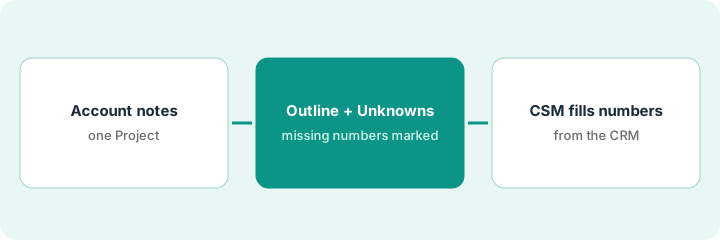
1. Step 1 — Gather the account notes in one Project
What it is: One Claude Project per account, holding the quarter's notes, so the outline is built from what actually happened.
- Create or reuse a Project named for the account.
- Upload the quarter's call notes, the last quarterly business review's deck or notes, and open support themes. Remove anything your company doesn't allow in AI tools.
- Leave usage and billing exports out for now. You'll add numbers yourself in Step 3.
- Set the Project instructions: "Use only Project files. Never write a number that isn't in the files. Write Unknown instead."
The customer success manager uploads eight call notes from the quarter, last quarter's quarterly business review notes, and a short list of open ticket themes. Instructions say to use only these files and write Unknown for any missing number.
Project checklist: Call notes this quarter | Last quarterly business review notes | Open support themes | Instructions pasted Y/N | Anything removed for policy Y/N.
2. Step 2 — Ask for an outline with Unknowns
What it is: Ask Claude for a quarterly business review outline with a fixed set of sections, where every number is a labeled gap.
- Use the same sections every quarter so customers know what to expect, for example: goals they named last quarter, what happened, wins, open issues, what's next, and questions for them.
- Ask for each claim to cite the file it came from.
- Every number, such as active users, seats, tickets closed, or renewal amount, comes out as "Unknown, from CRM."
- Ask for three questions to put to the customer. Good quarterly business review ask as much as they tell.
Under "What happened," Claude writes: "Rolled out to the finance team in August (call notes, Aug 14). Active users this quarter: Unknown, from CRM. Two open tickets about report exports (support themes)." Under "Questions for them" it suggests asking whether the finance rollout met the goal they named last quarter.
Prompt: "Using only Project files, draft a quarterly business review outline with these sections: [your sections]. Cite the file for each point. Write every number as 'Unknown, from CRM.' End with three questions to ask the customer."
3. Step 3 — The customer success manager fills every number
What it is: The customer success manager replaces each Unknown with a number from the CRM or product data, or leaves it out. No number goes in the deck from the model.
- Go through the outline and list every Unknown.
- Pull each number from its real source: the CRM for renewal and seats, product analytics for usage, the help desk for tickets.
- If you can't find a number, cut the line or say in the meeting that you'll follow up. Don't estimate on a slide.
- Before the meeting, read the outline once for anything Claude said that the notes don't support, and cut it.
The outline has five Unknowns. The customer success manager pulls seats and renewal date from the CRM, active users from the product dashboard, and ticket count from the help desk. The fifth, a time-saved figure the customer once mentioned, has no source, so the customer success manager turns it into a question: "Have you measured time saved since rollout?"
Gap list: Unknown | Source | Value | Filled by | Date. Any row without a source gets cut or becomes a question.
Pricing context (October 2026)
This how-to isn't a price sheet. When our Claude for customer success guide cross-checked public pages in September 2026, Pro is $20 a month billed monthly or $17 on annual billing ($200 up front), Max starts from $100 per month, and Team/Enterprise seats are listed separately (Enterprise FAQ cites $20 per seat per month plus usage). Projects are on Pro and higher. Confirm current prices on Anthropic's pricing page. Dated October 2026.
Checked Oct 12, 2026 on the vendor’s own pricing page: Anthropic’s pricing page lists Free at $0, Pro at $17 per month with annual billing ($200 billed up front) or $20 if billed monthly, and Max from $100 per month. Team and Enterprise are separate seats; an FAQ on the same page cites Enterprise at $20 per seat per month plus usage billed at API rates (annual). Projects are included on Pro and higher. Confirm Team seat figures on the live page before budgeting a whole CS team.
Uncertainty: Usage limits and plan packaging change. Check your company's rules on uploading customer notes to AI tools before you start. The only prices this site sells here are the optional $9 AI toolkit spreadsheet and $19 AI toolkit audit.
When this helps (honest take)
Useful when you run several quarterly business review a quarter, your notes are scattered across calls, and prep keeps happening the night before.
Not useful when your quarterly business review are mostly a dashboard walkthrough. The numbers are the content, and a report template does that better than a chat tool.
Related options (educational)
| Need | Where to look | Why |
|---|---|---|
| CS loop in Claude | Claude for customer success | Primary path; risks and follow-ups after the quarterly business review |
| Projects basics | Claude Projects | How files and instructions work |
| Team on ChatGPT | ChatGPT for revenue operations | Shared Custom GPT version of the same habit |
| Ticket context | HubSpot Service Hub AI · Zendesk AI | Where support numbers come from |
| Before another seat | Three checks before an AI seat | Live how-to |
Free: seat-waste calculator if two chat tools are both drafting quarterly business review.
FAQ
Can I upload the usage export and let Claude write the numbers?
You can upload it, but check every number it uses against the source before it goes on a slide. Keeping numbers out of the first draft makes that check much easier.
Should every quarterly business review use the same sections?
Mostly, yes. Customers get used to the structure, and you can compare quarters. Add a section when something big happened.
Where do current prices live?
On Anthropic's pricing page. The Claude for customer success guide records what we saw in September 2026. This page doesn't invent prices. Our Oct 12, 2026 check of the vendor’s own pricing page is summarized in the pricing section above.
May Claude invent a renewal number?
No. Every missing figure stays Unknown until the CSM fills it from the CRM or finance source.
Optional next step
Free reviews stay free. If Claude, ChatGPT, and a notetaker are all drafting the same account summaries, the $9 AI toolkit spreadsheet helps you lay them out, or the $19 AI toolkit audit gets you a written memo.