How-to · Vendor risk · UpGuard · Oct 18, 2026
Build an UpGuard AI Security Profile for one vendor, and have the risk owner check every cited control
UpGuard's AI reads a vendor's SOC 2 report and policies and maps them to control checks, each marked passed, failed, or needing support, with citations. The AI does the reading; a person does the accepting. This page shows how to build one Security Profile and have the risk owner check every cited control before signing off.
Who this is for
Third-party risk analysts and security managers who sign off on vendors in UpGuard Vendor Risk. The job here is checking AI-mapped controls and their citations. For a vendor review inside a compliance platform, see the existing how-to Drata vendor review.
How to do it
This is a how-to, not a ranking of vendor risk tools. Per the UpGuard AI review, Security Profiles map documents to control checks with citations (including SOC 2 control references since 6 October 2026), analysts can exclude a citation, override a result, or comment, gap questionnaires ask only for what is missing, and AI-written assessment reports come with UpGuard's own line that the decision is still yours. The ground rule: a named risk owner decides, after opening the citations.

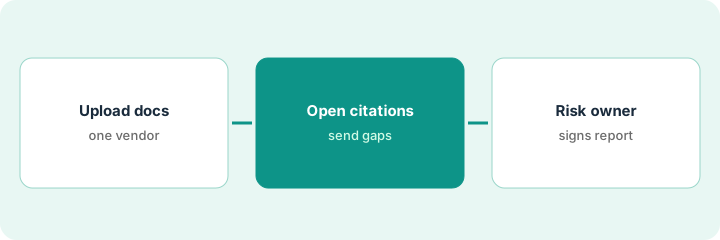
1. Upload one vendor's documents
What it is: Pick one critical vendor, upload its SOC 2 report, certificates, and key policies, and choose a template that matches its criticality or your framework.
- Pick a vendor that handles data you care about.
- Upload the SOC 2 Type II report, any bridge letter, and the data protection policy.
- Choose a built-in tier or a framework such as NIST CSF 2.0 or ISO 27001:2022.
- Note the date of every document — an old report means old evidence.
- Name the risk owner who will sign off.
A security manager uploads a CRM vendor's SOC 2 Type II and data protection policy against the NIST CSF 2.0 template, and names the head of security as risk owner.
List each uploaded document with its date before you read any results.
2. Read the mapped controls and send a gap questionnaire
What it is: Read the profile — passed, failed, and needs-support checks — open citations for every failed check and every thin pass, and send a gap questionnaire for checks still lacking evidence.
- Open the citation for every failed check.
- Open the citation for any pass that rests on one sentence or an old or draft document.
- Override with a comment where the evidence doesn't hold; the timeline records why.
- Send a gap questionnaire with only the unverified checks.
- For answers about data location, encryption, or incident notice, ask for the document behind it.
Most checks pass and five fail. Two failures are covered in a bridge letter he hadn't uploaded; one pass cites a policy marked draft. He uploads the bridge letter, overrides the draft-based pass to needs support, and sends a gap questionnaire for four checks.
Open every failed-check citation and every single-sentence pass before you send the gap questionnaire.
3. Risk owner signs the AI-written report
What it is: Generate the assessment report, have the analyst correct it end to end, and have the risk owner add the decision, conditions, and review date before it goes anywhere.
- Generate the AI-written report with a prompt for plain language.
- The analyst reads it end to end and fixes anything that overstates what was resolved.
- The risk owner adds their decision, conditions, and review date.
- Treat the external posture number as a reason to ask questions, not a decision.
- Only then share the report.
The report describes one open remediation request as resolved. The analyst corrects it; the risk owner approves the vendor with a condition on encryption evidence and a 90-day review.
Add the risk owner's decision and review date to the report before anyone else sees it.
Pricing context (October 2026)
This how-to isn't a price sheet. Per the UpGuard AI review and UpGuard's pricing page (checked Oct 18, 2026), Vendor Risk Standard is listed at $1,750 a month, billed annually, for 50 monitored vendors, with additional vendors listed at $79 a month; higher plans are by contact with sales. Dated October 2026.
Checked Oct 18, 2026 on the vendor’s own pricing page: UpGuard’s pricing page lists Vendor Risk Standard at $1,750 per month billed annually for 50 monitored vendors, with additional vendors at $79 per month; higher plans are contact sales.
Uncertainty: The only prices this site sells here are the optional $9 AI toolkit spreadsheet and $19 AI toolkit audit.
When this helps (honest take)
Useful when you monitor dozens of vendors, want AI help reading SOC 2 reports into control checks, and have analysts who open citations and a risk owner who decides.
Not useful when your vendor list is short and your compliance platform already covers it, or you want one number to approve or reject vendors on its own.
Related options (educational)
| Need | Where to look | Why |
|---|---|---|
| UpGuard AI features | UpGuard AI | Primary path |
| Vendor review in a compliance platform | Drata vendor review | Existing how-to |
| Drata's AI features | Drata AI | Vendor module beside your controls |
| Answering buyers' questionnaires | Conveyor Slack approval rules | The other side of the review |
| Compliance stack map | Stack map: compliance ops | Where UpGuard fits |
FAQ
Is a poor UpGuard grade a reason to reject a vendor?
Not on its own. Per our review, the external posture number reflects internet-facing assets, which may not include the systems that handle your data. Ask questions and let the risk owner decide.
Can we accept the AI's control results as they are?
Not without opening citations. Per our review, analysts can exclude a citation, override a result, or comment, and the timeline records every change.
How much does UpGuard cost?
Vendor Risk Standard is listed at $1,750 a month billed annually, with additional vendors at $79 a month. See the pricing section.
Optional next step
If you want a one-page toolkit map for the tools you already pay for, use the optional $9 AI toolkit spreadsheet. If you want a short review of seat waste and unused tools, use the optional $19 AI toolkit audit. Neither is required to follow this how-to.