How-to · Compliance / GRC · Drata AI · Oct 13, 2026
Let Drata's TPRM Agent read the vendor's SOC 2 first, then make the call yourself
A 90-page SOC 2 report takes an afternoon to read properly, and most security teams have a queue of them. This page shows a security or risk lead how to let Drata's TPRM Agent do the first read on three vendors awaiting review, while the decision to let a vendor touch customer data stays with one named person. Below, "TPRM" means third-party risk management, the work of reviewing vendors before and during a contract.
Who this is for
Security leads, GRC (governance, risk, and compliance) managers, and the one engineer who "owns compliance" at a growing company, already on Drata, with more vendor reviews waiting than time to read them. If you're still choosing a platform, Vanta vs Drata covers how the two differ, and Whistic AI is a dedicated vendor-assessment option.
How to do it
This is a how-to, not a ranking of GRC tools. Feature detail lives on the Drata AI review. Check that the TPRM Agent is included in your Drata package before you start; Drata doesn't publish which AI features come with which plan.
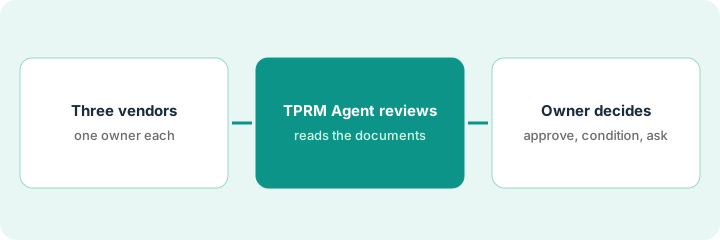
1. Step 1 — Pick three vendors awaiting review and name an owner for each
What it is: A small, deliberate first batch, with a person accountable for each vendor before the agent reads a single page.
- Choose three vendors from your list of vendors awaiting review: ideally one critical vendor (touches customer data), one mid-tier, and one renewal you reviewed by hand last year.
- Write the risk owner beside each one. For a critical vendor that's usually the security lead; for a mid-tier tool it might be the IT lead.
- Mark criteria that don't apply (for example, physical security for a pure SaaS tool) as not applicable before you generate any follow-up questionnaire, so the vendor gets fewer questions.
- Keep last year's review file open for the renewal. You'll compare against it in Step 2.
Awaiting review: a new payroll provider (critical), a design tool (mid-tier), and a support platform up for renewal. The security lead owns the payroll review, the IT lead owns the design tool, and the support lead's manager owns the renewal with security as reviewer.
Make a four-column sheet: Vendor | Tier | Risk owner | Last reviewed. Don't start an agent review until every row has an owner.
2. Step 2 — Let the agent review, and read what it flagged
What it is: Ask the TPRM Agent to start the review from the Drata AI chat panel. Per Drata's help center, it collects and processes the vendor's documents, evaluates them against your criteria, recommends a residual risk level with its reasoning shown, and prepares a follow-up questionnaire, observations, and a final report.
- Read every approval card before you accept it. Drata says the agent asks for approval before it takes an action, and the card shows exactly what it's about to do.
- Look first at criteria marked inconclusive. Those are the ones the agent couldn't assess from the documents, and they're where follow-up questions belong.
- For the critical vendor, open the agent's reasoning for every criterion it marked met. A fast read is not the same as a careful one.
- For the renewal, put the agent's criteria results next to last year's file and note any place they disagree.
The agent reads the payroll vendor's new SOC 2 report and flags two criteria as inconclusive: subservice organizations and breach notification time. Everything else is marked met. The security lead opens the reasoning on the encryption and access-review criteria and checks the page it relied on before moving on.
Prompt in the chat panel: "Start a vendor review for [vendor] against our critical-vendor criteria. Show your reasoning for each criterion and mark anything you can't assess from the documents as inconclusive."
3. Step 3 — The owner approves, adds conditions, or asks follow-ups
What it is: The agent recommends; the named owner decides. Drata lets you override any criterion status or decision the agent proposes, and outcomes include approved and approved with conditions.
- If there are inconclusive criteria, the owner approves sending the short follow-up questionnaire. Drata sends the vendor a reminder every three days by default and re-runs the assessment when the vendor responds.
- The owner reads the vendor's answers and the re-run result, not just the new recommendation.
- The owner records the outcome in their own name: approved, approved with conditions, or not approved.
- Any condition gets a date and a person who checks it.
The payroll vendor answers both follow-up questions. Breach notification is 72 hours, which meets policy. Subservice organizations are listed but one isn't covered by a bridge letter. The security lead records "approved with conditions" herself, with a condition to receive the bridge letter within 60 days.
Add one line to every vendor record: "Outcome recorded by: [name], [date]. Agent recommendation: [level]. Overrides: [criteria, or none]."
Pricing context (October 2026)
This how-to isn't a price sheet. Drata's pricing page (read 10 October 2026) shows no published prices; it describes Startup, Growth, and Enterprise stages and routes you to sales. Ask for the TPRM Agent by name in your quote. Packaging notes live on the Drata AI review. Dated October 2026.
Checked Oct 13, 2026 on the vendor’s own pricing page: Drata shows no public list price. Drata’s pricing page (the pricing address) now shows a platform overview with Startup, Growth, and Enterprise stages and sales calls to action, and no dollar figures. This page quotes no Drata dollar figure; confirm what your contract includes with Drata or your admin.
Uncertainty: Help-center details such as the three-day reminder default may change. If your contract and our review disagree, trust your contract. The only prices this site sells here are the optional $9 AI toolkit spreadsheet and $19 AI toolkit audit.
When this helps (honest take)
Useful when you have a growing vendor list, Drata is already your GRC platform, and each vendor tier has a person willing to own the decision.
Not useful when you review two vendors a year (a careful manual read is fine), or when leadership wants the agent's recommendation to be the approval. A tool can read the report; it isn't accountable for the vendor.
Related options (educational)
| Need | Where to look | Why |
|---|---|---|
| Drata AI features | Drata AI | Primary path on this page |
| Comparing GRC platforms | Vanta vs Drata | Same job, different platform |
| Dedicated vendor assessments | Whistic AI | AI vendor assessments and trust profiles |
| Compliance stack overview | Stack map for compliance ops | Job, tool, and owner in one view |
| Answering questionnaires you receive | Answer one Vanta questionnaire row with evidence or Unknown | Live how-to (the inbound side of the same work) |
FAQ
Can Drata's TPRM Agent approve a vendor on its own?
Drata's help center says the agent asks for approval before it takes an action and that you can override any status or decision. In this pattern it recommends, and a named risk owner records the outcome.
What does "inconclusive" mean on a criterion?
It means the agent couldn't assess that criterion from the documents it had. Treat those as the starting list for follow-up questions.
Where do current prices live?
With Drata's sales team. Drata publishes no prices (checked 10 October 2026), and this page doesn't invent any. Our Oct 13, 2026 check of the vendor’s own pricing page is summarized in the pricing section above.
Can the TPRM Agent approve a vendor on its own?
Not in this routine. The agent reads the documents and flags gaps; the named owner makes the approval call and records any conditions.
Optional next step
Free reviews stay free. If you're paying for a GRC platform, a separate vendor-risk tool, and chat seats that all read the same SOC 2 reports, the $9 AI toolkit spreadsheet helps you lay them out, or the $19 AI toolkit audit gets you a written memo.