How-to · Security operations · Torq · Oct 18, 2026
Let Torq Auto Triage give verdicts, and have the analyst approve every containment
Torq's Auto Triage gives each alert a verdict, severity, reasoning, and recommended next actions, and Socrates can investigate and carry out containment. Torq describes the human role as a dial, not a switch. This page shows how to start with one alert type, read the investigation, and keep every containment action with an analyst.
Who this is for
Security operations center (SOC) managers, detection and response engineers, and security automation leads deciding how much alert handling to give Torq's agents. The job here is analyst-approved containment. For adding one AI Agent action to a Tines workflow with a person approving every account change — a different job — see Tines AI Agent action approval.
How to do it
This is a how-to, not a ranking of SOC platforms. Per the Torq AI review, Auto Triage normalizes and enriches alerts and gives verdicts with reasoning, Socrates has Investigator and Builder modes, Torq says containment can run autonomously or with human-on-the-loop confirmation, and Case Management added Case Reviewer and Review Conclusion fields on 3 September 2026. The ground rule: an analyst approves every containment — isolating a host, disabling an account, revoking sessions, blocking an address.
1. Turn on Auto Triage for one alert type
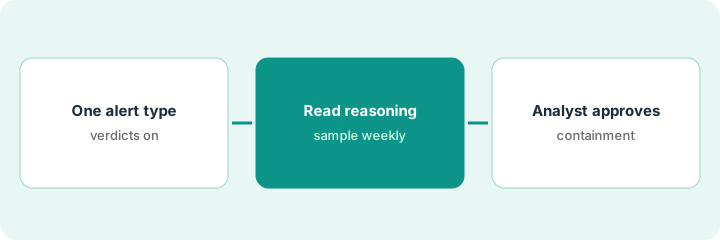
What it is: Pick one high-volume, low-impact, easy-to-verify alert type and let Auto Triage give verdicts on it — with analysts still closing.
- List your five noisiest alert types from last quarter.
- Pick one such as phishing reports or known adware detections.
- Keep anything touching privileged accounts or customer data analyst-only.
- Confirm crown-jewel data and VIP users are set as deterministic guardrails.
- Have one analyst re-check a fixed sample of verdicts every week.
A SOC manager picks phishing reports. Public cloud storage alerts stay analyst-only because they can expose customer data.
Write the one alert type in scope and the weekly sample size before turning anything on.
2. Read the Socrates investigation
What it is: For each escalated case, read the Investigator's summary, enrichment, and reasoning before deciding anything.
- Open the case summary and timeline.
- Check the observables it extracted: senders, URLs, file hashes, user identities.
- Read the reasoning behind the verdict, not just the verdict.
- Ask Socrates in plain language for anything missing.
- Record every overturned verdict with a reason; analyst corrections become tuning signals.
A senior analyst re-checks 50 closed phishing verdicts a week. She overturns four in the first two weeks, all from one contractor group, and the team adds that group to business context.
Record every overturn with a one-line reason so you can watch the rate fall.
3. Analyst approves containment via reviewer fields
What it is: Write a containment table, require analyst confirmation for every containment action, and use the Case Reviewer and Review Conclusion fields to track decisions.
- List containment actions: isolate a host, disable an account, revoke sessions, block an address.
- Set each to analyst-confirmed in this routine — none autonomous yet.
- Have a second engineer review any Socrates-built workflow before publishing.
- Fill in Case Reviewer and Review Conclusion on every case.
- Review overturned case conclusions monthly.
Torq recommends isolating a laptop after a confirmed phishing click. The analyst reads the case, confirms, and records herself as reviewer. A monthly dashboard shows three of 120 AI conclusions overturned, all on shared service accounts.
Mark every containment action analyst-confirmed in writing, and fill in the reviewer fields on every case.
Pricing context (October 2026)
This how-to isn't a price sheet. Per the Torq AI review, Torq publishes no prices; its pricing URL still returned page not found when we checked on Oct 18, 2026, and pricing is quote-only through a demo. Ask how AI usage is metered. Dated October 2026.
Checked Oct 18, 2026 on the vendor’s own pricing page: Torq shows no public price list; torq.io/pricing returned page not found on Oct 18, 2026, and Torq’s site offers demos. This page quotes no Torq dollar figure; confirm what your contract includes with Torq or your admin.
Uncertainty: The only prices this site sells here are the optional $9 AI toolkit spreadsheet and $19 AI toolkit audit.
When this helps (honest take)
Useful when a SOC with high alert volume wants agents to triage and investigate, has engineers to scope agents, and will write down which containment needs an analyst.
Not useful when alert volume is small enough for people, you want to build every workflow yourself, or nobody will sample AI-closed alerts.
Related options (educational)
| Need | Where to look | Why |
|---|---|---|
| Torq AI features | Torq AI | Primary path |
| One AI step in a workflow you build | Tines AI Agent action approval | A different job |
| Tines and Torq side by side | Tines vs Torq | Compare the two |
| Vendor and attack-surface signals | UpGuard AI | External risk |
| IT ops stack map | Stack map: IT ops | Where Torq fits |
FAQ
Can Torq contain threats without an analyst?
Yes, if you allow it. Per our review, Torq says containment can run autonomously or with human-on-the-loop confirmation. This routine keeps every containment analyst-confirmed.
Does Torq train its AI on our data?
Per our review, Torq lists a zero customer data training policy and says SOC Brain memory is private to each customer. Confirm processing location and retention in writing.
How much does Torq cost?
Torq publishes no prices; it is quote-only. See the pricing section.
Optional next step
If you want a one-page toolkit map for the tools you already pay for, use the optional $9 AI toolkit spreadsheet. If you want a short review of seat waste and unused tools, use the optional $19 AI toolkit audit. Neither is required to follow this how-to.