How-to · Security and IT automation · Tines · Oct 18, 2026
Add a Tines AI Agent action to one IT workflow, and have a person approve every account change
Tines lets you drop an AI Agent action into a workflow (a story) to summarize, enrich, and suggest. With tools attached, the model decides when to call them — so any tool that resets a password or blocks something needs a person in front of it. This page shows how to add one AI step to one IT workflow and keep every account change behind an approval.
Who this is for
Security operations leads, automation engineers, and IT ops managers who build workflows in Tines Stories. The job here is one AI step with a person approving account changes. For letting Torq's Auto Triage give verdicts and having an analyst approve every containment — a different job — see Torq Auto Triage containment approval.
How to do it
This is a how-to, not a ranking of automation tools. Per the Tines AI review, the AI Agent action runs in task mode (behind the scenes) or chat mode, pages collect input from people and can pause a workflow for confirmation, Workbench stories can require confirmation to run, and Change Control puts edits to live stories into a reviewed draft. Tines 3B, the newer code-first product, is not covered here. The ground rule: a person approves every action that changes an account or blocks anything.

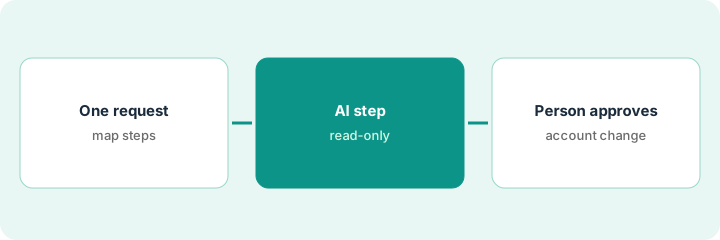
1. Pick one repetitive request
What it is: Choose one high-volume IT or security request where the AI can summarize and suggest, and write down which steps change anything.
- Pick a request such as suspicious-login alerts or account unlock requests.
- Map the current steps: receive, enrich, decide, act.
- Mark every step that changes an account, a device, or a block list.
- Name the on-call person who will approve.
- Turn on Change Control for the live story.
A SOC lead picks suspicious-login alerts from the identity provider. Enrichment already pulls location history and devices; the only changing step is a password reset.
Write the request, the changing steps, and the approver's name on one page.
2. Add an AI Agent action in task mode
What it is: Add an AI Agent action in task mode that summarizes the alert and suggests a next step, with only read-only tools and an output schema.
- Start with no tools: a single prompt and response that summarizes.
- If you add tools, make them read-only lookups.
- Set an output schema such as what happened, what is unusual, suggested action.
- Write in the system instructions what the agent must never do.
- Set a token-usage alert; each run uses AI credits.
The AI step writes three lines: a login from a new country, a device never seen before, and a suggested password reset.
Give your first AI step no tools at all, or read-only tools only.
3. Add approval before any account or block step
What it is: Put a page with Approve and Reject buttons in front of any step that changes an account or blocks anything, and keep that step in a separate story.
- Send the AI summary to the on-call person on a page with Approve and Reject.
- Keep the password reset or block in a separate story that runs only after approval.
- Store the AI suggestion and the person's decision as two record fields.
- Review disagreements after a month before automating anything further.
- Have a second person review any MCP or AI-built edit in the draft.
The analyst rejects two suggested resets for employees who were travelling. After a month, records show where the AI and analysts disagreed, mostly VPN exit nodes, so the team adds the VPN range to enrichment.
Add an approval page before every account change, and record the AI's suggestion next to the person's decision.
Pricing context (October 2026)
This how-to isn't a price sheet. Per the Tines AI review and Tines' pricing page (checked Oct 18, 2026), Tines lists a free edition with 3 live workflows and a one-time $50 AI allowance, and paid editions behind Get pricing with no published dollar figures. Dated October 2026.
Checked Oct 18, 2026 on the vendor’s own pricing page: Tines’ pricing page lists a free edition with 3 live workflows and a one-time $50 AI allowance; paid editions are behind Get pricing.
Uncertainty: The only prices this site sells here are the optional $9 AI toolkit spreadsheet and $19 AI toolkit audit.
When this helps (honest take)
Useful when a security or IT ops team already automates triage or access requests and wants AI to summarize and suggest inside workflows it controls.
Not useful when you want a tool that triages and closes alerts on its own out of the box, nobody will maintain workflows, or you expect AI to change accounts without a named approver.
Related options (educational)
| Need | Where to look | Why |
|---|---|---|
| Tines AI features | Tines AI | Primary path |
| AI SOC verdicts with analyst containment | Torq Auto Triage containment approval | A different job |
| Tines and Torq side by side | Tines vs Torq | Compare the two |
| Help desk ticket triage | ServiceNow triage labels | Existing how-to |
| IT ops stack map | Stack map: IT ops | Where Tines fits |
FAQ
Can Tines AI take actions without a person approving?
It can if you build it that way. Per our review, an agent with tools decides when to call them. Use approval pages, Require confirmation to run in Workbench, and Change Control.
Should the help desk get Workbench for resets?
Only with Require confirmation to run switched on for any story that changes an account, and with someone reviewing the log.
How much does Tines cost?
A free edition with 3 live workflows and a one-time $50 AI allowance; paid editions are by quote. See the pricing section.
Does this cover Tines 3B?
No. Per our review, Tines 3B is a separate code-first product announced on 31 July 2026. This routine uses Tines Stories.
Optional next step
If you want a one-page toolkit map for the tools you already pay for, use the optional $9 AI toolkit spreadsheet. If you want a short review of seat waste and unused tools, use the optional $19 AI toolkit audit. Neither is required to follow this how-to.