How-to · Marketing ops · Semrush · Oct 10, 2026
Pick keywords only when a content owner will ship weekly
“Keyword shortlist” here means a small set of search terms a named owner will publish against every week. It is not a thousand-row export nobody writes for.
Who this is for
Marketing and ops leads weighing Semrush for search visibility who will only pay if someone ships content (or meaningfully updates pages) every week. If the job is scoring drafts you already write against what ranks, see Surfer SEO. If the job is going from search research to a brief and a draft in one place, see Frase. If you are about to buy Semrush with no writer or owner, read Three checks before you add another AI seat first.
How to do it
This page is a how-to. It is not a ranking of SEO suites. The Semrush review covers the toolkits and packaging; this page is the narrower decision routine: an owner and a calendar slot first, ten keywords at most, and a one-week check before money keeps going out. Confirm current plan names on Semrush’s pricing page before you budget; they have changed recently.

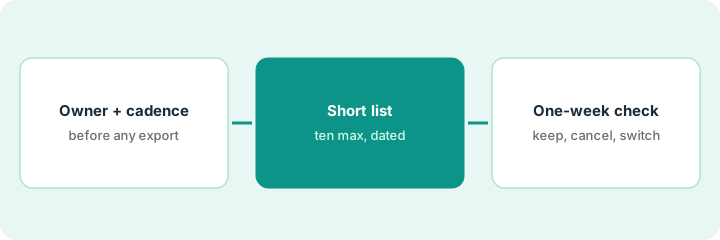
1. Step 1 — Name the owner and the weekly cadence
What it is: Decide who publishes and how often before any keyword export. No owner means no Semrush spend in this routine.
- Name one content owner and a backup.
- Define “ship weekly”: a new page, a substantial update, or promotion of an existing piece. Pick one.
- Note where drafts go live (your website editor or docs site).
- Do not buy Semrush “for AI visibility” with no writing time on anyone’s calendar.
AI visibility (how often your brand shows up in AI chat answers) is a real feature on newer Semrush plans, but it measures results; it does not write the weekly page.
Owner: content lead Maya. Cadence: one updated how-to or review page a week. Home: the company website. Backup: ops writer Jordan. Calendar: draft on Tuesday, publish on Thursday.
Create a recurring calendar event called “Ship keyword page” with the owner’s name on it. If the invite is declined or the owner is blank, do not start a paid Semrush plan.
2. Step 2 — Build a short keyword list in Semrush
What it is: From Semrush (a trial, the free plan, or an existing seat), pick five to ten keywords at most, each tied to a page you can ship in the next four weeks. Not a dump of 500 terms.
- Start from products and jobs you already write about, not broad terms you cannot win.
- Note the intent (learning about something or comparing options) and a target URL, or “new.”
- Treat search volume and difficulty as context only. Do not promise positions.
- Drop any keyword without a ship date in the next 28 days.
Ten rows with dates beat five hundred without them. The export is not the work; the Thursday page is.
Five keywords: “zapier vs make for ops,” “expense policy AI flags,” “meeting notes without bot,” plus two updates to existing how-tos. Each has a draft doc link and a Thursday publish slot. A 400-row “AI tools” export is deleted unused.
Fill a five-column table: Keyword | Intent | URL or new | Ship date | Owner. Every column is required. Delete rows without ship dates. Stop at ten.
3. Step 3 — Decide: keep Semrush, cancel, or use Surfer or Frase
What it is: After one week of shipping against the shortlist — or a documented failure to ship — decide whether Semrush is justified or whether a content-editor tool is the real need.
- Keep Semrush when the owner shipped and actually used its research or competitor gaps.
- Cancel when the calendar slipped and the export went unused. Do not “keep it for later.”
- Use Surfer SEO instead when the bottleneck is scoring drafts you already write.
- Use Frase instead when the bottleneck is turning search results into a brief and a first draft.
- Avoid paying for Semrush, Surfer, and Frase for the same weekly article without a clear split of jobs.
If the shortlist needs sourced background for each page, Write a sourced vendor brief you can date-stamp covers the dated research brief.
Week 1: two pages shipped using Semrush’s keyword-gap notes, so the trial continues another month. A parallel Surfer seat used only to feel busy on the same two URLs is paused; Surfer comes back only if scoring drafts becomes the bottleneck.
Write one decision sentence after week 1: “Keep Semrush because ___ shipped,” or “Cancel the Semrush trial — no owner shipped,” or “Switch the main tool to Surfer or Frase because ___.” Put a cancel-by date on any unused SEO AI seat.
Pricing context (October 2026)
This how-to is not a price sheet. Plan detail for Semrush, Surfer SEO and Frase lives on those reviews. Recheck each vendor’s site before you budget. Dated October 2026.
As of Oct 17, 2026, on the vendor’s own pricing page: semrush.com/prices, on its “SEO + AI Search” tab, lists a Free plan at $0 (one demo project, 10 reports a day); the SEO plan at $139.95 a month, or $117.33 a month billed annually, with 5 websites to monitor and 500 keywords tracked daily; Starter (SEO + AI Search) at $199 a month or $165.17 billed annually; and Pro+ at $299 or $248.17. Advanced no longer has a public price: it now shows “Custom” with “Request demo”, so the old published price is gone and you need a quote. The page says annual billing saves up to 17%. Additional users start at $45 a month. Surfer SEO and Frase were not rechecked.
Uncertainty: Plan names, AI visibility add-ons, user limits, and annual against monthly pricing change. If an invoice and a review disagree, trust the invoice. Do not paste a marketing list price you did not pay. The only prices this site sells here are the optional $9 AI toolkit spreadsheet and $19 AI toolkit audit.
When this helps (honest take)
Useful when a named owner will ship weekly and Semrush research changes what they write.
Not useful when there is no writer, you want a vanity keyword dashboard, or Surfer or Frase already covers the real bottleneck. Buying all three SEO AI tools for one weekly post usually wastes money.
Related options (educational)
| Need | Where to look | Why |
|---|---|---|
| Keyword and competitor research | Semrush | When research and visibility are the job |
| Scoring drafts you already write | Surfer SEO | When drafts already exist |
| Research to brief to draft | Frase | When brief speed is the bottleneck |
| Sourced background per page | Write a sourced vendor brief you can date-stamp | Live how-to |
| Before another seat | Three checks before you add another AI seat · See which AI tools you pay for and never open | Live how-tos |
Related reviews: Semrush · Surfer SEO · Frase. Related how-tos: Write a sourced vendor brief you can date-stamp · Edit one internal talking-head update like a doc in Descript · Three checks before you add another AI seat. Free: seat-waste calculator if several SEO AI seats cover the same weekly article.
FAQ
Can I buy Semrush first and find an owner later?
Not with this routine. Owner and cadence come first. An export nobody writes from is money spent on nothing.
Is this a Semrush vs Ahrefs comparison?
No. This how-to is about ownership before spend. Product detail stays on the Semrush review; this page does not compare or rank competitors.
Do I need the AI Search plans to start?
No. As of Oct 17, 2026, the SEO plan ($139.95 a month, or $117.33 a month billed annually) listed basic keyword research and competitor analysis, position tracking, and site audit, and the free plan allowed 10 reports a day. The plans labeled “SEO + AI Search” start at Starter ($199 a month). Add AI visibility only once someone is shipping weekly.
Where do dated prices live?
On the Semrush review (and the Surfer SEO and Frase reviews if relevant) plus semrush.com/prices. This October 2026 how-to only repeats prices we checked on the vendor’s own pricing page (https://www.semrush.com/prices/) as of Oct 17, 2026.
Optional next step
Free reviews stay free. Neither offer is required to use this page. If Semrush and another SEO or content AI seat already support the same weekly publishing, optional help: $9 AI toolkit spreadsheet (seats, spend, owner, cancel-by, overlap) or $19 AI toolkit audit when you want a written memo.