How-to · Compliance / GRC · Secureframe AI · Oct 13, 2026
Fix one failing cloud test with Comply AI before you open ten tickets
A wall of failing compliance tests tempts people to open a ticket for each one and paste in whatever fix the AI suggests. This page shows a platform engineer and a compliance manager how to work one failing test all the way through with Secureframe's Comply AI for Remediation first, so the pattern is proven before it's repeated. Below, a "cloud test" is one of Secureframe's automated checks on your AWS, Azure, or GCP setup, such as "volumes are encrypted at rest."
Who this is for
Platform and security engineers, and the compliance manager who chases them, at a company on Secureframe that's working toward or keeping SOC 2, ISO 27001, or a similar certification. If you're still choosing a platform, Secureframe vs Sprinto compares the two for first audits and growing programs.
How to do it
This is a how-to, not a ranking of compliance tools. Feature detail lives on the Secureframe AI review. Comply AI for remediation is listed on the Fundamentals plan; an admin can turn Comply AI off in Settings, so check it's on before you start.
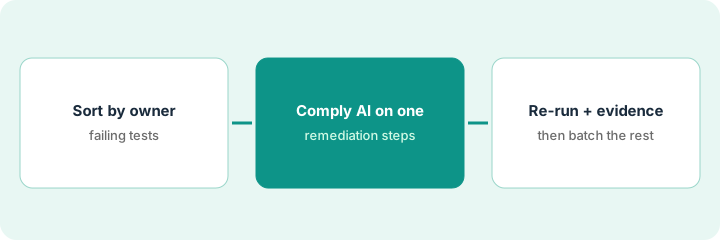
1. Step 1 — Sort failing tests by the person who owns the system
What it is: A failing-test list grouped by who can actually change the resource, rather than by framework or by date.
- Export or list the failing cloud tests for one framework.
- Add the system owner for each: the person or team who manages that database, bucket, or account day to day.
- Add one more column: how the resource is managed (Terraform, CloudFormation, CDK, or by hand in the console). This decides which fix method you'll ask for.
- Pick one test to start with: a real finding, owned by someone available this week, on a resource that isn't in the middle of a migration.
Fourteen failing tests. Nine belong to the platform team, three to the data team, two to IT. Most platform resources live in Terraform. The team picks "RDS instance not encrypted at rest" because the owner is in this week and the database is managed in Terraform.
Make a sheet with Test | Resource | System owner | Managed by | First pick (Y/N). Choose exactly one Y.
2. Step 2 — Work one test with Comply AI, follow-ups included
What it is: Open the failing test's detail panel and ask Comply AI for Remediation for fix steps. You choose the method (CLI, Terraform, CloudFormation, or CDK), and it writes code for that resource. It's a multi-turn chat, so ask follow-ups before anyone copies a line.
- Ask for the method that matches how the resource is managed. If it lives in Terraform, a CLI fix will drift and get reverted.
- Ask what each step changes and what could break. Some fixes can't be done in place.
- Have the system owner read every step against how the resource really works.
- Put the agreed fix through your normal change review, like any other production change.
Per Secureframe's AI and ML article, this feature sends OpenAI only the failing resource ID, a username where needed, the failure message, and the test description.
Comply AI's first answer is a CLI command. The engineer asks for Terraform instead, then asks whether encryption can be turned on in place. The answer: no, it needs a snapshot, an encrypted copy, and a cutover. She plans that for a maintenance window rather than running the first command she was given.
Follow-up prompt in the chat: "This resource is managed in Terraform. Show the Terraform change, tell me what each step modifies, and tell me whether any step needs downtime or a data copy."
3. Step 3 — Re-run the test and check the evidence, then batch
What it is: The fix only counts once the test passes again and the evidence makes sense to a compliance reader. Then you reuse what you learned on the rest of the list.
- After the change ships, re-run or wait for the test and confirm it passes.
- The compliance manager checks the test's evidence shows the right environment and resource. A pass on staging doesn't help a production control.
- Write down what you learned: the method that worked, the follow-up question that mattered, how long it took.
- Now batch the remaining tests by owner, and give each owner that one-page note instead of ten pasted AI answers.
After the cutover, the encryption test passes and the evidence shows the production instance. The team writes a short note ("ask for Terraform, ask about in-place changes, plan downtime for anything storage-related") and uses it for the other eight platform tests.
Add a "Lesson from first fix" line to the top of the failing-test sheet before anyone opens a second ticket.
Pricing context (October 2026)
This how-to isn't a price sheet. Secureframe's pricing page (read 10 October 2026) lists Fundamentals starting at $7,500/year, with Complete and Defense by quote; Fundamentals includes Comply AI for policies, remediation, and risk. Real quotes depend on frameworks, headcount, and add-ons. Details live on the Secureframe AI review. Dated October 2026.
Checked Oct 13, 2026 on the vendor’s own pricing page: Secureframe’s packages page lists Fundamentals starting at $7,500 per year, with Complete and Defense packages by quote (“Get a quote”). No other Secureframe dollar figure is published.
Uncertainty: Feature names change often in this category, and only the starting price is published. If your contract and our review disagree, trust your contract. The only prices this site sells here are the optional $9 AI toolkit spreadsheet and $19 AI toolkit audit.
When this helps (honest take)
Useful when most of your infrastructure lives in AWS, Azure, or GCP as code, failing tests are piling up, and system owners will review generated fixes.
Not useful when nobody owns the failing resources, or the plan is to paste AI-written commands straight into production. That's how a compliance fix turns into an outage.
Related options (educational)
| Need | Where to look | Why |
|---|---|---|
| Secureframe AI features | Secureframe AI | Primary path on this page |
| Comparing platforms | Secureframe vs Sprinto | Same job, different platform |
| Assistant-led fixes you confirm | Sprinto AI | Sprinto Assist plans you confirm |
| Device and identity fixes | JumpCloud AI | Where some fixes actually happen |
| Compliance stack overview | Stack map for compliance ops | Job, tool, and owner in one view |
FAQ
Can Comply AI fix my cloud environment automatically?
No. It writes remediation guidance and code that a person runs. Have the engineer who owns the system review each step and run it through normal change review.
Why start with one test instead of all of them?
Because the first fix usually teaches you something, like which method to ask for or which fixes need downtime, that saves time on every test after it.
Where do current prices live?
On Secureframe's pricing page and with their sales team. This page only repeats the published starting price. Our Oct 13, 2026 check of the vendor’s own pricing page is summarized in the pricing section above.
Should we paste Comply AI’s fix straight into production?
No. The system owner applies the change the normal way, re-runs the test, and checks the evidence before the same fix is repeated on other tests.
Optional next step
Free reviews stay free. If you're paying for a compliance platform plus separate chat seats that rewrite the same remediation steps, the $9 AI toolkit spreadsheet helps you lay them out, or the $19 AI toolkit audit gets you a written memo.