How-to · Revenue cycle · R1 · Oct 21, 2026
Turn on R1 Phare Flow for claim follow-up and denials, and have a revenue-cycle supervisor approve every appeal
R1 packages its revenue-cycle AI as Phare OS. Phare Flow uses agents to “check status, appeal denial, reconcile payments, call payer.” An appeal goes to the payer in the hospital’s name, and someone at the hospital should be able to defend every sentence. This page shows how to turn on Phare Flow for one payer while a revenue-cycle supervisor approves every appeal.
Who this is for
Revenue-cycle directors, patient financial services leads, denials managers, and coding managers at health systems using or considering R1. The job here is the back end — claim follow-up and denials — with a narrow start. This is an operations how-to, not billing, coding, or legal advice. For setting Akasa’s autonomy threshold for inpatient coding — a different job before the bill drops — see Akasa autonomy threshold. For prior authorization before the service — also a different job — see Notable prior auth approval.
How to do it
This is a how-to, not a ranking of revenue-cycle vendors. Per the R1 RCM AI review, Phare OS spans Phare Access (eligibility and authorizations), Phare Claim (pre-bill coding and documentation review), and Phare Flow (claim follow-up, denials, payments), plus Phare UM for utilization management, announced 16 September 2026. R1 says Phare is built on its AI governance framework with “expert human oversight and supervision,” and its Command Center offers role-based controls. R1’s automation figures are its claims. The ground rule: the revenue-cycle director writes down what may run without a person, and a revenue-cycle supervisor approves every appeal.

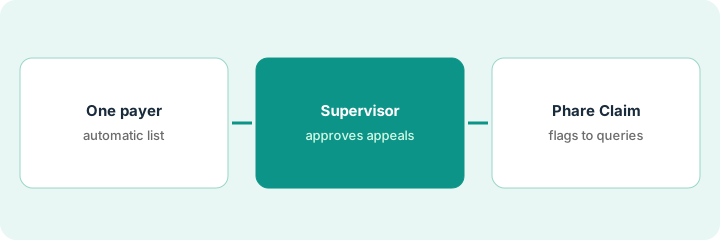
1. Start Phare Flow on one payer, with a written list of automatic actions
What it is: Turn on Phare Flow for one payer and write down exactly which actions may run without a person and who approves the rest.
- Pick one payer with steady volume and familiar denial patterns.
- List each action Phare Flow may take without a person: status checks, payment reconciliation, payer calls.
- Put appeals on the approval list, not the automatic list.
- Set a dollar limit above which any action needs a named approver.
- Use the Command Center’s role-based controls to match the list.
The director lets Phare Flow check status and reconcile payments automatically for one commercial payer, keeps every appeal and every resubmission above a set dollar limit on the approval list, and names the denials supervisor as approver.
Write a one-page list of the actions Phare Flow may take without a person for one payer, with a dollar limit and a named approver for everything else.
2. Revenue-cycle supervisor approves every appeal
What it is: Every appeal Phare Flow or Phare Intelligence prepares goes to the supervisor before submission. Clinical appeals rest on what the treating physician documented.
- Read each appeal against the denial reason the payer gave.
- Check every cited record and payer policy.
- Route clinical questions to a physician advisor; never add clinical facts that were not documented.
- Sample fifty claims the automation touched last month: clean, needs edit, or should never have run automatically.
- Record who approved each appeal.
The supervisor reads ten clinical appeals. Seven are ready. Two cite an imaging report from a different encounter, and one misses the payer’s stated reason. She fixes all three before submission, and her fifty-claim sample turns up two resubmissions she moves to the approval list.
Have the revenue-cycle supervisor read every Phare Flow appeal against the denial reason and cited records before submission, and sample fifty touched claims each month.
3. Add Phare Claim pre-bill review, with the coding manager owning every flag
What it is: Once Phare Flow is steady, add Phare Claim’s pre-bill review. A flagged documentation gap is a question for the physician, not a code change. Note Phare UM separately.
- Have the coding manager review thirty Phare Claim flags before billing.
- Record which flags led to a physician query, which were already resolved, and which were not supported.
- Keep queries open-ended; the physician decides what to document.
- Per the review, Phare UM was announced 16 September 2026; keep patient-status decisions with physician advisors and the utilization review process.
- Review results with the revenue-cycle director before widening.
The coding manager reviews thirty flags. Nineteen lead to a physician query, seven were already resolved in a later note, and four are not supported by the documentation. She shares the split with R1 before widening pre-bill review.
Have the coding manager review thirty Phare Claim flags and record query, already resolved, or not supported before any flag changes a claim.
Pricing context (October 2026)
This how-to isn’t a price sheet. Per the R1 RCM AI review, R1 publishes no price list for Phare OS, its modules, or its services. When we checked on Oct 21, 2026, r1rcm.com/pricing blocked our direct fetch and R1’s home page lists no prices. Treat it as quote-only and ask how fees are calculated for each module. Dated October 2026.
Checked Oct 21, 2026 on the vendor’s own site: R1 publishes no prices; our direct fetch of r1rcm.com/pricing and R1’s home page was blocked, so we read the home page through a reader tool and found no price list. This page quotes no R1 dollar figure; ask R1 for a written quote and see our review for what is known.
Uncertainty: The only prices this site sells here are the optional $9 AI toolkit spreadsheet and $19 AI toolkit audit.
When this helps (honest take)
Useful when you are a health system with high denial volume, one payer dominates the work, and a revenue-cycle supervisor will approve every appeal.
Not useful when nobody will write the list of automatic actions, you want appeals sent without review, or your gap is inpatient coding before the bill drops.
Related options (educational)
| Need | Where to look | Why |
|---|---|---|
| Phare Flow, Phare Claim, Phare UM | R1 RCM AI | Primary path; quote only |
| Inpatient coding autonomy thresholds | Akasa autonomy threshold | A different job |
| Prior authorization before the service | Notable prior auth approval | A different job |
| Choosing between RCM AI vendors | Waystar vs Akasa · Notable AI | Explainers |
FAQ
What is Phare Flow?
Per our review, the back-end part of R1’s Phare OS: agents that check claim status, appeal denials, reconcile payments, and call payers.
Can R1’s agents appeal denials without a person?
R1 describes agents that can appeal denials. During a pilot, keep every appeal on the approval list and have a revenue-cycle supervisor approve each one.
How much does R1 cost?
R1 publishes no prices. Treat it as quote-only (checked Oct 21, 2026).
Optional next step
If you want a one-page toolkit map for the tools you already pay for, use the optional $9 AI toolkit spreadsheet. If you want a short review of seat waste and unused tools, use the optional $19 AI toolkit audit. Neither is required to follow this how-to.