How-to · Revenue cycle · Akasa · Oct 21, 2026
Set Akasa’s autonomy threshold for inpatient coding, and have the coding manager review every code below it
Akasa launched autonomous inpatient coding on 2 October 2026. It reads the chart, assigns the full code set, and links each code to the chart language behind it. Akasa says the health system defines thresholds, service-line rules, and audit sampling. This page shows how to set that threshold so the coding manager reviews every code the system is not cleared to finalize on its own.
Who this is for
Inpatient coding managers, CDI directors, and revenue-cycle leaders at hospitals and health systems. The job here is setting and raising an autonomy threshold with written evidence. This is an operations how-to, not coding, billing, or compliance advice. For turning on R1 Phare Flow for claim follow-up and denials with a supervisor approving appeals — a different job later in the revenue cycle — see R1 Phare Flow denials supervisor approval.
How to do it
This is a how-to, not a ranking of coding tools. Per the Akasa AI review, Akasa’s autonomous inpatient coding assigns the full code set, including principal diagnosis, MS-DRG, and present-on-admission indicators; every code links to the supporting chart language with a rationale and confidence level; and Akasa says “you define thresholds, service line rules, payer mix, and audit sampling” and that it “codes only what you’ve approved it to code.” Akasa also offers Coding Optimizer, CDI Optimizer, and AI Advisor; outpatient facility encounters are described as coming soon. Akasa’s accuracy and speed figures are its claims. The ground rule: raising a threshold is a compliance decision the coding manager signs in writing, not a software setting.
1. Start with a conservative threshold on one or two service lines
What it is: Limit autonomy to lower-complexity service lines first, and test Akasa against encounters that already have a final coded bill you trust.
- Pick one or two lower-complexity service lines.
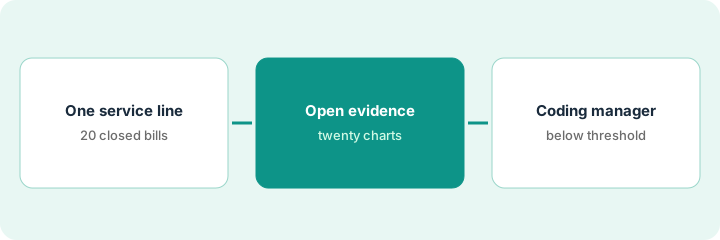
- Have Akasa code twenty closed encounters that already have a final coded bill.
- Compare principal diagnosis, MS-DRG, secondary diagnoses, and POA indicators.
- Write the starting threshold and the audit sample size (for example 20%).
- Name the coding manager as the only person who can change the threshold.
Akasa codes twenty closed encounters. Seventeen match on principal diagnosis and MS-DRG. Two differ on a secondary diagnosis that changes severity, and one assigns a POA indicator the documentation does not support. She logs all three, asks Akasa to explain each rationale, and keeps the threshold where it is.
Have Akasa code twenty closed encounters with a final coded bill, and write down every mismatch before setting any threshold above the starting point.
2. Open the evidence behind each code on twenty charts
What it is: Each code links to the exact chart language that supports it. A coding auditor opens those links and judges whether the documentation meets coding guidelines — a quote proves the words exist, not that the code is supported.
- Open the evidence link for every code on twenty autonomously coded encounters.
- Flag quotes that are a provider’s differential, not a confirmed diagnosis.
- Flag copied-forward text from a prior stay.
- Check the confidence level shown next to each flagged code.
- Send flagged encounters back for coder review and copy-forward patterns to CDI.
An auditor opens evidence links on twenty-five encounters. Twenty-two quotes support the codes. Two quote a differential, and one quotes copied-forward text from an earlier admission. She sends all three back and flags copy-forward text for the CDI team.
Open the evidence link for every code on twenty encounters and mark any quote that is a differential or copied-forward text.
3. Coding manager reviews every code below the threshold, and raises it only on audit results
What it is: Codes below the threshold go to the coding manager’s review queue. The threshold moves up only after a written audit sample supports it.
- Review every below-threshold code before the bill drops.
- Keep the written audit sample on autonomously finalized encounters.
- Raise the threshold one step at a time, one service line at a time.
- Record who approved each change, the date, and the sample result.
- Ask compliance to review the log each quarter.
After a month, the 20% audit sample shows two POA indicator errors on one service line. She holds that line at its current threshold, keeps the other line where it is, and logs who approved each decision.
Write a one-line rule for raising the threshold — which sample size and error count justify one step — and have the coding manager sign each change.
Pricing context (October 2026)
This how-to isn’t a price sheet. Per the Akasa AI review, Akasa does not publish a price list. For its Prebill Optimization Suite the review says Akasa describes performance-based pricing with no upfront fees, and it found no stated pricing model for autonomous coding. Treat autonomous coding as quote-only and ask how any “measurable financial improvement” is defined and audited. Dated October 2026.
Checked Oct 21, 2026 on the vendor’s own site: Akasa publishes no prices; akasa.com/pricing returned not found and Akasa’s site lists no prices. This page quotes no Akasa dollar figure; ask Akasa for a written quote and see our review for what is known.
Uncertainty: The only prices this site sells here are the optional $9 AI toolkit spreadsheet and $19 AI toolkit audit.
When this helps (honest take)
Useful when you run inpatient coding at a hospital or health system, have a coding backlog, and a coding manager will set thresholds, review below-threshold codes, and keep audit samples.
Not useful when you are an ambulatory practice, nobody will own the threshold log, or your main gap is claim follow-up and denials after the bill drops.
Related options (educational)
| Need | Where to look | Why |
|---|---|---|
| Autonomous inpatient coding with evidence | Akasa AI | Primary path; quote only |
| Claim follow-up and denial appeals | R1 Phare Flow denials supervisor approval | A different job |
| Choosing between RCM AI vendors | Waystar vs Akasa | Side-by-side explainer |
| Where revenue cycle fits | Stack map: healthcare ops | Broader map |
FAQ
Does Akasa code without coders?
Per our review, Akasa says its technology is designed to fully code complex inpatient cases without human intervention, within thresholds the health system sets. Whether your organization allows that is a decision for your coding manager and compliance officer.
When did Akasa launch autonomous inpatient coding?
Per our review, on 2 October 2026. Outpatient facility encounters are described as coming soon.
How much does Akasa cost?
Akasa publishes no price list. Treat autonomous coding as quote-only (checked Oct 21, 2026).
Optional next step
If you want a one-page toolkit map for the tools you already pay for, use the optional $9 AI toolkit spreadsheet. If you want a short review of seat waste and unused tools, use the optional $19 AI toolkit audit. Neither is required to follow this how-to.