How-to · Short-term rentals · PriceLabs · Oct 14, 2026
Set PriceLabs minimum price and minimum stay guardrails before you trust dynamic pricing
PriceLabs recalculates nightly prices and minimum stays daily from market data and your bookings. The engine prices inside the limits you give it. This page shows a host how to work out a real floor, set the guardrails, and have the owner approve each rule before any price syncs to a channel.
Who this is for
Hosts, co-hosts, and small managers pricing short-term or vacation rentals who are trying PriceLabs for the first time. The job here is guardrails, not a full revenue strategy. For a different pricing tool, see the Wheelhouse AI review.
How to do it
This is a how-to, not a ranking of pricing tools. Per the PriceLabs AI review, PriceLabs lists guardrails including base, minimum, and maximum prices, dynamic minimum stays, check-in and check-out rules, and orphan-day adjustments; you can pause syncing per listing. The review's ground rule: the owner approves every minimum-price and minimum-stay rule.

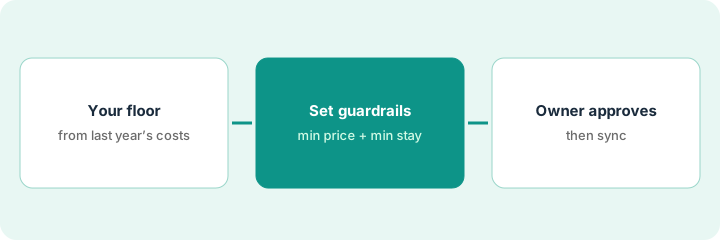
1. Step 1 — Work out your floor from last year's costs
What it is: The minimum price is the lowest nightly price you'd accept. Work it out from real costs, not from what competitors charge.
- Add up last year's fixed costs per night available (mortgage or rent, insurance, utilities).
- Add per-stay costs (cleaning, laundry, supplies) spread over a typical stay.
- Add platform fees.
- Round up; that's the starting floor.
The co-host divides last year's fixed costs by nights available, adds per-stay cleaning spread over an average three-night stay, and adds platform fees. The result is the floor she proposes to the owner.
Write your floor calculation on one line with each part labeled. If you can't fill in a part, find the number before setting any guardrail.
2. Step 2 — Set the guardrails
What it is: Enter the minimum price, a maximum, and minimum-stay rules for the listing. Keep sync paused while you set them.
- Set the minimum price from Step 1.
- Set a maximum for peak dates you'd consider too high for your guests.
- Set minimum stay by day of week or season.
- Decide on orphan-day handling (short gaps between bookings).
She sets the floor, a peak maximum, a two-night minimum on weekends, and allows one-night stays only to fill single-night gaps between bookings.
List every guardrail with its value and why you chose it. The owner will approve from this list.
3. Step 3 — The owner approves and you compare a week
What it is: The owner approves each rule. Then, with sync still paused, compare a week of recommendations with what you'd have charged. Turn sync on only after the owner agrees.
- Send the owner the guardrail list.
- The owner approves or adjusts each rule.
- Keep sync paused for seven days.
- Write what you'd have charged next to each recommended night.
- Discuss differences, then turn sync on.
The owner raises the weekend minimum stay to three nights in summer. During the paused week, the engine is higher on a conference weekend she'd missed and lower on two Sundays. They raise the Sunday floor slightly and turn sync on.
Keep sync paused for one week and log "PriceLabs / what I'd charge / difference" for each night. Talk through the three biggest gaps with the owner.
Pricing context (October 2026)
This how-to isn't a price sheet. Per the PriceLabs AI review, PriceLabs prices Dynamic Pricing per listing by region with a free trial; AI Insights is free, and Athena and the MCP connector were free in beta when reviewed. Dated October 2026.
Checked Oct 14, 2026 on the vendor’s own pricing page: PriceLabs’ plans page prices Dynamic Pricing at $19.99 USD per listing per month in the USA, UK, Canada, Europe, Australia, New Zealand, and Israel, and $9.99 USD per listing per month in the rest of the world (plus taxes), with a free trial.
Uncertainty: Sliding-scale discounts aren't shown in full on the pages we read. Beta features can start billing when the beta ends. Local permits, taxes, and occupancy limits are checked by a person. The only prices this site sells here are the optional $9 AI toolkit spreadsheet and $19 AI toolkit audit.
When this helps (honest take)
Useful when you're new to dynamic pricing and want limits you understand before the engine changes prices on your channels.
Not useful when the owner won't share cost numbers. Without a real floor, guardrails are guesses.
Related options (educational)
| Need | Where to look | Why |
|---|---|---|
| PriceLabs AI features | PriceLabs AI | Primary path on this page |
| A close alternative | PriceLabs vs Wheelhouse | Side-by-side |
| Another pricing tool | Wheelhouse AI | Comparison point |
| Guest replies with an approved rule | Hostaway Auto-reply | Same day's how-to |
| A whole map of property tools | Stack map: property ops | Where PriceLabs fits |
FAQ
Is a paused listing billed?
Per our review, PriceLabs' FAQ says paused listings aren't billed after the current period. Check your own billing page.
How often should the floor change?
When costs change, and at least once a year. Note each change with the owner's approval.
Where do current prices live?
On PriceLabs' plans page. Our Oct 14, 2026 check of the vendor’s own pricing page is summarized in the pricing section above.
Is Athena needed for this?
No. Per our review, Athena is in beta; this routine uses only the guardrail settings in Dynamic Pricing.
Optional next step
Free reviews stay free. If you pay for a pricing tool, a market-data tool, and a rental platform's own pricing add-on, the $9 AI toolkit spreadsheet helps you lay them out, or the $19 AI toolkit audit gets you a written memo.