How-to · Privacy / AI governance · OneTrust AI · Oct 13, 2026
Build the AI tool inventory in OneTrust before anyone writes an AI policy
Most AI policies are written before anyone knows which AI tools the company actually uses. This page shows a privacy manager or AI governance lead how to build the inventory first in OneTrust's AI Discovery and Registry, give every entry an owner, and only then route tools into risk assessments. Below, "shadow AI" means AI tools or features people use without a review, including SaaS products that switch on AI features after you bought them.
Who this is for
Privacy managers, DPOs, AI governance leads, and GRC (governance, risk, and compliance) managers at a company that already runs privacy work in OneTrust and is now being asked to govern AI. If your main gap is finding which SaaS and AI apps employees use, Nudge Security focuses on that discovery job.
How to do it
This is a how-to, not a ranking of AI governance tools. Feature detail lives on the OneTrust AI review. Several OneTrust features announced in late September 2026 are private previews, so this page uses only the AI Discovery and Registry and the assessment workflows the review describes as available.

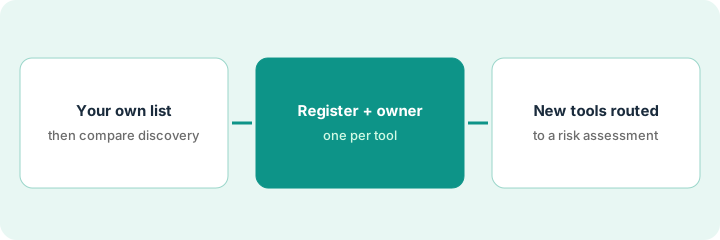
1. Step 1 — Write your own list, then compare it with discovery
What it is: A list of the AI tools you already know about, compared with what OneTrust finds. OneTrust says declared AI arrives through intake, procurement, and model onboarding, and undeclared AI is surfaced through vendor reviews, owner attestations, integrations with cloud and AI platforms, and periodic checks.
- Write down every AI system, feature, and tool you know is in use, from the support chatbot to the AI feature in your CRM.
- Connect the sources OneTrust supports and run the vendor reviews and attestations it uses.
- Sort the result into three groups: on your list and found, found but not on your list, and on your list but not found.
- Expect the third group. No discovery method finds everything; tools bought on personal cards are a common miss.
The governance lead lists 22 AI systems. After connecting the cloud environment and running vendor reviews, the registry shows 17 of hers plus four she hadn't listed: two internal agents a data team built and two SaaS tools with new AI features. The five it missed are browser-based chat tools bought on personal cards.
Make a sheet with Tool | On our list | Found by OneTrust | Owner | Lifecycle status. Fill the first three columns before you touch the fourth.
2. Step 2 — Register each tool with an owner
What it is: OneTrust's registry keeps one record per AI system, model, agent, dataset, vendor, project, or use case: what it does, who owns it, how it's built, what data it uses, and where it is in its lifecycle, with a change history.
- Add the tools discovery missed by hand, so the registry matches reality.
- Give every entry an owner before it gets an assessment. An inventory entry is a claim about a system until its owner confirms it.
- Set a lifecycle status for each. OneTrust's statuses include proposed, in development, testing, approved, restricted, under reassessment, and retired.
- Ask each owner to confirm what data the tool touches. That one answer decides most of the risk tier later.
The governance lead adds all five missed tools by hand. Each of the 26 entries gets an owner, and the two internal agents are marked "testing" until they've been assessed.
Send each owner a one-question request: "Confirm what this tool does and what data it can reach, or tell us it's wrong."
3. Step 3 — Route new tools to a risk assessment
What it is: Each registered use case can move through configurable intake, approval, attestation, and signoff workflows. OneTrust provides templates for the EU AI Act, the NIST AI Risk Management Framework, and ISO 42001, and can tier risk by use case, system, deployment context, or data sensitivity.
- Send the highest-risk entries first: anything touching customer or employee personal data.
- Let the workflow route reviews to privacy, security, and legal reviewers.
- Record each reviewer's conditions on the entry.
- Agree in writing what counts as a material change, such as a new data source, a model swap, or a new action an agent can take, so the approval doesn't quietly go out of date. Only then write the AI policy, using what the inventory taught you.
Legal wants an AI tool that summarizes customer contracts. It's tiered medium and routed to three reviewers. Security asks for the vendor's retention terms before approving; legal approves on the condition that summaries never replace the contract. The privacy manager records both conditions and sets reassessment for any change in the model provider.
Add a "Reassess if" field to every approved entry and fill it in before you mark the entry approved.
Pricing context (October 2026)
This how-to isn't a price sheet. OneTrust publishes no prices (checked 10 October 2026); every package is quote-only. Its pricing page says AI Governance is priced by admin users and AI inventory, so ask how the size of your inventory changes the price. Details live on the OneTrust AI review. Dated October 2026.
Checked Oct 13, 2026 on the vendor’s own pricing page: OneTrust shows no public list price. OneTrust’s pricing page lists packages with “Get Pricing” and “Talk to Sales” buttons and says AI governance solutions are priced on admin users and the size of the AI inventory; no dollar figures are shown. This page quotes no OneTrust dollar figure; confirm what your contract includes with OneTrust or your admin.
Uncertainty: Many September 2026 announcements, including the MCP Gateway and AI-Driven Assessments, are private previews with seasons rather than dates. If your contract and our review disagree, trust your contract. The only prices this site sells here are the optional $9 AI toolkit spreadsheet and $19 AI toolkit audit.
When this helps (honest take)
Useful when your privacy program already runs in OneTrust and leadership has asked for AI governance, and you can get owners to confirm what each tool does.
Not useful when you're a small company that mainly needs a cookie banner and a privacy policy, or nobody will own the inventory after the first pass. An inventory nobody maintains is out of date within a quarter.
Related options (educational)
| Need | Where to look | Why |
|---|---|---|
| OneTrust AI features | OneTrust AI | Primary path on this page |
| Finding SaaS and AI apps people already use | Nudge Security | Discovery and employee nudges |
| Risk registers with AI governance agents | LogicGate AI | Intake and assessment agents |
| Compliance stack overview | Stack map for compliance ops | Job, tool, and owner in one view |
| Before another seat | Find unused AI seats | Live how-to |
FAQ
Can OneTrust find all the AI tools our company uses?
Not on its own. OneTrust combines intake, procurement records, vendor reviews, owner attestations, and integrations with supported platforms. Start from your own list and add what discovery misses.
Why build the inventory before the policy?
Because the policy has to cover the tools people actually use. The inventory tells you which data, vendors, and teams the policy needs to address.
Where do current prices live?
With OneTrust's sales team. It publishes no prices (checked 10 October 2026), and this page doesn't invent any. Our Oct 13, 2026 check of the vendor’s own pricing page is summarized in the pricing section above.
Why build the inventory before the AI policy?
Because a policy written without a list of tools in use tends to miss the ones people actually rely on. The inventory tells you what the policy has to cover.
Optional next step
Free reviews stay free. If privacy, security compliance, vendor risk, and AI governance each have their own platform and AI add-on, the $9 AI toolkit spreadsheet helps you lay them out, or the $19 AI toolkit audit gets you a written memo.