How-to · Risk management / GRC · LogicGate AI · Oct 13, 2026
Autofill risk register entries in LogicGate and check every linked record
A suggested link between a risk and a control is a claim that the control reduces that risk. LogicGate's Risk Cloud will make those claims quickly, along with pre-filled records and assessment fields. This page shows an enterprise risk manager how to run five new risks through the AI, then have each risk owner accept or reject every link and assessment, so the register reflects their judgment rather than the model's. Below, "linked record" means a control, system, or other record connected to a risk in Risk Cloud.
Who this is for
Enterprise risk managers, compliance leads, and GRC (governance, risk, and compliance) administrators who already run a risk register in LogicGate Risk Cloud's Enterprise Risk Management Application. If your team is mainly mapping controls across several compliance frameworks, Hyperproof AI is built around that job.
How to do it
This is a how-to, not a ranking of GRC platforms. Feature detail lives on the LogicGate AI review. LogicGate's Summer 2026 release says GRC Agents are generally available in Enterprise Risk Management, but its own earlier recap gave a later date, so confirm what's live in your instance before you start.

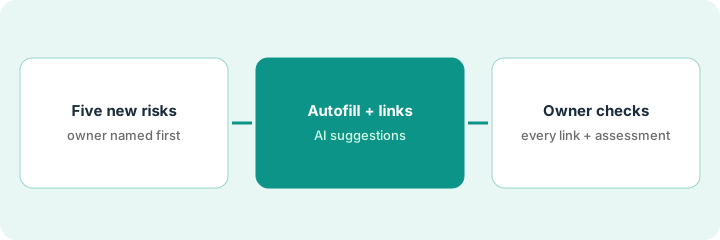
1. Step 1 — Take five new risks and name their owners
What it is: A small first batch of new risks, each with the person who owns it named before the AI touches the record.
- Pick five risks that have come in recently but haven't been assessed yet.
- Write the owner beside each one: the person who knows the business area and whether its controls actually run.
- Gather the supporting documents for each: the incident note, the email, the vendor letter that raised it.
- Avoid using Bulk Record Linking on hundreds of records for your first try. Learn on five first.
Five new risks: loss of a key logistics supplier, a pricing-system outage, a new customs rule, a key-person dependency in treasury, and a data-retention gap in the CRM. Owners: the supply-chain director, the IT operations lead, the trade compliance manager, the CFO, and the sales ops lead.
Make a sheet with Risk | Owner | Source document | Pre-filled (Y/N) | Links accepted | Links rejected | Assessment confirmed.
2. Step 2 — Let the AI pre-fill records and suggest links
What it is: Per LogicGate, the Enterprise Risk Intake Agent pre-fills new risk records, reviews the details and supporting documents, and routes them for assessment. The Enterprise Risk Assessment Agent evaluates a risk against your framework, fills the assessment fields with rationales, and identifies control gaps. Risk Cloud's foundational AI suggests which controls, assets, or other records each risk should link to.
- Run the five risks through intake and let the agent pre-fill each record from its source document.
- Check pre-filled fields against the source for every record. Leave a field blank rather than accept a guess.
- Let the assessment agent fill the assessment fields and rationales, and generate link suggestions.
- Don't accept anything yet. Everything the AI produced is a proposal for the owner.
For the logistics supplier risk, the AI pre-fills the record, rates impact high and likelihood medium with a written rationale, and suggests five linked controls, including an IT backup control.
For each record, note one field the AI filled that the source document doesn't actually support. If you find none in five records, check again.
3. Step 3 — The owner checks every link and assessment
What it is: LogicGate says its agents are not a replacement for human judgment and that humans stay in the loop as final approvers. In this pattern, the risk owner is that approver.
- Send each owner their risk with the pre-filled fields, the assessment and rationale, and the suggested links.
- For every suggested link, the owner accepts or rejects it with a one-line reason.
- The owner flags any control that exists on paper but hasn't run recently. Those become issues with owners and dates.
- The owner confirms or changes the assessment, and rewrites the rationale in their own words if they change it.
The supply-chain director accepts two links (dual-sourcing for top parts, a quarterly supplier financial review) and rejects the IT backup control because it doesn't apply. She flags the other two as controls that haven't run this year; they become issues. She keeps the impact assessment and lowers likelihood, writing why.
Before a risk goes to committee, check its sheet row has an entry in every column. A blank "Assessment confirmed" means it isn't ready.
Pricing context (October 2026)
This how-to isn't a price sheet. LogicGate publishes no prices (checked 10 October 2026). You buy the Applications you need plus Power User licenses for administrators, while Standard and External Users are included. Ask whether GRC Agents are included in each Application's price. Details live on the LogicGate AI review. Dated October 2026.
Checked Oct 13, 2026 on the vendor’s own pricing page: LogicGate shows no public list price. LogicGate’s pricing page says you buy the Applications you need plus Power User licenses, with each component individually priced and a “Contact Sales” path; no dollar figures are shown. This page quotes no LogicGate dollar figure; confirm what your contract includes with LogicGate or your admin.
Uncertainty: LogicGate doesn't say whether GRC Agents cost extra, and its MCP server access and more agents are announced, not available. If your contract and our review disagree, trust your contract. The only prices this site sells here are the optional $9 AI toolkit spreadsheet and $19 AI toolkit audit.
When this helps (honest take)
Useful when your register already lives in Risk Cloud, new risks arrive faster than you can write them up, and risk owners will take ten minutes to check each record.
Not useful when owners won't review, or the plan is to bulk-accept links across the whole register. A register full of unchecked links looks complete and tells the committee nothing.
Related options (educational)
| Need | Where to look | Why |
|---|---|---|
| LogicGate AI features | LogicGate AI | Primary path on this page |
| Multi-framework control mapping | Hyperproof AI | Crosswalks and risk register help |
| Audit, SOX, and risk in one platform | AuditBoard AI, now Optro | Audit-led GRC |
| Evidence collected as data from systems | Anecdotes AI | Data Engine and agents |
| Compliance stack overview | Stack map for compliance ops | Job, tool, and owner in one view |
FAQ
Can LogicGate's agents decide a risk assessment on their own?
They fill assessment fields with rationales, but LogicGate says humans stay the final approvers. In this pattern the risk owner confirms or changes every assessment.
What's the difference between Spark AI and Risk Cloud's AI?
LogicGate's Summer 2026 release says the skills previously branded as Spark AI are now built into Risk Cloud rather than sold as a separate layer.
Where do current prices live?
With LogicGate's sales team. It publishes no prices (checked 10 October 2026), and this page doesn't invent any. Our Oct 13, 2026 check of the vendor’s own pricing page is summarized in the pricing section above.
Can autofill set the final risk level?
No. The AI may pre-fill fields and suggest links; the risk owner checks every link and sets the final level.
Optional next step
Free reviews stay free. If risk, compliance, and vendor teams each pay for their own GRC tool and AI add-on, the $9 AI toolkit spreadsheet helps you lay them out, or the $19 AI toolkit audit gets you a written memo.