How-to · Support · Kustomer AI · Oct 11, 2026
Draft a Kustomer reply from a sanitized timeline a human edits
A “sanitized timeline reply” means drafting from Kustomer conversation/CRM events you allowlist — then a human edits and sends. AI does not invent order, billing, or entitlement facts missing from the timeline. Terms: QA means a quality check done by a person.
Who this is for
Customer service leads whose CRM/timeline home is already Kustomer and who want AI reply drafts without leaking internal events or inventing customer facts. If Gorgias+Shopify is the commerce helpdesk, see Gorgias AI. If Zendesk is ticket system of record, see Zendesk AI.
How to do it
This page is a how-to. It is not a ranking of customer service AI. Product detail and dated packaging notes live on Kustomer AI. Confirm AI features on your Kustomer plan before you pilot.

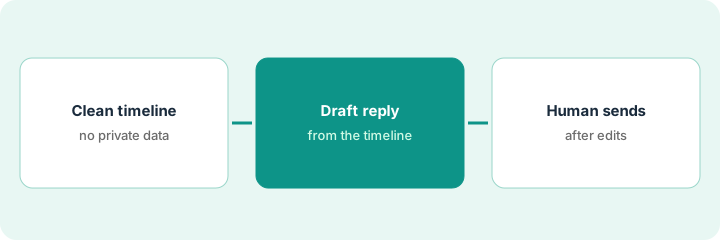
1. Step 1 — Sanitize the timeline
What it is: Build an allowlist of timeline event types and fields that may enter a draft prompt.
- Allow examples: customer messages, agent public replies, known order status attribute you sync, subscription status attribute.
- Deny examples: internal coaching notes, fraud scores, legal holds, staff Slack pastes, competitor intel.
- If a needed field is missing → Unknown — do not pull from memory or another system mid-prompt unless policy allows.
- Strip personal data you must not restate (full card numbers, Social Security numbers) even if present.
Allow: last 5 public messages, subscription=active, last invoice date attribute. Deny: internal “angry VIP” note, fraud flag. Missing shipment carrier → Unknown.
One-page allow/deny list signed by customer service + security. Anything not listed is deny-by-default for AI drafts.
2. Step 2 — Draft the reply
What it is: Generate a reply from the sanitized timeline only.
- Prompt: answer using allowlisted events; Unknown for gaps; no new credits, legal admissions, or ETAs.
- Keep length short so humans edit fast.
- Prefer linking existing help articles over inventing steps.
- Reject drafts that quote denied internal notes.
Draft acknowledges the customer’s last message, states subscription=active, notes shipment carrier Unknown, offers a human follow-up window. Deletes AI sentence that quoted the internal VIP note.
Produce two drafts; keep the one with explicit Unknowns and no denied content. Discard confident guesses.
3. Step 3 — Human edits and sends
What it is: Agent edits claims, tone, and next steps — then sends in Kustomer.
- Edit checklist: Facts from allowlist | Unknowns kept | No credits invented | Tone OK | Send.
- Tag timeline-gap when Unknowns blocked a full answer — ops fixes sync.
- Weekly sample of AI drafts for leak/invention rate.
- Do not dual-home the same timeline reply job in Gorgias unless stores/queues truly differ.
Agent adds the correct help article link, keeps Unknown on carrier, sends. Ticket tagged timeline-gap. Weekly QA: 0 internal-note leaks.
Auto-send off for timeline drafts until leak rate is zero in a 25-ticket sample.
Pricing context (October 2026)
This how-to is not a price sheet. Plan notes live on Kustomer AI. Recheck kustomer.com pricing and your account team before you budget. Related paths: Gorgias AI, Zendesk AI. Dated October 2026.
Checked Oct 11, 2026 on the vendor’s own pricing page: Kustomer shows no public price. Its pricing page said on Oct 11, 2026 that it does not post one-size-fits-all pricing and offers a pricing demo instead. This page quotes no Kustomer dollar figure.
Uncertainty: Kustomer AI features and timeline object schemas are account-specific. If an invoice and a review disagree, trust the invoice. Do not paste a marketing list price you did not pay. The only prices this site sells here are the optional $9 AI toolkit spreadsheet and $19 AI toolkit audit.
When this helps (honest take)
Useful when Kustomer is timeline system of record, allow/deny lists exist, and humans send.
Not useful when agents paste whole timelines including internals into prompts, or another helpdesk owns the same customers.
Related options (educational)
| Need | Where to look | Why |
|---|---|---|
| Kustomer AI | Kustomer AI | Primary path |
| Gorgias Shopify Unknowns | Gorgias AI | Ecommerce order status |
| Zendesk macro QA | Zendesk AI | Ticket macro gate |
| Support stack map | Stack map for support ops | Job | Tool | Owner |
| Before another seat | Three checks before an AI seat · Find unused AI seats | Live how-tos |
Related reviews: Kustomer AI · Gorgias AI · Zendesk AI. Free: seat-waste calculator if multiple customer service AI seats draft from the same timeline.
FAQ
Can AI use internal notes if they help the customer?
Not in this pattern. Internal notes stay denied. Promote facts to public attributes if customers should hear them.
Should AI auto-send timeline drafts?
No until QA shows zero leaks and zero invented facts — and even then, keep human send on sensitive intents.
Where do dated prices live?
On the Kustomer AI review plus vendor commercial terms. This October 2026 how-to does not invent list prices. Our Oct 11, 2026 check of the vendor’s own pricing page is summarized in the pricing section above.
How do I find what Kustomer AI costs?
Kustomer does not post list prices. Ask for a quote that separates seats from AI usage before you widen this routine.
Optional next step
Free reviews stay free. Neither offer is required to use this page. If Kustomer and another customer service AI seat already draft from the same timeline, optional help: $9 AI toolkit spreadsheet or $19 AI toolkit audit when you want a written memo.