How-to · Legal ops · Ironclad AI · Oct 9, 2026
Quote one clause against the Ironclad playbook — or Unknown
“Quote or Unknown” here means the assistant cites the clause text and the playbook rule you already maintain — or says Unknown. It does not invent fallback language or accept risk on counsel’s behalf. This page is not legal advice.
Who this is for
Legal ops and ops leads whose contracts already route in Ironclad (a contract lifecycle management tool) and who want AI help quoting clauses against a maintained playbook. If you only need e-signature plus a simple checklist, see Build a clause checklist handoff in DocuSign instead. For internal playbook language beside Ironclad (still not legal advice), see Claude for legal ops.
How to do it
This page is a how-to. It is not legal advice and not a ranking of contract tools. The Ironclad AI review covers the AI features across the contract workflow; this page is the narrower routine — one clause type, one playbook rule, and a counsel gate before any accept or reject. Check which AI features your workspace shows before assuming they match the marketing pages.

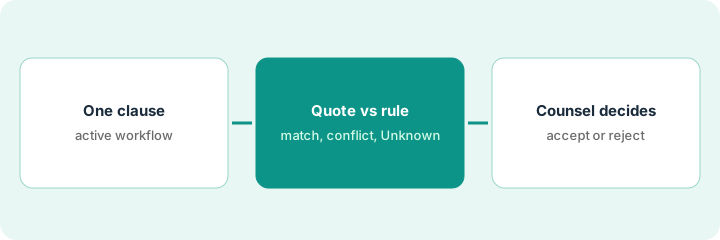
1. Step 1 — Pick one clause in an active workflow
What it is: Limit the pilot to one clause type on an agreement already in an Ironclad workflow — for example limitation of liability, governing law, data processing, or auto-renewal.
- Name the workflow template and the agreement type.
- Confirm a playbook rule already exists for that clause — or admit it does not.
- Name who may propose suggested edits and who must approve deviations from the playbook.
- Out of scope for this first pass: unusual deals with no playbook rule and no counsel owner.
If there is no rule, the honest output is “no rule” — and that goes to counsel, not to an assistant.
An active workflow for a master services agreement. Clause in focus: limitation of liability. The playbook has a rule for mutual caps. Requests for unlimited liability stay out of the AI pilot until counsel owns them.
Write one line: workflow name — clause type — playbook rule ID or title (or “no rule”). If there is no rule, stop and escalate. Do not ask AI to invent one.
2. Step 2 — Match the playbook rule (or Unknown)
What it is: Use Ironclad’s AI assist (where your plan includes it) to quote the counterparty’s clause and set it next to the playbook rule. Prefer word-for-word quotes over summaries that soften the risk.
- Fixed shape: quoted clause | playbook rule | match, conflict, or Unknown | questions for counsel.
- Mark Unknown when the playbook is silent or the clause is ambiguous — do not invent “standard” labels.
- Keep the comparison in the workflow comments counsel already reads.
- Do not auto-apply fallback language the playbook does not authorize.
The quote is the useful part. A paraphrase like “roughly in line with our cap” hides exactly the words counsel needs to see.
The assistant quotes the counterparty’s liability section next to the playbook’s mutual-cap rule. Result: conflict on uncapped consequential damages. Three questions for counsel are logged. No “standard SaaS” label appears in the packet.
From one cleaned-up clause, produce four things: the quote, the playbook rule citation, match / conflict / Unknown, and at most five questions for counsel. Delete any sentence that invents fallback language.
3. Step 3 — Counsel decides before accept or reject
What it is: A hard rule: AI drafts quotes and comparison notes; it never accepts, rejects, or makes the final edits. Counsel (or an approver the playbook names) owns the decision.
- Ban auto-accept from any AI output.
- Require named counsel for conflicts and for Unknowns that affect risk.
- Log Unknowns — do not fill them with confident “market norms.”
- If you draft the handoff memo in a chat seat, keep the same gate — see Claude for legal ops.
Contracts sometimes arrive with a security questionnaire attached. The same evidence-or-Unknown habit applies there — Answer one Vanta questionnaire row with evidence or Unknown.
An AI-assisted note labels a liability clause “within market.” Ops almost accepts. Counsel rejects the label, edits the clause, then approves. New rule: no market-norm labels in the send packet — only quotes, playbook citations, and counsel’s answers.
Add one checklist line to the workflow: “Was AI accept or reject used? Yes → stop.” Run a five-minute dry run where the AI says approve, and confirm the send still blocks without counsel.
Pricing context (October 2026)
This how-to is not a price sheet. Plan detail for Ironclad AI lives on that review. Recheck the vendor’s site before you budget. Dated October 2026.
Checked Oct 9, 2026 on the vendor’s own pricing page: ironcladapp.com/pricing shows no list price. It says pricing depends on your products, users, and workflows, and offers a tailored quote; you pick contract management, the AI assistant, and e-signature products, plus optional integrations and extra instances. So this page gives no Ironclad dollar figure — budget from your quote.
Uncertainty: Feature names, limits, and which workspaces have the AI assist change, and pricing is quoted. If an invoice and a review disagree, trust the invoice. Do not paste a marketing list price you did not pay. The only prices this site sells here are the optional $9 AI toolkit spreadsheet and $19 AI toolkit audit.
When this helps (honest take)
Useful when Ironclad is already the contract system of record, playbooks exist, and counsel review is non-negotiable.
Not useful when you have no playbook, you want AI to replace counsel, or you only need basic e-signature envelopes (Build a clause checklist handoff in DocuSign is the lighter routine). Measure the clause-quote job before adding another contracts AI seat.
Related options (educational)
| Need | Where to look | Why |
|---|---|---|
| Clause vs playbook inside the contract workflow | Ironclad AI | When Ironclad is the system of record |
| E-signature checklist handoff | DocuSign AI · Build a clause checklist handoff in DocuSign | Lighter routine when you only send envelopes |
| Internal playbook drafts (not advice) | Claude for legal ops | Chat-side language with a counsel gate |
| Security questionnaire that came with the deal | Answer one Vanta questionnaire row with evidence or Unknown | Evidence or Unknown |
Related reviews: Ironclad AI · DocuSign AI · Claude for legal ops. Related how-tos: Build a clause checklist handoff in DocuSign · Answer one Vanta questionnaire row with evidence or Unknown. Free: seat-waste calculator if Ironclad and another contracts AI seat cover the same clause handoff.
FAQ
Is this legal advice?
No. Quotes and playbook comparisons are drafts for human review. Escalate to counsel before anything is accepted, rejected, or sent.
Can AI accept or reject a clause with this routine?
No. Never. People own accept, reject, and send.
What if the playbook has no rule for this clause?
Write “no rule,” log it, and send it to counsel. The pilot stops there for that clause — an assistant should not invent a rule.
Where do dated prices live?
On the Ironclad AI review and ironcladapp.com/pricing. This October 2026 how-to only repeats prices we checked on the vendor’s own pricing page on Oct 9, 2026. Ironclad showed no public price that day.
Optional next step
Free reviews stay free. Neither offer is required to use this page. If Ironclad AI and another contracts or chat seat already cover the same clause job, optional help: $9 AI toolkit spreadsheet (seats, spend, owner, cancel-by, overlap) or $19 AI toolkit audit when you want a written memo.