How-to · Compliance / GRC · Hyperproof AI · Oct 13, 2026
Map one control across two frameworks in Hyperproof and have the owner accept it
Adding ISO 27001 to a SOC 2 program sounds like a mapping exercise, and Hyperproof will happily suggest the mappings. The catch is that two related requirements don't always ask for the same thing. This page shows a GRC (governance, risk, and compliance) manager how to take one shared control through Hyperproof's crosswalk suggestion, then have the control owner accept or reject it with a written reason. Below, a "crosswalk" is a link saying one framework's requirement relates to another's.
Who this is for
GRC managers and compliance leads running two or more frameworks against one control set in Hyperproof, often at a company that added ISO 27001 after SOC 2, then HIPAA or CMMC. If you're on one framework with a first audit coming, a lighter tool may get you there faster; see the stack map for compliance ops.
How to do it
This is a how-to, not a ranking of GRC platforms. Feature detail lives on the Hyperproof AI review. Hyperproof says AI features come through an AI Early Access Program via sales or customer success, with generally available features on by default, so check what's turned on in your organization.

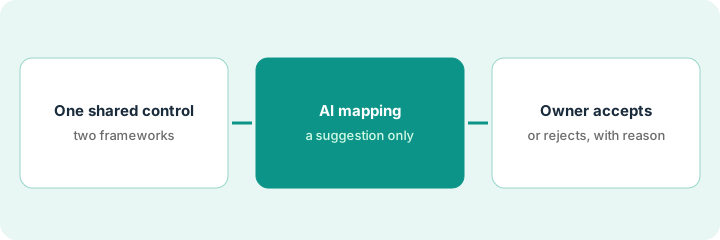
1. Step 1 — Pick one control that both frameworks touch
What it is: One control, chosen on purpose, that you expect to cover a requirement in each framework.
- Choose a control with clear evidence and an available owner. Access reviews, multi-factor authentication, and backups are good first picks.
- Open the Controls module's Crosswalks layout to see which requirements the control already covers.
- Write down the control owner's name before you look at any suggestion.
- Avoid a control that's mid-rewrite. You want to test the mapping, not the control.
The company has SOC 2 and is adding ISO 27001. The GRC manager picks the quarterly access review control. The IT lead owns it, and its evidence is a quarterly export from the identity provider.
Make a sheet with Control | Owner | Framework A requirement | Framework B requirement | Decision | Reason. Fill the first four columns now.
2. Step 2 — Read the AI's mapping suggestion against both requirements
What it is: When you add a framework, Hyperproof says it maps your existing controls to the new requirements using its Hyperproof Crosswalk dataset, and its AI agents can suggest further mappings. Treat each one as a proposal.
- Open both requirement texts side by side. Not the summaries, the actual wording.
- Check the control's wording covers each requirement, including frequency and named roles.
- Check the evidence covers each requirement too. A control can say the right thing while its evidence leaves something out.
- If you use the AI Assistant to make related changes, handle one confirmation card at a time. Hyperproof's help center warns that an unresolved card can be applied to the next work item by mistake.
The suggestion maps the access review control to the ISO requirement. Reading it, the GRC manager sees ISO also expects access rights to be reviewed at planned intervals with records kept. The control already says quarterly, but the export doesn't show reviewer names.
For each requirement, write one line: "Control wording covers it: yes / no. Evidence covers it: yes / no. Gap: [text]."
3. Step 3 — The owner accepts or rejects, with a reason
What it is: The mapping counts only once the control owner accepts it. Hyperproof logs AI-assisted actions in the activity feed under the person who approved them, so the person confirming is the person accountable.
- Send the owner both requirement texts and your gap notes.
- The owner accepts the mapping, accepts it with a fix (a wording change or an evidence change), or rejects it.
- Every decision gets a one-sentence reason in the owner's words. Your auditor will ask about rejected and partial mappings later.
- If a fix is needed, it gets a due date before the next evidence cycle.
The IT lead accepts the mapping and agrees to add reviewer names to the next quarterly export. The reason recorded: "Covers both. ISO needs reviewer records; adding names from Q4."
Do this for one control this week. Next week, do five, using what you learned about where the second framework asks for more.
Pricing context (October 2026)
This how-to isn't a price sheet. Hyperproof publishes no prices for its GRC platform (checked 10 October 2026); buying runs through a demo and quote. Ask your quote to name which AI agents and frameworks are included. Details live on the Hyperproof AI review. Dated October 2026.
Checked Oct 13, 2026 on the vendor’s own pricing page: Hyperproof shows no public list price. Its /pricing address redirected to Hyperproof’s product page on our check, which shows no plan prices; buying runs through a demo. This page quotes no Hyperproof dollar figure; confirm what your contract includes with Hyperproof or your admin.
Uncertainty: Hyperproof doesn't list per feature which AI is generally available versus in early access, and its own pages give different framework counts. If your contract and our review disagree, trust your contract. The only prices this site sells here are the optional $9 AI toolkit spreadsheet and $19 AI toolkit audit.
When this helps (honest take)
Useful when you run several frameworks against one control set and have owners who'll read requirement texts before they click accept.
Not useful when nobody owns the control set, or the plan is to bulk-accept every suggested mapping before the audit. Related requirements aren't identical ones, and your auditor still tests the controls.
Related options (educational)
| Need | Where to look | Why |
|---|---|---|
| Hyperproof AI features | Hyperproof AI | Primary path on this page |
| Compliance stack overview | Stack map for compliance ops | Job, tool, and owner in one view |
| Comparing two large GRC platforms | Vanta vs Drata | Agents, questionnaires, frameworks |
| Software and audit from one company | Thoropass AI | In-house auditors, First Pass AI |
| Policy drafts for a growing team | Scrut AI | Policy drafting and gap checks |
FAQ
Does Hyperproof map controls across frameworks automatically?
Hyperproof says it maps existing controls to new framework requirements using its Crosswalk dataset, and its AI can suggest more. In this pattern, the control owner reads both requirement texts before accepting.
What if one framework asks for more than the other?
Add what's missing to the control or its evidence, or keep the mapping partial with a written reason.
Where do current prices live?
With Hyperproof's sales team. It publishes no GRC platform prices (checked 10 October 2026), and this page doesn't invent any. Our Oct 13, 2026 check of the vendor’s own pricing page is summarized in the pricing section above.
Does an AI crosswalk suggestion count as a mapping?
Not in this routine. It only counts after the control owner reads both requirements and accepts it, with a reason recorded either way.
Optional next step
Free reviews stay free. If you're paying for a GRC platform, a separate vendor-risk tool, and chat seats that all summarize the same evidence, the $9 AI toolkit spreadsheet helps you lay them out, or the $19 AI toolkit audit gets you a written memo.