How-to · Support · Gorgias AI · Oct 11, 2026
Draft Gorgias replies that mark Shopify Unknowns instead of inventing order status
“Shopify Unknowns” means any order, fulfillment, or refund field the agent (or AI) cannot see in the Gorgias–Shopify data you trust — write Unknown instead of inventing “your order shipped yesterday.” Humans edit before send. Terms: QA means a quality check done by a person.
Who this is for
Ecommerce support leads whose helpdesk is Gorgias and store is Shopify, who want AI drafts without hallucinated tracking or refund promises. If Kustomer is the CRM timeline home, see Kustomer AI. If Zendesk is system of record, see Zendesk AI. Not an Intercom Fin how-to.
How to do it
This page is a how-to. It is not a ranking of ecommerce support AI. Product detail and dated packaging notes live on Gorgias AI. Confirm Shopify integration fields and AI features on your Gorgias plan before you pilot.

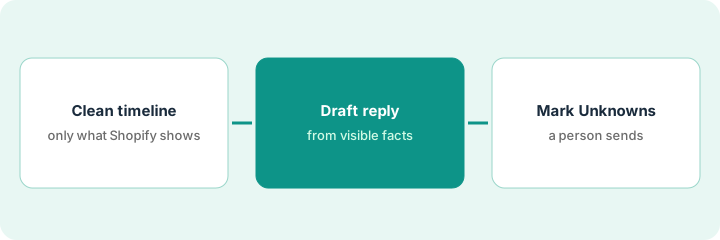
1. Step 1 — Sanitize the Shopify timeline
What it is: Before drafting, copy only fields Gorgias shows from Shopify that you allow in customer email.
- Allowlist examples: order name/number, line items, fulfillment status as displayed, tracking URL if present, refund status if present.
- Redact: internal notes, fraud scores, supplier costs, staff names you do not share.
- If fulfillment status is missing or conflicting integrations disagree → mark Unknown before any draft.
- Do not paste raw admin HTML into the model if your policy forbids it — use the Gorgias sidebar fields.
Allowlisted: Order #1042, 1× Hoodie, Fulfillment: Unfulfilled, Tracking: (none). Redacted: fraud score, wholesale cost. Conflict between Shopify and a 3PL app → status Unknown for drafting purposes.
Write an allowlist of five fields. Anything outside the list cannot appear in an AI draft.
2. Step 2 — Draft the reply from what is visible
What it is: Ask Gorgias AI (or your approved assist) to draft using only the allowlisted timeline.
- Prompt: use only provided fields; if tracking missing say Unknown and offer the next human step; never invent carrier scans or ETA.
- Prefer macros for the next step (“we’ll check with the warehouse”) over fake precision.
- Keep tone on-brand but claims minimal.
- Reject drafts that add discounts or refunds not in policy macros.
Draft: “For order #1042 (Hoodie), Shopify shows Unfulfilled and no tracking URL yet — status Unknown for shipment. Next step: we are checking fulfillment and will update within one business day.” Deleted AI line that claimed “shipped via UPS yesterday.”
Generate three drafts; delete any with invented carrier, ETA, or refund. Keep the Unknown sentence.
3. Step 3 — Mark Unknowns; human sends
What it is: Agent confirms Unknowns and policy, then sends — AI does not auto-send order-status guesses.
- Checklist: Allowlisted fields only | Unknowns explicit | No invented ETA | Macro for next step | Human send.
- Tag tickets where Shopify data was Incomplete for ops follow-up.
- Sample QA weekly on AI order-status drafts.
- Do not add Zendesk AI to the same Shopify order-status job if Gorgias remains system of record.
Agent keeps Unknown, swaps in Macro “fulfillment-check,” sends. Ticket tagged shopify-data-gap. Weekly QA: 25 drafts, 1 invented ETA caught — prompt updated.
Pin the send checklist on the pod wall. Auto-send off for order-status intents until invent rate is zero in QA.
Pricing context (October 2026)
This how-to is not a price sheet. Plan notes live on Gorgias AI. Recheck gorgias.com/pricing and your Gorgias admin before you budget. Related paths: Kustomer AI, Zendesk AI. Dated October 2026.
Checked Oct 11, 2026 on the vendor’s own pricing page: Gorgias’ pricing page says plans are priced by monthly ticket volume, not per agent, with an AI Agent on every plan billed per automated interaction; its FAQ lists $0.90 per AI Agent interaction on annual plans and $1.00 on monthly plans, and each AI interaction also counts as a ticket. The helpdesk plan figures embedded in the page did not agree with each other when we read them, so we quote no plan price; check the live plan cards.
Uncertainty: Gorgias AI and Shopify widget fields vary by plan and apps. If an invoice and a review disagree, trust the invoice. Do not paste a marketing list price you did not pay. The only prices this site sells here are the optional $9 AI toolkit spreadsheet and $19 AI toolkit audit.
When this helps (honest take)
Useful when Gorgias+Shopify is system of record, allowlists exist, and Unknown beats guessing.
Not useful when integrations are broken and you still want confident ETAs, or another helpdesk owns the same store’s tickets.
Related options (educational)
| Need | Where to look | Why |
|---|---|---|
| Gorgias AI | Gorgias AI | Primary path — Shopify support |
| Kustomer timeline reply | Kustomer AI | CRM timeline drafts |
| Zendesk macro QA | Zendesk AI | When Zendesk is system of record |
| Support stack map | Stack map for support ops | Job | Tool | Owner |
| Before another seat | Three checks before an AI seat · Find unused AI seats | Live how-tos |
Related reviews: Gorgias AI · Kustomer AI · Zendesk AI. Free: seat-waste calculator if multiple ecommerce support AI seats draft the same order replies.
FAQ
Can AI invent an ETA if the customer is upset?
No. Upset customers still get Unknown + a human next step. Invented ETAs create chargebacks later.
What if Shopify and the 3PL disagree?
Treat status as Unknown until a human reconciles. Do not pick the friendlier system in the draft.
Where do dated prices live?
On the Gorgias AI review plus the vendor site. This October 2026 how-to does not invent list prices. Our Oct 11, 2026 check of the vendor’s own pricing page is summarized in the pricing section above.
Does each AI reply cost extra in Gorgias?
Gorgias’ pricing FAQ on Oct 11, 2026 said AI Agent interactions are billed per interaction and also count as helpdesk tickets. Drafts that a person sends are handled as normal tickets, so check how your plan counts them.
Optional next step
Free reviews stay free. Neither offer is required to use this page. If Gorgias and another support AI seat already draft the same Shopify order replies, optional help: $9 AI toolkit spreadsheet or $19 AI toolkit audit when you want a written memo.