How-to · Training content · Go1 · Oct 18, 2026
Build a Go1 AI-assisted playlist, and have L&D approve it before it reaches learners
Go1's AI can search its library and draft a playlist in seconds. An off-the-shelf course was written for everyone, not for your policy. This page shows how to build one AI-assisted playlist and have L&D approve every item before it reaches learners.
Who this is for
L&D managers, HR generalists, and compliance training owners who buy ready-made courses from Go1 rather than writing them. The job here is approving one AI-built playlist. For drafting a lesson with Docebo Creator and having the owner approve it, see the existing how-to Docebo Creator lesson approval.
How to do it
This is a how-to, not a ranking of content libraries. Per the Go1 AI review, Go1 AI includes AI-Enhanced Search, AI Chat, AI-assisted playlist curation, and notifications about retiring content with suggested replacements, and Go1 content can run inside your existing LMS. Go1 AI is described as rolling out via account managers, so availability may vary. The ground rule: L&D or the policy owner previews and approves every item before it is assigned, and completing a library course is a record of completion, not proof of competence.
1. Search for one skill gap
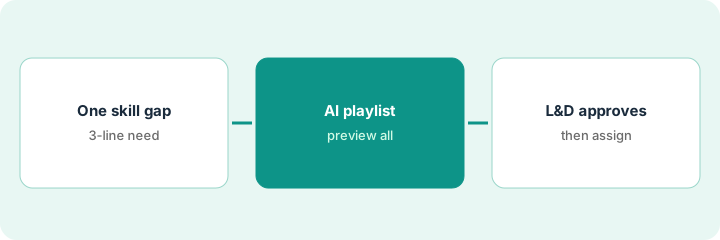
What it is: Write the requirement first — audience, length, region, and three things people must be able to do — then use AI-Enhanced Search or AI Chat to find options.
- Write the requirement in three lines.
- Ask AI Chat for courses that match it.
- Compare each suggestion's learning outcomes with your three lines, not its title.
- Filter by language, region, and level.
- Note why you picked each course.
She asks for a 20-minute course for new branch staff on spotting check fraud, for US audiences. Of five suggestions, two match her three must-dos; one is aimed at UK banks and two are general cybersecurity.
Write your three-line requirement before you search.
2. Draft the AI playlist and preview every item
What it is: Ask Go1's AI to draft a playlist on the topic, then preview every item end to end and drop anything that doesn't match your policy.
- Ask for a playlist on one topic.
- Preview every item in full, not just the title and summary.
- Drop anything that describes a process or rule you don't use.
- Drop region-specific content for regions where you have no staff.
- Log in as a test learner to see what learners will actually see.
She asks for a harassment prevention playlist. Of seven suggested items, she drops one that describes a hotline process the company doesn't use and one covering a state where the company has no staff.
Preview every playlist item end to end before you send it for approval.
3. L&D approves, then watch retiring-content alerts
What it is: The L&D or policy owner approves the playlist before assignment, and approves any suggested replacement when a course is retiring.
- The policy owner approves the final list by name and date.
- Assign the playlist only after approval.
- When Go1 flags a retiring course, preview the suggested replacement in full.
- Check the replacement still covers what the old course covered.
- The program owner approves the swap; keep old completion records.
The HR director approves the remaining five items. Two months later Go1 flags one as retiring; the suggested replacement skips the reporting steps, so L&D picks another course and the HR director approves the swap.
Have the policy owner approve the playlist, and every retiring-content swap, before learners see it.
Pricing context (October 2026)
This how-to isn't a price sheet. Per the Go1 AI review and Go1's plans page (checked Oct 18, 2026), Premium Essentials and Premium Pro are priced through sales, and Go1 doesn't publish what each AI feature costs. Small-team plan figures weren't quoted in our review. Dated October 2026.
Checked Oct 18, 2026 on the vendor’s own pricing page: Go1 shows no public enterprise price. Go1’s plans page lists Premium Essentials and Premium Pro with Speak with an expert, and points small teams to a separate plans page. This page quotes no Go1 dollar figure; confirm what your contract includes with Go1 or your admin.
Uncertainty: The only prices this site sells here are the optional $9 AI toolkit spreadsheet and $19 AI toolkit audit.
When this helps (honest take)
Useful when you buy ready-made compliance and skills courses and have someone in L&D who will preview every AI-suggested item.
Not useful when most of your training is about your own products and procedures, nobody can preview library content against policy, or you need a published enterprise price.
Related options (educational)
| Need | Where to look | Why |
|---|---|---|
| Go1 AI features | Go1 AI | Primary path |
| Lesson drafts an owner approves | Docebo Creator lesson approval | Existing how-to |
| Manager-validated skill reviews | Degreed Maestro skill review | Skills, not content |
| Enterprise LMS with AI | Docebo AI | Can carry Go1 content |
| Learning ops stack map | Stack map: learning ops | Where Go1 fits |
FAQ
Can I use Go1 inside my existing LMS?
Yes. Per our review, Go1 lists more than 70 LMS and HR integrations. Admin content restrictions still decide what learners can see.
Who should approve what Go1's AI suggests?
L&D or the policy owner should preview every playlist item and approve any replacement for a retiring course.
How much does Go1 cost?
Premium plans are quote-only, and AI features aren't priced separately. See the pricing section.
Optional next step
If you want a one-page toolkit map for the tools you already pay for, use the optional $9 AI toolkit spreadsheet. If you want a short review of seat waste and unused tools, use the optional $19 AI toolkit audit. Neither is required to follow this how-to.