How-to · Skills and coaching · Degreed · Oct 18, 2026
Run a Degreed Maestro skill review, and have the manager validate every proficiency level
Degreed Maestro's AI skill reviews propose where a person stands against your proficiency levels. Skill data ends up feeding staffing and mobility decisions, so a proposed level should be a starting point, not a verdict. This page shows how to run one skill review and have the manager validate the level before it is saved.
Who this is for
L&D, talent, and upskilling program leads running Degreed alongside an LMS. The job here is manager validation of one person's proficiency level. For checking the skills Cornerstone infers for a whole job role and having HR approve them — a different job — see Cornerstone skills inference HR approval.
How to do it
This is a how-to, not a ranking of learning platforms. Per the Degreed AI review, Maestro is Degreed's AI coach with roleplays and custom rubrics, AI skill reviews against your own proficiency levels, and Maestro Studio for building coaches and roleplays; Skills Check-In lets employees place themselves on your scales. The ground rule from the review: an AI skill review or self check-in proposes, the manager confirms or corrects, and only confirmed levels are used for decisions about people. AI coaching and roleplay feedback are coaching input, not performance evidence.

1. Set one roleplay rubric
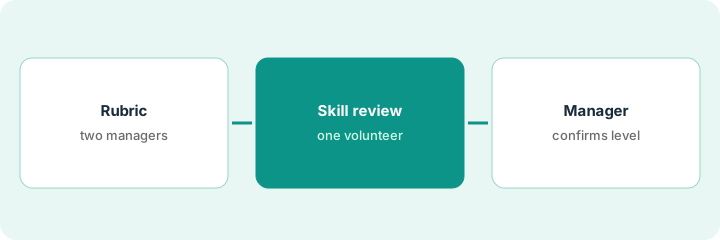
What it is: Build one roleplay in Maestro Studio with a short rubric written by the coaching manager, and calibrate it with two managers.
- Pick one skill tied to the job, such as handling a pricing objection.
- Have the coaching manager write a five-line rubric.
- Have two managers review the same five practice sessions with the AI feedback.
- Change the rubric where both managers disagree with the AI.
- Tell employees who will see the results and how they are used.
She builds a pricing-objection roleplay with a five-line rubric. Two regional managers think the AI over-rewards mentioning discounts early, so she adds a criterion about asking what the buyer is comparing against.
Have two managers review the same five sessions before the rubric is used widely.
2. Employee runs a Maestro skill review
What it is: A volunteer runs a Maestro skill review for one skill, which proposes a proficiency level against your organization's definitions.
- Ask one volunteer, not the whole team.
- Run the review against your own proficiency definitions.
- Keep personal performance notes out of the conversation.
- Save the proposed level as proposed, not confirmed.
- Share the result with the volunteer and their manager.
One volunteer runs a skill review for cloud cost management. The review proposes intermediate.
Run the first skill review with one volunteer and label the result as proposed.
3. Manager validates the level before it counts
What it is: The manager compares the proposed level with what they've seen on the job, confirms or corrects it with a note, and only confirmed levels are saved for planning.
- Compare the proposed level with real work the manager has observed.
- Confirm or move it, with a one-line reason.
- Save only confirmed levels for team plans and staffing.
- Have L&D approve any pathway drafted from the gap before it is assigned.
- Revisit after the next pathway or academy ends.
She has watched him lead two cost reviews and moves him up one level, noting why. For a second skill she agrees with the AI. Only her confirmed levels are saved.
Have the manager confirm or correct every proposed level, with a reason, before it is saved.
Pricing context (October 2026)
This how-to isn't a price sheet. Per the Degreed AI review and Degreed's pricing page (checked Oct 18, 2026), Degreed publishes no prices; pricing is personalized by company, needs, budget, and headcount. Ask which Maestro features your quote includes. Dated October 2026.
Checked Oct 18, 2026 on the vendor’s own pricing page: Degreed shows no public list price. Degreed’s pricing page says pricing is personalized based on company, needs, budget, and headcount. This page quotes no Degreed dollar figure; confirm what your contract includes with Degreed or your admin.
Uncertainty: The only prices this site sells here are the optional $9 AI toolkit spreadsheet and $19 AI toolkit audit.
When this helps (honest take)
Useful when you run a large upskilling program, want AI coaching and practice at scale, and managers will confirm levels before they are used.
Not useful when you mainly need compliance courses tracked, have a small workforce, or expect AI skill reviews to make decisions about people on their own.
Related options (educational)
| Need | Where to look | Why |
|---|---|---|
| Degreed AI features | Degreed AI | Primary path |
| HR approves inferred skills for a role | Cornerstone skills inference HR approval | A different job |
| Skills on one enterprise platform | Cornerstone AI | Skills inference |
| Performance reviews and growth plans | Lattice AI | Reviews and check-ins |
| Learning ops stack map | Stack map: learning ops | Where Degreed fits |
FAQ
Who should confirm the levels Degreed's AI suggests?
Per our review, the person's manager, using your own proficiency definitions. Use only confirmed levels for decisions about people.
Is roleplay feedback performance evidence?
No. Per our review, AI coaching and roleplay feedback are coaching input, not performance evidence.
How much does Degreed cost?
Degreed publishes no prices; it is quote-only. See the pricing section.
Optional next step
If you want a one-page toolkit map for the tools you already pay for, use the optional $9 AI toolkit spreadsheet. If you want a short review of seat waste and unused tools, use the optional $19 AI toolkit audit. Neither is required to follow this how-to.