How-to · Skills and talent · Cornerstone · Oct 18, 2026
Use Cornerstone's Skills Engine to infer skills, and have HR approve every skills decision
Cornerstone's Skills Engine infers which skills belong to a job and which skills a person probably has. Cornerstone's own skills article calls skills inferences you make from evidence, not facts you record. This page shows how to check inferred skills for one job family and keep every skills decision with HR.
Who this is for
HR, talent, and L&D operations leads at large organizations running Cornerstone. The job here is HR approval of inferred skills for a role. For a manager validating one person's proficiency level after a Degreed skill review — a different job — see Degreed Maestro skill review.
How to do it
This is a how-to, not a ranking of talent platforms. Per the Cornerstone AI review, Cornerstone renamed the AI-first platform Cornerstone Workforce AI in 2026 (older pages still say Galaxy), the Skills Engine and People Graph are its inference layer, and Skills Architect is an add-on that maintains your own job and skills architecture. The ground rule from the review: a skill the AI infers is a guess until HR and the person's manager agree with it, and no agent changes a development plan without a named approver.

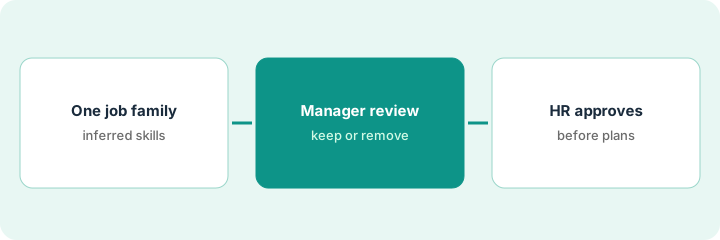
1. Run inference on one job family
What it is: Pick one job family HR knows well and pull the skills Cornerstone's AI infers for its roles.
- Pick one job family, such as field service technicians.
- Pull the inferred skill list for each role in it.
- Pull the current role description for comparison.
- Name the manager who supervises the role and the HR approver.
- Hold off on development plans until the list is approved.
She pulls the inferred skills for the field service technician role: fourteen skills.
Pull the inferred list and the role description side by side for one job family.
2. Review inferred skills with the manager
What it is: Sit down with the supervising manager and decide which inferred skills stay, which go, and which are missing.
- Cross out skills that belong to a different role.
- Flag skills that are wrong for the job.
- Add skills the AI missed, such as required certifications.
- Note who made each change and why.
- If you have Skills Architect, record changes in your own skills language.
The service manager crosses out three skills that belong to the dispatcher role, flags customer negotiation as wrong for the job, and adds a safety certification the AI missed.
Mark every inferred skill the manager would remove before HR sees the list.
3. HR approves before development plans go out
What it is: HR approves the edited skill list, and only then are AI-generated development plans drafted from it — each reviewed by the employee and manager.
- HR updates the role in the skills architecture and notes who approved it.
- Generate development plans only from the approved list.
- Have each manager edit the plan with the employee before it is saved.
- Decide which learning actions may run on their own and which need an approver.
- Revisit the list when Cornerstone ships a new agent.
HR approves the edited list of twelve skills. When a team lead generates a plan for one technician, they drop a course on a retired tool before saving it.
Have HR approve the edited skill list before any development plan is generated from it.
Pricing context (October 2026)
This how-to isn't a price sheet. Per the Cornerstone AI review and Cornerstone's packages page (checked Oct 18, 2026), Cornerstone publishes no prices; packages are licensed per employee per year or in bands by employee count, and readiness agents are bought individually. Dated October 2026.
Checked Oct 18, 2026 on the vendor’s own pricing page: Cornerstone shows no public list price. Cornerstone’s packages page describes packages licensed per employee per year or in bands by employee count; readiness agents are bought individually. This page quotes no Cornerstone dollar figure; confirm what your contract includes with Cornerstone or your admin.
Uncertainty: The only prices this site sells here are the optional $9 AI toolkit spreadsheet and $19 AI toolkit audit.
When this helps (honest take)
Useful when you are a large organization that wants learning and talent on one skills foundation, and HR will own the skills architecture.
Not useful when you have a few hundred learners, nobody will review inferred skills, or you hope AI will decide who is ready for a role.
Related options (educational)
| Need | Where to look | Why |
|---|---|---|
| Cornerstone AI features | Cornerstone AI | Primary path |
| Manager validates one person's level | Degreed Maestro skill review | A different job |
| Absorb and Cornerstone side by side | Absorb vs Cornerstone | Compare the two |
| HR system of record with AI | Workday AI | Core HR and skills |
| Learning ops stack map | Stack map: learning ops | Where Cornerstone fits |
FAQ
Is Cornerstone Galaxy the same as Cornerstone Workforce AI?
Per our review, Workforce AI is the 2026 name for the platform; older pages still say Galaxy.
Can Cornerstone's AI infer skills for our jobs?
Yes. Per our review, it describes real-time skills inference. Treat inferred skills as suggestions that HR and managers keep or remove.
How much does Cornerstone cost?
Cornerstone publishes no prices; it is quote-only. See the pricing section.
Optional next step
If you want a one-page toolkit map for the tools you already pay for, use the optional $9 AI toolkit spreadsheet. If you want a short review of seat waste and unused tools, use the optional $19 AI toolkit audit. Neither is required to follow this how-to.