How-to · Trade compliance · Descartes · Oct 22, 2026
Use Descartes AI Assist on denied-party screening hits, and have the compliance lead confirm every result
Descartes Visual Compliance’s AI Assist uses machine learning to spot likely false positives among denied, sanctioned, and restricted party screening hits. Descartes calls it a supplementary tool, not the sole basis for a decision. This page shows how to test it on one week of real hits while the compliance lead confirms or clears every one by hand, and how to write approval points before adding Descartes agents.
Who this is for
Trade compliance leads, export control managers, and logistics compliance analysts using Descartes Visual Compliance or weighing it. The job here is one week of screening hits with a person deciding each one. This is an operations how-to, not legal or export-control advice. For mapping one product’s suppliers in Altana with the compliance lead confirming each link — a different job in trade compliance — see Altana supplier map.
How to do it
This is a how-to, not a ranking of screening tools. Per the Descartes AI review, AI Assist sits inside the Compliance Manager Workflow, sensitivity can be set by region or department, results below a threshold can still be reviewed, and every cleared hit keeps a status history for audit. Visual Compliance says trade compliance teams “retain full control in decision making.” Descartes introduced the Agent Control Plane on 6 October 2026 to coordinate agents within customer-defined permissions and approval points; the release gave no availability date or price. Descartes’ figures are its claims. The ground rule: a cleared hit that was a real match is a compliance failure, so the compliance lead confirms or clears every hit before any shipment is released.
1. Pull one week of screening hits
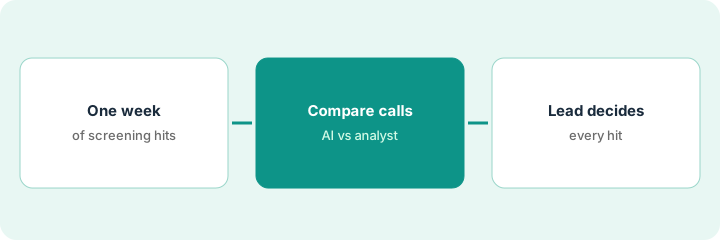
What it is: Export one normal week of denied-party screening hits from the Compliance Manager Workflow, with the final human decision already recorded for each. That week becomes your test set.
- Pick a week with typical volume, not a holiday week.
- Export each hit with the screened name, the list it matched, and the final decision.
- Note the AI Assist sensitivity setting for each region or department.
- Keep customer names inside Descartes; do not paste them into outside chat tools.
The compliance manager exports 180 hits from one week. 171 were cleared by analysts as false positives and 9 needed a closer look; one was a true match that blocked a shipment. She records the sensitivity setting for each of the three regions.
Export one week of screening hits with their final human decisions and the AI Assist sensitivity setting, and keep that week as your test set.
2. Read what AI Assist would clear, hit by hit
What it is: Compare AI Assist’s likely-false-positive calls with the decisions your analysts already made. The one that matters most is any hit AI Assist would treat as a false positive that a person decided was real or needed escalation.
- Line up AI Assist’s call next to the analyst decision for every hit.
- Flag any hit AI Assist would clear that the analyst escalated or blocked.
- Note which names, lists, or regions those disagreements come from.
- Review results below the threshold too; Descartes says they can still be reviewed.
The analyst compares 180 calls. AI Assist agrees with the analysts on 176. Two disagreements are transliterated names from the same country, and one is the true match from the test week. The analyst sends all three to the compliance lead with the history attached.
Compare AI Assist’s call with your analyst’s decision on every hit from the test week, and send every disagreement to the compliance lead with its status history.
3. The compliance lead confirms or clears every hit, then sets approval points
What it is: AI Assist helps the analyst prioritize; it does not release shipments. The compliance lead confirms or clears every hit by hand and owns the sensitivity settings. Before any Descartes agent works across systems, write down which steps need a person’s approval.
- Keep a rule: no shipment is released on an AI Assist call alone.
- Have the compliance lead decide any change to sensitivity, region by region, with the test results attached.
- Write the approval points for any future agent before the Agent Control Plane is turned on.
- Ask Descartes where those approval points and the action record live in your account.
The compliance lead keeps sensitivity unchanged for the region where the transliterated names came from, and lowers it nowhere. She writes two approval points for any future agent: releasing a held shipment and changing a screening list both need her sign-off. She asks Descartes to show where the agent action record will live.
Have the compliance lead confirm or clear every hit by hand, decide any sensitivity change with test results, and write agent approval points before the Agent Control Plane goes on.
Pricing context (October 2026)
This how-to isn’t a price sheet. Per the Descartes AI review, Descartes publishes no prices for its transportation, visibility, or routing products, which are quote-only. Visual Compliance does publish denied-party screening guidance (below); its Standard, Mid-Market, and Enterprise plans are priced on request, and AI-enabled screening to reduce false positives is listed in Mid-Market, not Standard. Ask whether AI Assist is included at your volume. Dated October 2026.
Checked Oct 22, 2026 on the vendor’s own site: Visual Compliance’s screening pricing page says screening “starts at a few thousand dollars a year for a basic implementation with small screening volumes and one user” and that “a typical customer screening 50,000 entities should budget around $20,000 a year.” Standard, Mid-Market, and Enterprise are priced on request, and AI-enabled screening to reduce false positives is listed in Mid-Market. Descartes’ transportation, visibility, and routing products publish no prices (descartes.com/pricing returned not found).
Uncertainty: The only prices this site sells here are the optional $9 AI toolkit spreadsheet and $19 AI toolkit audit.
When this helps (honest take)
Useful when you screen enough names that analysts spend most of their time clearing false positives, the compliance lead will keep deciding every hit, and you can test on a week with known outcomes.
Not useful when you screen a handful of names a month, nobody owns the sensitivity settings, or you hope to release shipments on the AI call alone.
Related options (educational)
| Need | Where to look | Why |
|---|---|---|
| Screening assist, customs document capture, and agents | Descartes AI | Primary path; screening price guidance published |
| One product’s supplier map with confirmed links | Altana supplier map | A different job |
| Value-chain mapping and Passports | Altana AI | Different tool |
| Shipper TMS with AI workers | Shipwell AI | Different job |
| Where compliance tools fit | Stack map: compliance ops | Broader map |
FAQ
Can AI Assist clear a denied-party hit on its own?
Do not set it up that way. Descartes calls AI Assist a supplementary tool, and every cleared hit keeps a status history. The compliance lead confirms or clears each hit.
What is the Descartes Agent Control Plane?
Announced 6 October 2026, it coordinates AI agents within customer-defined permissions and approval points and keeps a record of agent actions. No availability date or price was published, per our review.
Is AI Assist in every Visual Compliance plan?
Visual Compliance lists AI-enabled screening to reduce false positives in Mid-Market, not Standard. Confirm what your plan includes.
What does denied-party screening cost?
Visual Compliance says screening starts at a few thousand dollars a year for a basic setup, and a typical customer screening 50,000 entities should budget around $20,000 a year (checked Oct 22, 2026).
Optional next step
If you want a one-page toolkit map for the tools you already pay for, use the optional $9 AI toolkit spreadsheet. If you want a short review of seat waste and unused tools, use the optional $19 AI toolkit audit. Neither is required to follow this how-to.