How-to · Trade compliance · Altana · Oct 22, 2026
Map one product’s suppliers from its bill of materials in Altana, and have the trade compliance lead confirm every AI-suggested supplier link
Altana’s AI reads a bill of materials and suggests which companies in its Supply Chain Graph are likely in your upstream value chain. Altana says “it suggests, you decide.” This page shows how to map one product, have the trade compliance lead confirm every suggested supplier link before it is used in a filing, an audit, or a Product Passport, and close the gaps with supplier requests.
Who this is for
Trade compliance leads, sourcing managers, and customs brokerage teams at importers using Altana or weighing it. The job here is one product’s supplier map, with a named person confirming every link the AI suggests. This is an operations how-to, not legal or customs advice. For running denied-party screening hits through Descartes AI Assist — a different job in trade compliance — see Descartes AI Assist denied-party screening. For confirming HTS codes on new products with Flexport — a different customs job (classification, not supplier mapping) — see Flexport AI customs classification.
How to do it
This is a how-to, not a ranking of trade platforms. Per the Altana AI review, you share a bill of materials and supplier data and Altana’s AI suggests likely upstream suppliers, “giving you the opportunity to verify.” Sourcing teams can add, edit, and delete connections, and suppliers can confirm links through requests in the platform. Product Passports carry a product’s HS code, country of origin, and more than 200 other attributes, and Altana describes customs pre-validation and a trade-manager agent for classification, origin, FTA qualification, and duty. Altana’s figures are its claims. The ground rule: an AI-suggested supplier is a lead from shipment data, not proof of where your goods come from, so nothing goes into a filing, audit, or Passport until the trade compliance lead confirms it.

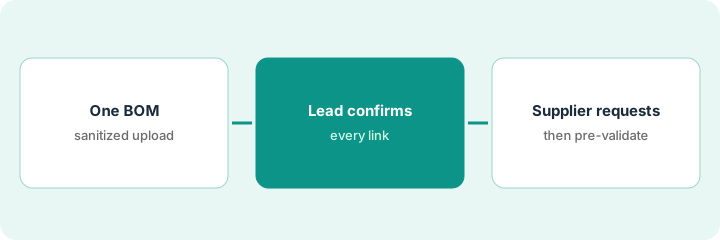
1. Upload one sanitized bill of materials and read the suggested map
What it is: Start with one product, not the whole catalog. Remove contract prices and anything you would not show a supplier, then upload the bill of materials and read the suppliers Altana suggests for each component.
- Pick one finished product with a short bill of materials (ten to thirty components).
- Strip contract prices and internal cost data before the upload.
- List each component with the suppliers Altana suggests and where the suggestion came from.
- Mark the components where Altana suggests more than one possible supplier.
The sourcing manager uploads the bill of materials for one table lamp: 14 components. Altana suggests suppliers for 11 of them, two possible suppliers for the brass fitting, and none for the fabric shade. She lists all 14 with the suggestion next to each and sends the sheet to the trade compliance lead.
Upload one sanitized bill of materials, list every component with the supplier Altana suggests, and mark any component with more than one possible supplier or none at all.
2. Have the trade compliance lead confirm every suggested supplier link
What it is: Each link the AI suggests stays unconfirmed until the trade compliance lead has a supplier document behind it: an invoice, a certificate of origin, or a signed supplier declaration. Confirmed links get a date and the document name.
- Give the trade compliance lead the list from step 1.
- For each suggested link, ask: which document from the supplier backs this?
- Mark each link confirmed (with the document), rejected, or still open.
- Do not use any open link in a Passport, a filing, or an audit answer.
The compliance lead works through 22 suggested links for one charger. She confirms 15 against invoices and origin certificates, rejects 2 (the suppliers stopped shipping to the factory last year), and leaves 5 open. Only the 15 confirmed links go into the product’s Passport draft.
For one product, have the trade compliance lead mark every AI-suggested supplier link as confirmed with a named document, rejected, or open, and keep open links out of any Passport or filing.
3. Send supplier requests for the gaps, then run customs pre-validation
What it is: Use Altana’s supplier requests to ask for the missing origin documents. Suppliers can join and answer buyer requests at no cost, per Altana. Once the open links are closed or marked, check the product before its next entry.
- Send an origin or document request to each supplier behind an open link.
- Have a compliance analyst check each returned document before marking the link confirmed.
- Run the product’s customs pre-validation before the next entry, and read what it flags.
- Hand any classification, origin, or duty suggestion to the licensed broker or compliance lead to decide.
The analyst sends requests to five suppliers behind open links. Four reply within two weeks; one certificate names a different mill than Altana suggested, so the analyst corrects the link instead of confirming it. The compliance lead runs pre-validation on the jacket before its next entry and sends one origin question to the broker.
Send document requests for every open supplier link, check each reply before you mark it confirmed, and run customs pre-validation on the product before its next entry.
Pricing context (October 2026)
This how-to isn’t a price sheet. Per the Altana AI review, Altana publishes no prices for buyers and offers a demo request, so it is quote-only for importers, brokers, and logistics providers; suppliers can join and respond to buyer requests at no cost. Ask whether entry writing, Passports, simulation, and screening are separate modules and how pricing scales with products or entries. Dated October 2026.
Checked Oct 22, 2026 on the vendor’s own site: Altana publishes no prices for buyers; altana.ai/pricing returned not found and Altana’s site offers a demo request. Our review notes suppliers can join and answer buyer requests at no cost. This page quotes no Altana dollar figure; see our review for what is known and Altana’s own site before you budget.
Uncertainty: The only prices this site sells here are the optional $9 AI toolkit spreadsheet and $19 AI toolkit audit.
When this helps (honest take)
Useful when you import physical goods with multi-tier supply chains, a named trade compliance lead will confirm links with supplier documents, and you need product-level records you can share with brokers and customs.
Not useful when nobody will confirm the suggested links, you only need a single denied-party screen, or you would treat the AI map as proof of origin.
Related options (educational)
| Need | Where to look | Why |
|---|---|---|
| Value-chain mapping, Passports, and supplier requests | Altana AI | Primary path; quote only |
| Denied-party screening hits with AI Assist | Descartes AI Assist denied-party screening | A different job |
| HTS codes on new products with a broker confirming | Flexport AI customs classification | A different job |
| Supplier risk alerts and sub-tier visibility | Everstream AI | Alerts, not a product record |
| Where trade compliance tools fit | Stack map: compliance ops | Broader map |
FAQ
Does Altana tell me where my goods come from?
It suggests likely upstream suppliers from shipment and other data. Per our review, Altana frames this as a suggestion you verify. The trade compliance lead confirms each link with a supplier document.
What is an Altana Product Passport?
A shareable record of a product’s journey and attributes, including HS code and country of origin. Share one with customs only after the links behind it are confirmed.
Do suppliers pay to answer requests?
Altana says suppliers can join and answer buyer requests at no cost; advanced trade tools for a supplier’s own team are sold separately.
How much does Altana cost?
Altana publishes no prices for buyers, so it is quote-only (checked Oct 22, 2026).
Optional next step
If you want a one-page toolkit map for the tools you already pay for, use the optional $9 AI toolkit spreadsheet. If you want a short review of seat waste and unused tools, use the optional $19 AI toolkit audit. Neither is required to follow this how-to.