How-to · Customs · Flexport · Oct 22, 2026
Run Flexport’s AI Customs Classification on new products, and have a named broker confirm every HTS code
Flexport’s AI Customs Classification turns finding a 10-digit US HTS code into a guided conversation, with candidate codes compared side by side and the relevant rulings linked. This page shows how to run it on ten new products while a named licensed broker confirms every code, how to turn one recurring decision into a tested rule, and how to decide whether Flexport MCP access is worth turning on.
Who this is for
Importers’ logistics managers, ecommerce operations leads, and trade compliance leads who ship with Flexport or are comparing forwarders. The job here is classifying new products with a named broker confirming every code. This is an operations how-to, not customs or legal advice. For mapping one product’s suppliers from its bill of materials in Altana — a different customs job (supplier mapping and pre-validation, not classification) — see Altana supplier map.
How to do it
This is a how-to, not a ranking of forwarders. Per the Flexport AI review, AI Customs Classification asks follow-up questions about the product and compares candidate codes with linked Customs and Border Protection rulings; Flexport says its AI flags classification errors and its licensed customs brokers confirm every code. The Fall Release 2026 added a Customs Business Rules Engine, where AI writes your customs procedures as deterministic code that checks every entry before filing, and Flexport MCP (launched 29 September 2026) lets assistants such as Claude and ChatGPT track, quote, and book within each user’s own permissions. Flexport’s figures are its claims. The ground rule: a plausible code with a ruling attached can still be wrong for your exact materials, so a named broker or compliance lead confirms every code.

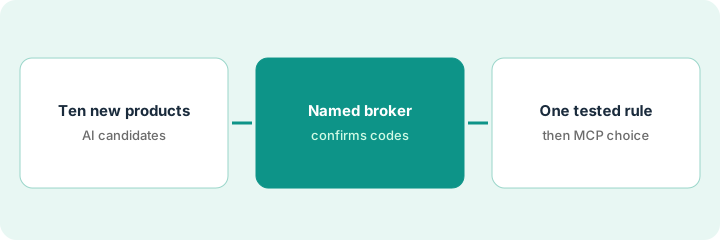
1. Classify ten new products
What it is: Pick ten products you have not imported before and run each through AI Customs Classification. Answer the follow-up questions from the spec sheet, not from memory, and keep the candidate codes and rulings it shows.
- Pick ten new products with complete spec sheets (materials, use, construction).
- Answer every follow-up question from the spec sheet.
- Save the candidate codes and linked rulings for each product.
- Note any product where the leading candidates differ in duty rate.
The operations lead runs ten new products. Seven land on one clear code. Three show two close candidates: a jacket with a shell fabric question, an insulated bottle, and a multi-tool. She saves all candidates with their rulings for the broker.
Run ten new products through Flexport’s AI Customs Classification with answers taken from the spec sheet, and save every candidate code and ruling it shows.
2. A named broker confirms every HTS code
What it is: Name one licensed broker or compliance lead as the person who confirms codes for your account. Each code gets confirmed, changed, or sent back with a question before any entry uses it.
- Name the confirming broker or compliance lead in writing.
- Send each product with its spec sheet, candidates, and rulings.
- Record the confirmed code and the reason, especially where it differs from the leading candidate.
- Do not file any entry on a code that is not yet confirmed.
The broker confirms eight codes as suggested, changes one after reading the bottle’s material breakdown, and asks for a photo of the multi-tool’s blade lock before confirming. The compliance lead records each reason in the product file.
Name one broker or compliance lead to confirm codes, send each product with its candidates and rulings, and record the confirmed code and reason before any entry uses it.
3. Write one Business Rules Engine rule, then decide on MCP
What it is: Turn one decision your broker makes again and again into a Customs Business Rules Engine rule, test it, and have it signed off. Then decide whether Flexport MCP access for your team is worth turning on.
- Pick one repeated rule, such as which product family always needs a specific document.
- Have the broker test the rule on past entries before it is signed off.
- List who would use Flexport MCP and for what (tracking, quotes, bookings).
- If you turn MCP on, have an admin limit it to named users and keep bookings coming back for review.
The broker’s team writes one rule: any upholstered product needs a fabric content declaration before filing. It catches two past entries missing the declaration in testing and is signed off. The logistics manager turns on MCP for two planners for tracking questions only and keeps bookings with the Flexport team.
Turn one repeated broker decision into a Customs Business Rules Engine rule, test it on past entries before sign-off, and list who would use Flexport MCP and for what before turning it on.
Pricing context (October 2026)
This how-to isn’t a price sheet. Per the Flexport AI review, Flexport publishes no price list for its software or AI features; freight, customs brokerage, and fulfillment are quoted for your shipments and lanes, and the MCP page points to a demo request. Ask whether MCP access, AI classification, the Customs Business Rules Engine, and Control Tower carry separate fees or come with your forwarding and customs services. Dated October 2026.
Checked Oct 22, 2026 on the vendor’s own site: Flexport publishes no software price list; flexport.com/pricing returned not found and Flexport’s site points to quotes and demos for freight and customs. This page quotes no Flexport dollar figure; see our review for what is known and Flexport’s own site before you budget.
Uncertainty: The only prices this site sells here are the optional $9 AI toolkit spreadsheet and $19 AI toolkit audit.
When this helps (honest take)
Useful when you add new products often, a licensed broker will confirm every code, and you can write down the decisions your broker makes repeatedly.
Not useful when you import a fixed catalog that rarely changes, nobody owns the final code, or you would file on an AI candidate code without a person confirming it.
Related options (educational)
| Need | Where to look | Why |
|---|---|---|
| Forwarder and customs broker with AI classification and MCP | Flexport AI | Primary path; freight and customs quoted |
| One product’s supplier map and pre-validation | Altana supplier map | A different job |
| Screening assist and customs document capture | Descartes AI | Different tool |
| Shipment visibility across carriers | project44 vs FourKites | Visibility, not customs |
| Where logistics tools fit | Stack map: logistics ops | Broader map |
FAQ
Does Flexport’s AI choose my HTS codes?
It drafts and compares candidate codes with linked rulings. Flexport says its licensed brokers confirm every code; your compliance lead should also own the final decision.
What is the Customs Business Rules Engine?
Per our review, AI writes your customs procedures as deterministic code that checks every entry against your rules before filing, and once tested and signed off it runs the same way every time.
Should I turn on Flexport MCP?
Only for named users and named jobs. An admin turns it on, each person signs in with their own Flexport login, and admins can revoke access.
How much does Flexport cost?
Flexport publishes no software price list; freight and customs are quoted, so treat the AI features as quote-only (checked Oct 22, 2026).
Optional next step
If you want a one-page toolkit map for the tools you already pay for, use the optional $9 AI toolkit spreadsheet. If you want a short review of seat waste and unused tools, use the optional $19 AI toolkit audit. Neither is required to follow this how-to.