How-to · Feedback management · Canny · Oct 18, 2026
Let Canny Autopilot pull feature requests from support and calls, and have the product manager approve every merge
Canny's Autopilot reads closed support conversations and call transcripts, pulls out feature requests, and suggests new ideas or merges in an inbox. A wrong merge hides a different request inside a popular one and inflates its count. This page shows how to connect one source and keep every merge and status change with the product manager who owns the area.
Who this is for
B2B product managers and product ops leads who hear feature requests in tickets and sales calls and lose most of them. The job here is approving merges and statuses. For validating weekly taxonomy changes across all feedback in Enterpret — a different job — see Enterpret taxonomy change validation.
How to do it
This is a how-to, not a ranking of feedback tools. Per the Canny AI review, Autopilot captures requests from sources such as Intercom, Zendesk, Gong, and Fathom, approving a suggestion doesn't publish anything to your portal, Publish to portal is off by default, and linked CRM opportunity revenue is a Business feature. The ground rule: Autopilot never merges feedback, changes a status, or publishes without a named product manager approving it.

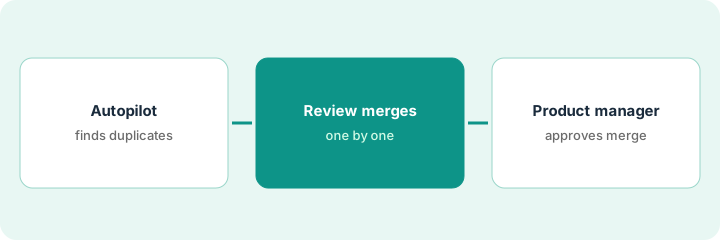
1. Connect one source
What it is: Connect a single call or ticket source to Autopilot so you can judge its reading before the inbox fills up.
- Pick one source, such as Gong filtered to the customer success workspace.
- Expect Autopilot to process the previous 30 days of closed conversations on first connect.
- Set a spend limit first — every person Autopilot attributes feedback to counts as a tracked user.
- Keep Public Actions on Manual and Publish to portal off.
- Upload help articles to the Knowledge Hub so Autopilot recognizes features you already have.
A product manager connects Gong and sets a tracked-user spend limit. Autopilot processes the last 30 days and suggests 34 items.
Write down the source, the spend limit, and the Public Actions setting before you connect anything.
2. Work the Autopilot inbox by hand
What it is: For a week, open the source conversation behind every suggestion and choose Looks good, Merge idea, Make idea, Move, or Delete yourself.
- Open the call snippet or ticket behind each suggestion.
- Delete complaints about bugs already fixed and reps describing the roadmap.
- Check the No feedback found tab for misses.
- Treat an extracted Must have as the AI's reading of tone, not a customer commitment.
- Strip personal details from anything you send to Autopilot by hand.
Of 34 suggestions, 22 are real requests and 14 of those match existing ideas. Seven are about a bug already fixed and five are a rep describing the roadmap; she deletes those twelve and finds two misses in No feedback found.
Review every suggestion for one week before you let anyone else work the inbox.
3. Product manager approves merges, then sorts by revenue
What it is: The product manager who owns each area approves every merge into their ideas and every status change, and only then looks at linked revenue.
- Filter a popular idea to last week's Autopilot insights and read each one.
- Move any insight that asks for something different into its own idea.
- Change statuses, especially public ones, by hand.
- On Business, open the Sales Pipeline report and read the call behind each linked opportunity.
- Use revenue to ask better questions, not to rank the roadmap.
Of nine insights merged into the SSO idea, seven ask for SAML SSO and two ask for SCIM user provisioning. The product manager moves those two to a new SCIM idea and reads the three linked deals; two mention SSO only in passing.
Name the approving product manager for each idea group and audit one popular idea's merges every week.
Pricing context (October 2026)
This how-to isn't a price sheet. Per the Canny AI review and Canny's pricing page (checked Oct 18, 2026), Autopilot is included on all plans: Free is $0 a month for 25 tracked users, Pro starts at $79 a month billed yearly for 100 tracked users and rises with tracked users, and Business is custom. Dated October 2026.
Checked Oct 18, 2026 on the vendor’s own pricing page: Canny’s pricing page lists Free at $0 for up to 25 tracked users and Pro at $79 per month billed yearly; Business is custom.
Uncertainty: The only prices this site sells here are the optional $9 AI toolkit spreadsheet and $19 AI toolkit audit.
When this helps (honest take)
Useful when your team gets feature requests through support tools and recorded calls and has product managers who will clear the inbox weekly.
Not useful when feedback mostly arrives in research interviews, nobody will review the inbox, or you expect revenue-weighted lists to make roadmap decisions.
Related options (educational)
| Need | Where to look | Why |
|---|---|---|
| Canny AI features | Canny AI | Primary path |
| Weekly taxonomy changes | Enterpret taxonomy change validation | A different job |
| Feedback analytics at volume | Enterpret | Themes across all feedback |
| Research insights against highlights | Dovetail Chat source check | Interviews, not requests |
| Product ops stack map | Stack map: product ops | Where Canny fits |
FAQ
Does Canny Autopilot publish ideas to my portal automatically?
Not by default. Per our review, Publish to portal is off by default and Autopilot's ideas stay internal unless you publish them. Keep Public Actions on Manual.
Do merged insights affect my bill?
Yes. Per our review, insights are attributed to the actual end users from the source conversation, so they count toward tracked users. Set a spend limit before connecting high-volume sources.
How much does Canny cost?
Free at $0 for 25 tracked users, Pro from $79 a month billed yearly, and Business custom on the page we checked; see the pricing section.
Optional next step
If you want a one-page toolkit map for the tools you already pay for, use the optional $9 AI toolkit spreadsheet. If you want a short review of seat waste and unused tools, use the optional $19 AI toolkit audit. Neither is required to follow this how-to.