How-to · People · BambooHR AI · Oct 11, 2026
Split BambooHR onboarding FAQs into AI-draft vs HR-owned
An “8/4 split” here means eight onboarding FAQ rows AI may draft from your BambooHR-facing written procedure, and four rows that stay HR-owned (or counsel-owned) end-to-end. BambooHR is the system of record on this page — not Rippling, not Gusto. This is not legal, immigration, benefits, or payroll advice. Terms: HCM means human capital management, the core HR suite.
Who this is for
People ops leads whose HR system of record is already BambooHR and who want a clear AI-draft vs HR-owned split for onboarding FAQs. If Gusto is the payroll/HR home for a smaller team, see Gusto AI. If Workday is HCM system of record, see Workday AI. If Rippling is system of record, use our Rippling onboarding FAQ how-to instead — do not copy-paste that page’s examples into BambooHR.
How to do it
This page is a how-to. It is not a ranking of HR system AI. Product detail and dated packaging notes live on BambooHR AI. Confirm AI features on your BambooHR plan before you pilot.

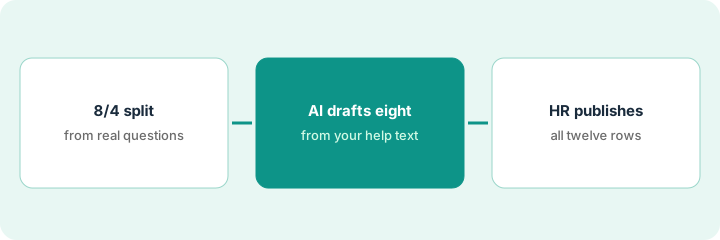
1. Step 1 — Build the 8/4 FAQ split
What it is: From real BambooHR onboarding questions (last cohort, eNPS comments, HR tickets), pick twelve — mark eight draft-eligible and four HR-owned.
- Draft-eligible (typical): how to upload I-9 (work-eligibility form) docs in BambooHR, where to find the org chart, how to update direct deposit navigation, where the employee handbook PDF lives, how to request time off in-product path, who to ask for laptop status, how to complete the training checklist, where benefits links appear in BambooHR.
- HR-owned (typical): state leave eligibility, accommodation process outcomes, visa/immigration steps, equity vesting narratives — leave Unknown in any AI draft.
- Pull questions from BambooHR workflows and your HR help inbox — not from a Rippling ticket export.
- Name HR publisher + optional counsel reviewer.
Eight draft-eligible from BambooHR navigation written procedures. Four HR-owned: parental leave eligibility by state, disability accommodation next steps, visa FAQ, equity cliff explanation. Sources: BambooHR onboarding checklist + HR inbox — not a multi-system mashup.
Sheet: Question | Source (BambooHR ticket # / written procedure) | Draft-eligible Y/N | Owner. Require twelve real rows. If you only have Rippling examples, stop — wrong system of record for this page.
2. Step 2 — AI-draft the eight from written procedure only
What it is: Draft answers grounded only in pasted BambooHR written procedure / help screenshots text you provide.
- Prompt: answer only from paste; if missing write Unknown; never invent statutory rules, premiums, or deadlines.
- Keep the four HR-owned rows as titles + Unknown only.
- Store drafts in an HR staging doc inside your BambooHR-adjacent wiki — not live on the careers site.
- Reject cross-product instructions (“in Rippling do X”) — employees on BambooHR should not see foreign system of record steps.
“Request time off” draft cites BambooHR time-off request clicks from written procedure. “Parental leave eligibility” stays Unknown + HR-owned. AI attempt to quote a California statute not in the written procedure is deleted.
Draft the eight only. Paste written procedure under each. Delete any sentence without a source highlight. Leave four Unknowns untouched by AI prose.
3. Step 3 — HR owns publish on all twelve
What it is: HR publishes cleared rows into the BambooHR-facing onboarding FAQ; AI never goes live alone.
- HR edits and initials each of the eight.
- HR/counsel clears or keeps unpublished the four sensitive rows.
- Date-stamp; revisit after the next BambooHR onboarding cohort.
- Do not spin up Gusto or Rippling AI to publish a parallel FAQ for the same BambooHR company.
Eight navigation FAQs live in the BambooHR onboarding resources page with “Reviewed: People ops · Oct 11, 2026.” Four sensitive rows unpublished. No parallel Rippling FAQ pilot for the same workforce.
Publish checklist: BambooHR URL | Initials | Source written procedure | Cohort date. No initials → stays staging.
Pricing context (October 2026)
This how-to is not a price sheet. Plan notes live on BambooHR AI. Recheck bamboohr.com/pricing and your BambooHR admin before you budget. Related paths: Gusto AI, Workday AI. Dated October 2026.
Checked Oct 11, 2026 on the vendor’s own pricing page: BambooHR’s pricing page lists Core at $10, Pro at $17 and Elite at $25 USD per employee per month (marked with an asterisk, with a Get Quote button and automatic volume discounts). Core lists an AI Assistant for HR data questions; Pro lists an upgraded assistant that can answer from company policies and documents.
Uncertainty: BambooHR AI-labeled features vary by plan and rollout. If an invoice and a review disagree, trust the invoice. Do not paste a marketing list price you did not pay. The only prices this site sells here are the optional $9 AI toolkit spreadsheet and $19 AI toolkit audit.
When this helps (honest take)
Useful when BambooHR is HR system of record, you have twelve real onboarding questions, and HR owns publish.
Not useful when Rippling or Workday is the real system of record, you want AI legal answers, or there is no HR reviewer.
Related options (educational)
| Need | Where to look | Why |
|---|---|---|
| BambooHR AI | BambooHR AI | Primary path — BambooHR system of record |
| Gusto payroll FAQ flags | Gusto AI | When Gusto is system of record |
| Workday HCM pilot | Workday AI | When Workday is HCM system of record |
| People stack map | Stack map for people ops | Job | Tool | Owner |
| Before another seat | Three checks before an AI seat · Find unused AI seats | Live how-tos |
Related reviews: BambooHR AI · Gusto AI · Workday AI. Free: seat-waste calculator if multiple HR AI seats draft the same onboarding FAQ.
FAQ
Is this legal or payroll advice?
No. It is an ops drafting split for BambooHR-sourced FAQs. Sensitive rows need HR/counsel.
Can we reuse a Rippling FAQ draft in BambooHR?
Not as-is. Navigation, modules, and system of record differ. Rebuild from BambooHR written procedures.
Where do dated prices live?
On the BambooHR AI review plus the vendor site. This October 2026 how-to does not invent list prices. Our Oct 11, 2026 check of the vendor’s own pricing page is summarized in the pricing section above.
Which BambooHR plan answers questions from our policies?
On Oct 11, 2026 BambooHR’s pricing page said the Pro plan’s assistant can answer from policies, handbooks and benefits documents, while Core answers HR data questions. Either way, the four HR-owned rows in this routine stay human.
Optional next step
Free reviews stay free. Neither offer is required to use this page. If BambooHR and another HR AI seat already draft the same onboarding FAQ, optional help: $9 AI toolkit spreadsheet or $19 AI toolkit audit when you want a written memo.