Ops · Internal tools · UI mocks
v0 review (Sep 2026): internal UI mocks ops can hand to eng
Fast UI mocks for internal tools — not a product rebuild; handoff to eng. Use v0 to sketch a vendor approval queue, detail drawer, and audit tab so engineering gets a concrete desktop target instead of a vague Slack thread.
Who this page helps
Ops leads on small teams who need internal tool UIs — approval queues, intake screens, audit tabs — and want a desktop mock eng can react to before anyone rebuilds a product. If you need a live multi-user app on production data tomorrow, start with Retool AI or your existing builder instead of treating v0 as the whole stack.
What v0 is
v0 (by Vercel) is an AI UI generator: you describe an interface, iterate in chat, and get React/Tailwind-style components and previews. The useful ops pattern is mock → harden-list → eng, not “ship finance approvals from the chat.” This review focuses on that handoff job for internal tools.

Major features (with how someone uses them)
Examples at a glance: each feature has a concrete ops example plus a Try this mini-workflow.
1. Prompt-to-UI mocks
What it is: Describe a desktop internal screen and get a first-pass layout — filters, tables, drawers, tabs — you can click through in preview. Best when you constrain scope: one job, desktop only, no invented backend.
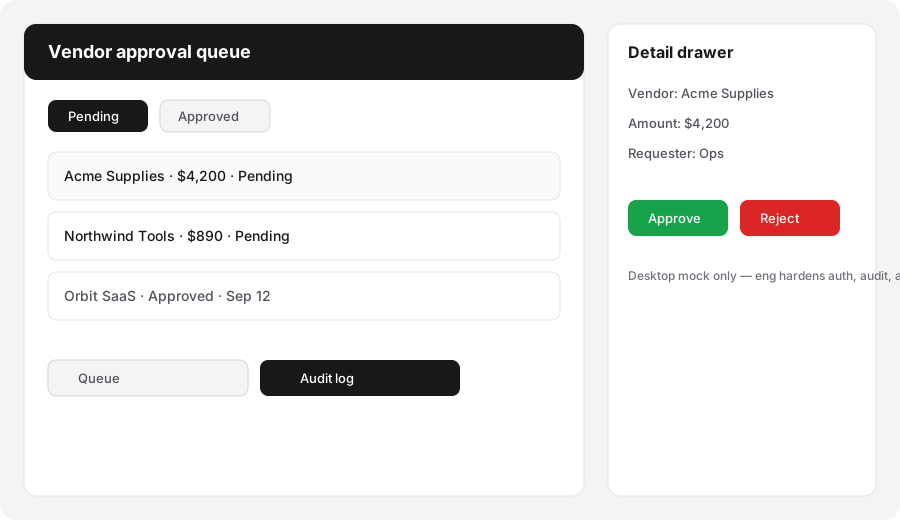
In v0 (desktop scope only):
Generate a simple internal UI mock: vendor approval queue with filters (pending/approved), detail drawer, and audit log tab. Desktop only. List components eng must harden.
2. Iterate components for handoff
What it is: Follow-up prompts refine layout, empty states, and component boundaries. The ops win is a shared visual + a bullet list of what eng must own (auth, RBAC, writebacks, audit integrity) — not pixel-perfect production code from chat alone.
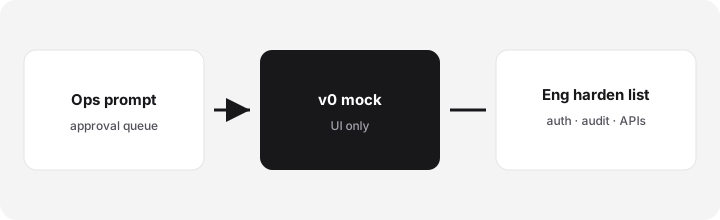
After the first mock:
Split this screen into named components (queue table, filter bar, detail drawer, audit log tab). For each, list what eng must harden before production: auth, permissions, data source, and audit rules. Do not invent APIs that do not exist.
3. Export & deploy context
What it is: Public v0 packaging emphasizes generation, Git sync, and deploy paths into the Vercel ecosystem. Hosting and production auth are separate concerns. For ops, treat deploy as optional demo hosting — not a substitute for your internal app platform.
Before calling a mock “done”:
Write a 5-bullet handoff note: who can see the preview, what data is fake, which three clicks must work in the mock, and which systems eng will wire later. Mark anything production-looking but unsafe as Demo only.
4. Credits & model tiers
What it is: Public v0 pricing (Sep 2026) meters generation with dollar-denominated monthly credits; model tiers (Mini / Pro / Max / Max Fast) burn at different token rates. Long chats and large outputs cost more. Name a credit owner before ops runs weekly mock sessions.
Before upgrading seats:
Estimate mocks per month and preferred model tier from v0.dev/pricing. If we cannot name a credit owner and a monthly ceiling, keep Free or one Plus seat for 30 days of handoff mocks only.
Public pricing (September 2026)
From public v0.dev/pricing we cross-checked in September 2026 (USD; tax may apply):
- Free: $0/month — about $5 included monthly credits; public packaging cites a daily message limit (commonly 7/day). Fine for learning and one proof mock.
- Plus: about $30 / user / month — about $30 monthly credits per user plus daily login credits; team sharing / centralized billing on Vercel.
- Business: about $100 / user / month — similar credit shape to Plus with training opt-out and admin controls (confirm live).
- Enterprise: custom — SSO, RBAC, SLAs, training exclusions.
- Model token rates: Mini / Pro / Max / Max Fast publish different $/1M input and output rates — Max Fast burns faster than Mini for the same chat.
Uncertainty flags: Plan names, credit pools, daily bonuses, and which models are included move. Vercel hosting is separate from v0 credits. Never budget from this page alone — open v0.dev/pricing for your account.
When v0 is useful (honest take)
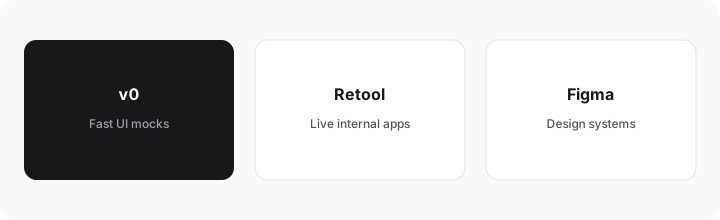
v0 tends to help when ops needs a fast desktop UI mock to align finance/eng, the job is one screen family (queue + drawer + audit), and eng will harden auth and data. It tends not to help when you treat the chat output as production, when you need live multi-user apps on company data (prefer Retool or similar), or when design-system fidelity in Figma is the real bottleneck. Buying v0 seats to “replace” an internal tools platform is usually the wrong framing.
Paying for v0 and a few other AI tools? The $9 AI toolkit spreadsheet lists every AI subscription you have, what each one costs, and how fast it pays for itself, so you can see which ones are worth the money.
Want someone to do it for you? AI toolkit audit — $19
Alternatives compared: mock vs build vs design
| Axis | v0 | Retool AI | Figma | Sheets + sketch |
|---|---|---|---|---|
| Best when… | Need a fast UI mock + harden list. | Need a live internal app on your data. | Need design-system fidelity. | One-off wireframe without more SaaS. |
| Cost shape (Sep 2026) | Free / Plus ~$30/user/mo credits. Confirm v0.dev/pricing. | Retool seats + AI credits (see Retool AI). | Figma seats; no codegen by default. | Near $0 tooling; human time is the cost. |
| Less useful when… | You need production auth tomorrow. | You only need a throwaway mock. | You need clickable React previews fast. | You need multi-role UI prototypes. |
Also see Retool AI, Cursor, Claude Artifacts, and the ops & automation hub.
FAQ
What is v0?
v0 by Vercel is an AI UI generator for interface mocks and components — useful as an eng handoff artifact, not a full internal-tools platform by itself.
How much does v0 cost in September 2026?
Public packaging lists Free (~$5 credits), Plus ~$30/user/month, Business ~$100/user/month, and Enterprise custom. Confirm on v0.dev/pricing — model tiers burn credits at different rates.
Should ops use v0 instead of Retool?
Different stages: v0 for mocks/handoff; Retool (or similar) for live multi-user apps. Many teams use both in sequence.
Is a v0 mock production-ready?
Usually no. Eng still owns auth, audit integrity, permissions, and real writebacks.
Optional next step (if seats overlap)
If v0 is one of several AI seats and you want a written pass across the whole list, the optional $19 AI toolkit audit produces a short memo. Prefer an editable grid? The $9 AI toolkit spreadsheet is a one-time CSV. Soft offer only — this deep-dive stands alone.
Checkout is live via Stripe. After you pay, we email delivery (spreadsheet) or intake next steps (audit).