Tool · Finance · Accounts payable + approvals · Oct 2026
Stampli review (Oct 2026): Billy the Bot for AP invoice coding and approvals
Stampli is accounts payable and procure-to-pay software that sits on top of your ERP. Its AI — Billy, which Stampli’s blog calls Billy the Bot™ — captures invoices, suggests GL coding, predicts approvers, matches POs, and flags duplicates, all on an invoice page where every comment and approval stays attached. Stampli says every suggestion is reviewed by a person before it posts. This page walks through each part with a real AP task, a Try this, and where AP, approvers, and the controller stay in charge.
What this Stampli page covers
This page is for AP managers, controllers, and finance ops leads at mid-size companies with many invoices, many approvers, and an ERP they don’t want to replace. The question it answers: what does Billy actually do on an invoice, how do you check it, and where do people still have to approve?
Company (checked 6 October 2026): Stampli, Inc. was founded in 2015 by Eyal Feldman and Ofer Feldman and is based in Mountain View, California. Its company information page says it has raised $148 million, most recently a Series D led by Blackstone in October 2023. It started with AP automation and now sells a procure-to-pay platform: procurement, accounts payable, vendor management, payments, Stampli Card, and Deep Finance. Your ERP stays the system of record; Stampli lists integrations with NetSuite, Sage Intacct, Microsoft Dynamics, SAP, Oracle Fusion, Acumatica, QuickBooks, and others. These are Stampli’s statements.
About the name: Stampli’s current product pages call the AI “Billy” or “Stampli AI”; its blog and older materials use “Billy the Bot™.” Same assistant.
Who decides: Stampli says its AI “always operates under human oversight” and that all suggested entries remain subject to human review and approval before posting to the ERP. AP reviews the coding, approvers approve the invoice, and a person releases the payment. Everything below comes from Stampli’s own pages as we read them on 6 October 2026.
Major features (with how someone uses them)
Examples at a glance: each feature has a concrete example from a real job plus a short Try this you can run this week.
1. Invoice capture and Billy’s GL coding (primary)
What it is: Invoices arrive by email, upload, or the vendor portal. Billy reads the invoice — vendor, number, date, line items, tax, total — and suggests coding line by line: GL accounts, departments, and custom dimensions learned from your past coding and your ERP. For PO invoices it pulls coding from the PO; for non-PO invoices it picks the cost center and expense type. When it isn’t sure, it flags the field for AP to verify. Stampli says that in April 2026 its AI made suggestions on 87% of the invoice fields it evaluated and was correct 92% of the time when it did — Stampli’s own measurement, with every suggestion reviewed before posting.
Billy learns from your history, so test it on invoices it hasn’t already seen coded — in a pilot or sandbox — or the comparison will look better than real life.
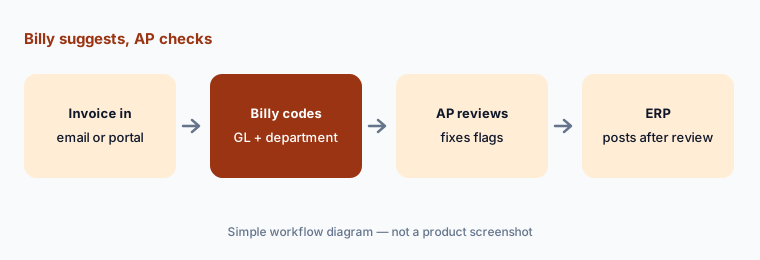
Primary workflow:
Feed ten past invoices. Compare Billy’s GL coding to what you actually booked. Count the corrections.
2. Approver prediction and routing
What it is: Stampli routes each invoice through approval workflows you configure, with reminders and mobile approvals. Billy learns your approval patterns and starts suggesting approvers after a few invoices — Stampli’s example is learning that the IT director signs off on software. Comments, documents, and approvals stay on the invoice, so the history is there at audit time. A suggested approver is a guess from history; your approval policy is the rule.
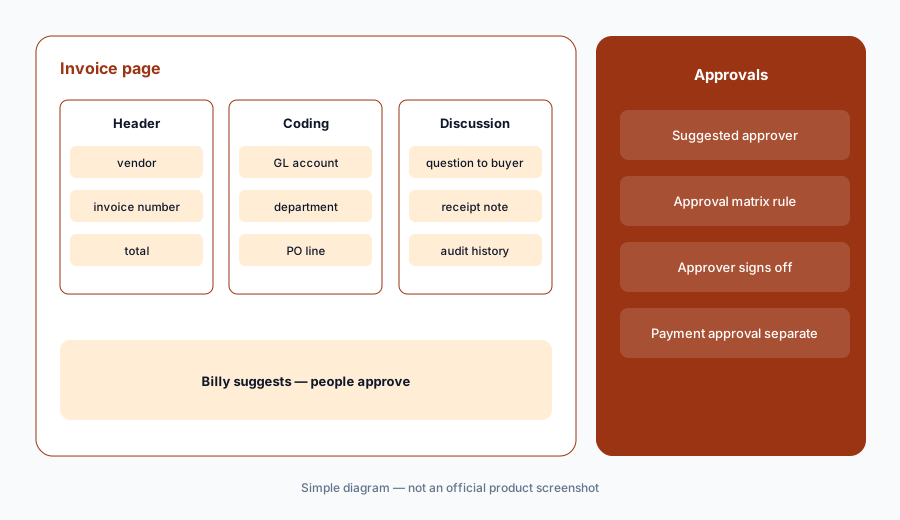
Check against policy:
Pull twenty recent invoices. Compare each suggested approver to your written approval matrix, and turn every mismatch into a fixed workflow rule.
3. Line-level PO and receipt matching
What it is: Stampli matches invoices to POs and receipts at the line level, with 2- and 3-way matching. When details don’t match, Billy flags the discrepancy for AP; when items are received or missing, teams are notified. The documents and the discussion stay on the invoice so the fix happens in one place. Stampli’s pricing page lists semi-automated 2–3 way matching as included and “full automation by Billy” as available.
Partial receipts:
Pick ten PO invoices where only part of the order was received. Check that each one was flagged, and note who decided to pay, hold, or short-pay.
4. Duplicates, vendor checks, and sensitive changes
What it is: Billy flags likely duplicate invoices and validates vendors and required fields. Stampli says its AI verifies vendor email integrity to help prevent fraud and tracks document expirations. In Vendor Management, vendors submit W-9s, banking details, and insurance through a portal; sensitive changes such as bank details are routed through approval, with a record of who submitted, reviewed, and approved them. Stampli can block invoices or payments when required documents are missing or expired. Stampli’s phrase is “self-service, not self-approval.”
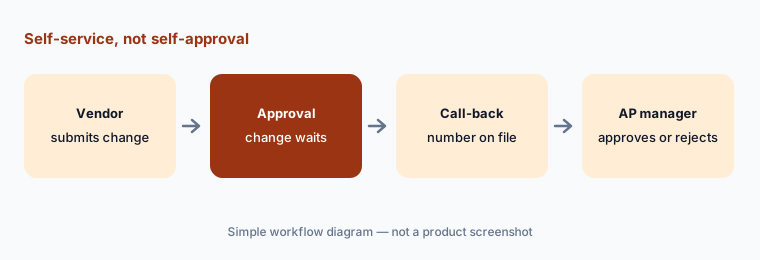
Test the bank-change path:
With a test vendor, submit a bank-detail change through the portal. Confirm it waits for approval, see who gets it, and write the call-back step into your procedure.
5. Direct Pay and payment approvals
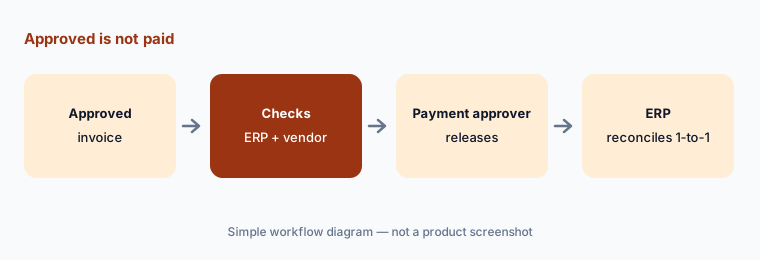
What it is: Stampli Direct Pay carries the approved invoice into payment by ACH, paper check, virtual card, or supported international methods. Before a payment is released, it checks ERP status, vendor readiness, and required controls. Payment approvals are configured separately from invoice approvals to keep segregation of duties, and each payment reconciles one-to-one back to the ERP. An approved invoice is not a released payment — a person still releases it.
Who can do what:
List everyone who can edit vendor bank details, approve invoices, and release payments. Make sure no single person can do all three.
6. Deep Finance for finance leaders
What it is: Stampli Deep Finance™ answers finance leaders’ questions about the data already in Stampli — invoices, approvals, vendors, payments, cards — with focused analyses that point out patterns, anomalies, and follow-ups. Stampli says it is not the same AI as Billy: Billy works the invoice, while Deep Finance helps explain what the data shows. Stampli also says it complements ERP reporting and the month-end close rather than replacing them.
Trace before you share:
Ask Deep Finance one question you would bring to a leadership meeting. Open the invoices behind its top two findings before you repeat either one.
Pricing context (October 2026)
Stampli does not publish prices. Its pricing page (checked 6 October 2026) has a “Request a Quote” form and a feature table with no figures. For accounts payable it lists unlimited entities/locations and vendors, semi-automated 2–3 way matching included with full automation by Billy available, 12 pre-built reports and dashboards, a dedicated customer success manager, onboarding, team training, and support. Beyond AP it lists Stampli Procurement, Direct Pay, Stampli Card, and Advanced Vendor Management; the table marks part of the payments and card offering “Free for Stampli customers” without saying exactly which charges that covers.
Stampli’s company information page directs buyers to stampli.com/contact to get started.
Uncertainty: With no public prices, budget from a written quote that names the modules (AP, Procurement, Direct Pay, Card, Vendor Management, Deep Finance), whether “full automation by Billy” is included, and any payment or card fees. Stampli’s accuracy figures are its own; measure Billy on your invoices during a pilot.
When it’s useful (honest take)
Useful when you process many invoices across entities, locations, or approvers, coding and chasing approvals take most of AP’s week, and you want to keep your ERP. Useful too when invoice questions currently live in email threads, because Stampli keeps the discussion on the invoice.
Less useful when you pay a few dozen bills a month — lighter bill-pay tools may be enough — or you already run AP inside a spend suite. Less useful if anyone expects Billy to approve spend: AP checks the coding, approvers approve, and a person releases every payment.
Paying for Stampli and a few other AI tools? The $9 AI toolkit spreadsheet lists every AI subscription you have, what each one costs, and how fast it pays for itself, so you can see which ones are worth the money.
Want someone to do it for you? AI toolkit audit — $19
Related options (educational)
| Need | Better home | Why |
|---|---|---|
| Invoice coding, approvals, and PO matching on top of your ERP | Stampli (this page) | Billy suggests; people review and approve |
| Bill pay for small and mid-size businesses | BILL | Lighter AP with payments |
| Global payables and supplier payments | Tipalti AI | Multi-currency, tax forms, mass payouts |
| Cards, bill pay, and expenses together | Ramp | Spend platform outside a suite |
| Full spend suite with sourcing and procurement | Coupa Navi | Larger P2P programs |
| Month-end close after AP | Numeric or FloQast AI | Reconciliations and flux |
FAQ
Does Billy approve invoices or release payments on its own?
No. Stampli says all AI suggestions remain subject to human review and approval before posting to the ERP. Approvers approve invoices in your workflow, and payment approvals are configured separately so a person releases each payment.
How much does Stampli cost in October 2026?
Stampli does not publish prices. On 6 October 2026 its pricing page had a “Request a Quote” form and a feature table with no figures. Contact Stampli for a quote.
Is Billy the Bot the same as Stampli AI?
Yes. Stampli’s blog calls its AI assistant Billy the Bot™; its current product pages call it Billy or Stampli AI. Deep Finance is a separate analysis feature.
Which ERPs does Stampli work with?
Stampli lists NetSuite, Sage Intacct, Sage 100, Microsoft Dynamics 365 Business Central and Finance, Dynamics GP, SAP ECC and S/4HANA, Oracle Fusion, Acumatica, Dealertrack, and QuickBooks Online and Desktop. Confirm your ERP version in the demo.
How do I test Billy’s coding fairly?
Use invoices Billy hasn’t already learned from, in a pilot or sandbox, and compare its coding with what you booked. Count corrections by type (account, department, prepaid versus expense) so you know which invoices still need manual review.
Optional next step (if seats overlap)
If you pay for Stampli, AP features in your ERP or spend platform, and a separate bill-pay tool — and more than one codes or routes the same invoices — that overlap is worth a look. Map the overlap with the $19 AI toolkit audit or the $9 AI toolkit spreadsheet. Email Audit $19 or Toolkit spreadsheet $9.
Checkout is live via Stripe. After you pay, we email delivery (spreadsheet) or intake next steps (audit).