How-to · Accounts payable · Stampli · Oct 12, 2026
Move invoice questions into Stampli instead of email threads
"Is this coded right?" "Who approves this?" "Did we get the goods?" When those questions live in email, the answer is gone by audit time and the invoice sits. This page shows an accounts payable team how to ask them on the invoice itself in Stampli, route them to the right person, and close each one before the invoice moves on.
Who this is for
Accounts payable managers and accounts payable clerks at companies that already process invoices in Stampli, where approvers still answer questions by email or chat. If your accounts payable process is mostly card spend, see the Ramp digest before close instead.
How to do it
This is a how-to, not a ranking of accounts payable tools. Feature detail lives on the Stampli review. Stampli keeps comments, documents, and approvals on the invoice; this pattern makes that the only place questions get asked.

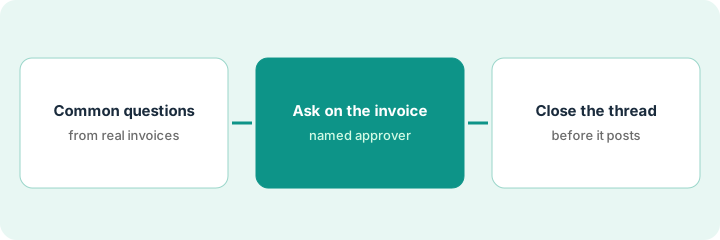
1. Step 1 — List the questions that keep coming up
What it is: Most accounts payable questions are the same handful. Writing them down lets you ask them the same way every time.
- Search the accounts payable inbox for the last month and sort the questions into types. Common ones: coding, approver, receipt of goods, vendor details, duplicate.
- Count each type. The top three are the ones to move first.
- For coding questions, note whether Billy (Stampli's AI) flagged the field as uncertain. Flagged fields are where questions should start.
- Write one standard wording for each type.
A month of accounts payable email shows 62 invoice questions. 28 are "which location does this belong to," 15 are "who approves this," and 9 are "did we receive this." Those three types become standard questions.
Make a short list: Question type | Count last month | Standard wording | Who usually answers.
2. Step 2 — Ask on the invoice, routed to a named approver
What it is: Ask the question as a comment on the invoice in Stampli and mention the person who can answer, so the question, the answer, and the approval all stay together.
- Use the standard wording from Step 1 and mention one person by name.
- If Billy suggests an approver, check it against your written approval matrix before routing. A suggested approver is a guess from history; the matrix is the rule.
- For amounts that always need a specific approver, set a fixed workflow rule instead of relying on a suggestion.
- Tell approvers once, in writing, that invoice questions now arrive in Stampli, not email.
Billy suggests the department head for a large marketing invoice. The matrix says invoices above the company's set amount also need the CFO. The accounts payable clerk adds the CFO, and the controller adds a fixed rule for that amount so it doesn't depend on a suggestion again.
Comment template: "@[name], [standard question]. Needed to [code / approve / pay] by [date]."
3. Step 3 — Close the question before the invoice moves
What it is: An invoice with an open question doesn't move to payment. When the answer comes back, the person who asked confirms it and closes the loop on the invoice.
- Accounts payable doesn't approve or schedule payment while a question on the invoice is unanswered.
- When the answer arrives, accounts payable updates the coding or routing and replies on the invoice confirming what changed.
- If an approver answers by email anyway, accounts payable pastes the answer onto the invoice and replies once, pointing to Stampli.
- Each week, list invoices with questions open more than three days and follow up by name.
The regional manager answers "Denver office" on a facilities invoice. The accounts payable clerk updates the location, replies "Coded to Denver, thanks," and the invoice moves to approval. At audit, the question and answer sit on the invoice next to the approval.
Add a weekly accounts payable task: "Invoices with open questions over 3 days: [list]. Followed up with: [names]."
Pricing context (October 2026)
This how-to isn't a price sheet. When we checked on 6 October 2026, Stampli's pricing page had a request-a-quote form and a feature table with no figures. Packaging notes live on the Stampli review. Ask Stampli for a written quote. Dated October 2026.
Checked Oct 12, 2026 on the vendor’s own pricing page: Stampli shows no public list price. Stampli’s pricing page routes to talk-to-sales / quote rather than published figures. This page quotes no Stampli dollar amount; ask Stampli for a written quote.
Uncertainty: Stampli's published accuracy figures for Billy are its own measurement. Test on your own invoices before relying on them. The only prices this site sells here are the optional $9 AI toolkit spreadsheet and $19 AI toolkit audit.
When this helps (honest take)
Useful when Stampli is your accounts payable system, invoices regularly wait on answers buried in email, and auditors ask for the history behind approvals.
Not useful when approvers won't log in to Stampli at all. Fix that with a short training and a clear rule first, or the questions will move back to email.
Related options (educational)
| Need | Where to look | Why |
|---|---|---|
| Stampli features | Stampli | Primary path on this page |
| Finance ops stack | Stack map for finance ops | Job, tool, and owner in one view |
| Close basics | Close checklist from your books · Ramp digest before close | Live how-tos |
| Before another seat | Three checks before an AI seat | Live how-to |
Free: seat-waste calculator if another accounts payable or chat tool is also handling invoice questions.
FAQ
Does Billy approve invoices on its own?
No. It suggests coding and approvers. Approval follows your workflow and your people.
What if an approver keeps answering by email?
Paste the answer onto the invoice and reply once pointing to Stampli. After a few rounds most approvers switch.
Where do current prices live?
With Stampli. The Stampli review notes what its pricing page showed. This page doesn't invent prices. Our Oct 12, 2026 check of the vendor’s own pricing page is summarized in the pricing section above.
Why not keep asking in email?
Email threads leave the invoice. On-invoice questions keep the answer next to the document the approver is signing.
Optional next step
Free reviews stay free. If Stampli, a shared accounts payable inbox tool, and a chat channel all hold invoice questions, the $9 AI toolkit spreadsheet helps you lay them out, or the $19 AI toolkit audit gets you a written memo.