How-to · Finance · Ramp · Oct 6, 2026
Use Ramp’s AI to cut one close chore — without inventing amounts
“Cut one close chore” means AI helps you review or code expenses you already captured in Ramp — not invent dollar amounts or book journal entries on its own. A human still confirms against the ledger.
Who this is for
Finance ops teams already on Ramp (cards, bills, or expenses) who want AI help with reviews, coding, or reporting during close week. If your books live in another system and Ramp is only a partial card feed, say so — Ramp cannot invent a full general ledger. If you are on Brex instead, use the Brex AI review with the same rules.
How to do it
This page is a how-to. It is not a ranking of spend platforms. Product detail and dated pricing live on the reviews linked below.

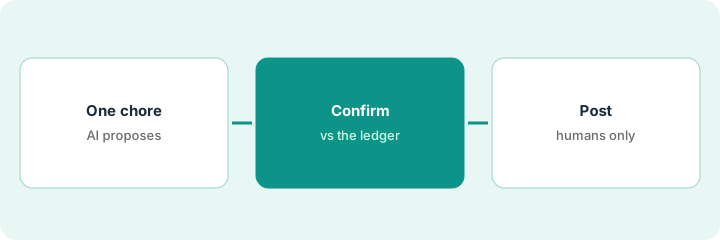
1. Step 1 — Pick one close chore
What it is: Choose one close chore for AI help this cycle — not every report at once.
- Examples: flag missing receipts, propose categories for a batch, or draft a variance narrative from exports you already pulled.
- Prefer chores where Ramp already holds the transactions.
- Write the chore in one sentence: “AI proposes; a human confirms; the books stay in QuickBooks, NetSuite, or wherever they live.”
- Skip chores that require inventing accruals or cash balances Ramp does not know.
Job: “Propose categories for last week’s uncoded small card charges.” Not: “Estimate this month’s accrual for vendors we might owe.”
Write one close chore on a sticky with three columns: AI may propose / a human must confirm / AI must never touch. Continue only if “never touch” includes amounts not in Ramp and all ledger postings.
2. Step 2 — Confirm every figure against the ledger
What it is: Treat Ramp’s AI expense reviews, coding suggestions, and report drafts as proposals. Every number that will reach leadership must match a Ramp export or the general ledger.
- Spot-check a sample of coded expenses against receipts and merchants.
- If AI suggests a category with no support, leave it uncoded or Unknown until a human decides.
- Do not paste AI-written totals into the board deck.
- Which AI features you have depends on your Ramp plan — confirm on the Ramp review and in your account (see the pricing note below).
AI proposes “Software” for twelve charges. Two are actually ads. A human flips those two. The software subtotal in the memo is rebuilt from the corrected export — not left as the first AI sentence.
After one AI-assisted batch, pick ten lines at random. Confirm merchant, amount, and category in Ramp. If two or more are wrong, stop expanding until you fix the rule or the sampling process.
3. Step 3 — Leave postings to humans
What it is: Journal entries, reconciliations, and “mark closed” stay with people (and your accounting system), even when Ramp’s AI drafts a checklist or narrative.
- Export or sync using your normal Ramp → books path.
- Post only what a human approved.
- File the AI draft next to the working papers as a helper — not as the signed-off close.
AI drafts “travel was up because of the offsite.” A human checks the travel account and Ramp’s travel category: the offsite is real, but one miscoded flight gets fixed first. The narrative goes out after the fix, and its amounts match the ledger.
Add a close checklist line: “No AI-only amounts in the memo.” Initial it when the memo figures match the export or ledger. If they do not match, rewrite — do not invent a bridge.
Pricing context (October 2026)
This how-to is not a price sheet. Plan detail for Ramp and Brex AI lives on those reviews. Recheck each vendor’s site before you budget. Dated October 2026.
Checked Oct 6, 2026 on the vendor’s own pricing page: ramp.com/pricing lists Free at $0 per user per month and Plus at $15 per user per month plus a platform fee based on team size (with a discount for annual billing). Ramp lists AI-driven expense reviews, AI coding for every field, and auto-coded bill line items on Plus. Brex prices were not rechecked for this page — see the review and Brex’s site.
Uncertainty: Free vs paid packaging, AI feature gates, platform fees, and accounting integrations change. If an invoice and a review disagree, trust the invoice. Do not paste a marketing list price you did not pay. The only prices this site sells here are the optional $9 AI toolkit spreadsheet and $19 AI toolkit audit.
When this helps (honest take)
Useful when Ramp (or Brex) already captures the spend, someone will sample AI coding, and postings stay human.
Not useful when you want the model to invent accruals, cash, or board totals — or when a spreadsheet plus a general chat tool is enough for narrative drafts from exports you already trust.
Related options (educational)
| Need | Where to look | Why |
|---|---|---|
| Ramp cards, bills, AI reviews and coding | Ramp | Primary path on this page |
| Already on Brex | Brex AI | Same rule: proposing is not posting |
| Close checklist from your books | Claude for finance | Different tool; still no invented figures |
| Finance stack inventory | Stack map — finance ops | Job, tool, owner, and cost map |
Related reviews: Ramp · Brex AI · Claude for finance · Expensify AI. Related how-to: Get a close checklist that answers from your books. Free: seat-waste calculator · payback calculator.
FAQ
Can Ramp’s AI fill in an amount if a receipt is missing?
Do not let it. Missing support stays Unknown or uncoded until a human decides. Do not invent dollars for the memo.
Should AI post to the general ledger?
Not on this page. AI proposes and drafts; humans post through your normal controls.
Ramp or Brex for this how-to?
Use the platform you already run. The steps follow the same pattern on both reviews.
Where do dated prices live?
On the linked reviews and the vendor sites. This October 2026 how-to only repeats prices we checked on the vendor’s own pricing page on Oct 6, 2026.
Optional next step
Free reviews stay free. Neither offer is required to use this page. Optional help when finance AI seats overlap: $9 AI toolkit spreadsheet or $19 AI toolkit audit.