How-to · Finance · Tipalti AI · Oct 11, 2026
Outline a Tipalti payee pilot with human pay gates
A “payee pilot” here means a bounded Tipalti onboarding experiment where AI may draft payee fields, but payouts stay human-gated. This is not tax, sanctions, or payments advice. Terms: ERP means enterprise resource planning, the core finance and operations system.
Who this is for
Finance ops whose payee/payout home is already Tipalti (or who are piloting Tipalti) and need explicit human pay gates beside any AI field assists. If BILL is the accounts payable invoice home, see BILL AI. If NetSuite is ERP system of record for controller gates, see NetSuite AI.
How to do it
This page is a how-to. It is not a ranking of payout AI products. Product detail and dated packaging notes live on Tipalti AI. Confirm AI and payee features on your Tipalti contract before you pilot.

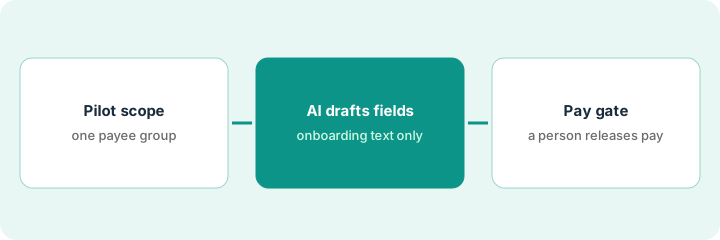
1. Step 1 — Set pilot scope
What it is: Bound the pilot so “AI for payees” cannot silently become “AI for payments.”
- Pick payee segment (e.g. new US contractors only) and a time box (e.g. two weeks).
- Cap volume (e.g. first 20 payees).
- Name finance owner + compliance reviewer.
- Explicit non-goals: no auto-pay, no AI-approved tax form conclusions, no skipping sanctions/KYC (know-your-customer identity checks) process you already require.
Pilot: 20 new US 1099 (US contractor tax form) contractors, Oct 11–25. Owner: accounts payable lead. Compliance: finance manager. Non-goals posted in the pilot doc. International payees excluded from week one.
One-pager: Segment | Cap | Dates | Owner | Non-goals. If any field is blank, do not start AI drafting.
2. Step 2 — Allow AI draft fields only
What it is: AI may propose non-authoritative field drafts from payee-supplied documents you already collected — humans correct before save.
- Draft-ok examples: address formatting, clearing incomplete optional fields flagged as Unknown, summarizing uploaded questionnaire text into notes.
- Never-ok examples: inventing bank details, tax classification, or entity type the payee did not provide.
- Store drafts in a review queue — not live pay-ready status.
- Prompt rule: if missing, write Unknown — do not guess international bank account (IBAN) or routing numbers.
AI drafts a normalized mailing address from a PDF and flags tax classification Unknown. Human enters classification from the signed form. AI attempt to “infer” LLC vs individual from an email signature is rejected.
For five sample payees, list fields AI may touch. Any bank or tax field = human-only. Reject drafts that fill Unknowns with guesses.
3. Step 3 — Keep the pay gate human
What it is: Payment release uses your existing Tipalti approval chain — AI is not an approver.
- Payee reaches payable only after human verification checklist.
- First payment on a new payee requires named approver (threshold per your policy).
- Log pilot misses (bad drafts caught in review).
- Do not parallel-run BILL AI pay gates for the same Tipalti payees unless jobs truly differ.
Checklist: ID docs present | Tax form reviewed | Bank details entered by human | Sanctions process per policy | Approver initials. AI draft notes never flip status to payable alone. First payment dual-approved.
Pilot exit review: count payees where AI draft saved time without a field error. If field error rate is above your bar, keep AI off or narrow draft-ok fields.
Pricing context (October 2026)
This how-to is not a price sheet. Plan notes live on Tipalti AI. Recheck tipalti.com pricing and your Tipalti account team before you budget. Related paths: BILL AI, NetSuite AI. Dated October 2026.
Checked Oct 11, 2026 on the vendor’s own pricing page: Tipalti’s pricing page lists Tipalti Accounts Payable with plans starting at $99 per month and Tipalti Mass Payments (global payouts) with plans starting at $249 per month, both with unlimited users, plus per-transaction fees and a custom quote from sales. It says mid-market and enterprise companies get custom pricing.
Uncertainty: Tipalti modules and AI-labeled assists are contract-specific. If an invoice and a review disagree, trust the invoice. Do not paste a marketing list price you did not pay. The only prices this site sells here are the optional $9 AI toolkit spreadsheet and $19 AI toolkit audit.
When this helps (honest take)
Useful when Tipalti is (or will be) payee system of record, scope is capped, and pay gates stay human.
Not useful when you want AI to approve payouts, tax classification is unclear and unowned, or compliance refuses a reviewer.
Related options (educational)
| Need | Where to look | Why |
|---|---|---|
| Tipalti payee / payout AI | Tipalti AI | Primary path on this page |
| BILL accounts payable exceptions | BILL AI | Invoice coding exceptions |
| NetSuite controller gates | NetSuite AI | ERP job split |
| Finance stack map | Stack map for finance ops | Job | Tool | Owner |
| Before another seat | Three checks before an AI seat · Find unused AI seats | Live how-tos |
Related reviews: Tipalti AI · BILL AI · NetSuite AI. Free: seat-waste calculator if multiple payout/accounts payable AI seats overlap.
FAQ
Can AI mark a payee payable?
No. Humans complete verification and approval. AI drafts fields only in this pattern.
Is this sanctions or tax advice?
No. Follow your existing compliance process and advisors. AI output is not advice.
Where do dated prices live?
On the Tipalti AI review plus your Tipalti commercial terms. This October 2026 how-to does not invent list prices. Our Oct 11, 2026 check of the vendor’s own pricing page is summarized in the pricing section above.
Which Tipalti product fits a payee pilot?
On Oct 11, 2026 Tipalti listed Mass Payments for paying large payee networks (creators, sellers, contractors) and Accounts Payable for supplier invoices. Ask sales which module your pilot needs before you scope it.
Optional next step
Free reviews stay free. Neither offer is required to use this page. If Tipalti and another finance AI seat already draft the same payee fields, optional help: $9 AI toolkit spreadsheet or $19 AI toolkit audit when you want a written memo.