How-to · Legal · Spellbook · Oct 19, 2026
Use Spellbook’s Market comparisons on one clause, and have the lawyer approve every redline in Word
Spellbook’s Market comparisons show how a clause compares to market language, and Review can propose redlines in Word. A persuasive redline still needs counsel. This page shows lawyer approval on every redline. Ironclad clause quote workflows are a different job.
Who this is for
Legal ops and counsel who already draft in Word with Spellbook. The job here is Market comparison plus lawyer approval on redlines — not Ironclad clause quotes.
How to do it
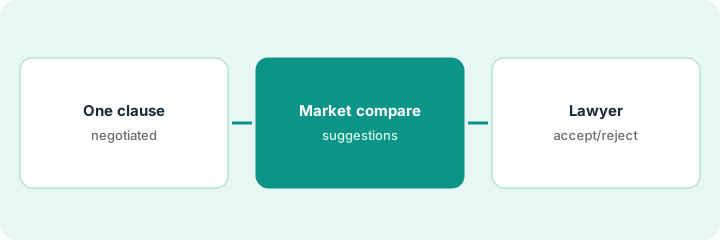
This is a how-to, not a ranking of CLM tools. Per the Spellbook AI review, Spellbook offers Market comparisons, Review redlines in Word, Draft and Ask, Associate, and Autonomous Contract Management as early access. The ground rule: no Market-inspired redline is sent until a lawyer accepts or rejects it in Word.
1. Pick one negotiated clause
What it is: Choose one clause you are actively negotiating, not an entire agreement on day one.
- Name the clause and the counterparty mark-up.
- Open the Word document Spellbook is linked to.
- Keep Autonomous Contract Management early access out of this routine.
- Write the fallback position counsel already approved.
- Limit the first run to that clause.
Counsel picks the liability cap clause in a vendor master services agreement currently in redlines.
Write the clause name and fallback position before you run Market.
2. Run Market comparison
What it is: Run Market on that clause, read the comparison, and draft candidate redlines without sending.
- Read how Market describes typical positions.
- Do not treat Market as your playbook — your playbook wins on conflicts.
- Draft redlines as suggestions only.
- Keep Ask/Draft helpers secondary on this first pass.
- Note anything Market cites that your industry treats differently.
Market suggests a mutual cap pattern. Counsel’s playbook requires a higher vendor-side cap for this deal type. Suggestions stay in Word as unaccepted revisions.
Run Market once and leave all redlines unaccepted.
3. Lawyer accepts or rejects each redline in Word
What it is: A lawyer walks every redline, accepts or rejects in Word, and only then returns the document.
- Accept/reject line by line.
- Reject anything that conflicts with the playbook.
- Record why key rejects happened for the deal file.
- Do not enable Autonomous Contract Management for unsupervised sends.
- Return the document only after the pass.
Counsel accepts two clarifying redlines, rejects the mutual-cap suggestion, and sends the Word file.
Lawyer clicks accept or reject on every redline before the file leaves.
Pricing context (October 2026)
This how-to isn’t a price sheet. Per the Spellbook AI review, Spellbook publishes no public list prices (checked Oct 19, 2026). Ask Spellbook for a quote. Dated October 2026.
Checked Oct 19, 2026 on the vendor’s own pricing page: Spellbook shows no public list price on Spellbook’s pricing page. This page quotes no Spellbook dollar figure; confirm what your contract includes with Spellbook or your admin.
Uncertainty: The only prices this site sells here are the optional $9 AI toolkit spreadsheet and $19 AI toolkit audit.
When this helps (honest take)
Useful when you negotiate in Word with Spellbook and counsel will approve every redline.
Not useful when you wanted unsupervised contract agents, or no lawyer will open the file.
Related options (educational)
| Need | Where to look | Why |
|---|---|---|
| Spellbook AI | Spellbook AI | Primary path |
| Juro AI Review | Juro AI Review playbook check | A different job (playbook review) |
| Ironclad clause quote | Ironclad clause quote | Related CLM pattern |
FAQ
Is Autonomous Contract Management included?
Per our review it is early access. This routine does not use it.
How much does Spellbook cost?
Spellbook publishes no public list prices we verified on Oct 19, 2026. Ask for a quote.
Optional next step
If you want a one-page toolkit map for the tools you already pay for, use the optional $9 AI toolkit spreadsheet. If you want a short review of seat waste and unused tools, use the optional $19 AI toolkit audit. Neither is required to follow this how-to.