How-to · Freight · Shipwell · Oct 22, 2026
Let Shipwell’s Document AI read BOLs and PODs, and have the freight manager approve every rate decision before a tender
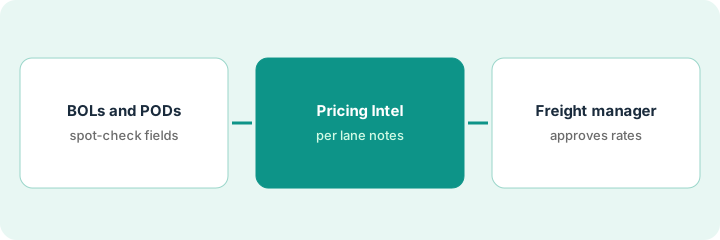
Shipwell’s Document AI reads freight paperwork in batches and shows a confidence value and page-level evidence for every field. Its Pricing Intelligence compares your contract rates with market rates and suggests repricing or switching carriers. This page shows how to spot-check extracted fields before billing and make the freight manager the person who approves every rate decision before a tender.
Who this is for
Freight managers, logistics coordinators, and transportation leads at shippers running Shipwell or choosing a TMS. The job here is paperwork extraction you can trust and rate decisions a named person owns. For asking ShipBob’s Bobby about stockouts and exception orders with the ops lead approving changes — a different job for ecommerce fulfillment, also MCP-capable — see ShipBob Bobby exception orders.
How to do it
This is a how-to, not a ranking of TMS products. Per the Shipwell AI review, Document AI identifies BOLs, PODs, freight invoices, and rate confirmations, extracts key fields with a confidence value and page-level evidence, and is sold standalone. The In-App AI Assistant (formerly shown as Swifty) answers questions and creates orders inside the TMS; the Track & Trace AI Worker chases carriers; the MCP Server gives approved AI tools access; and AI Studio holds worker settings with every action logged. Pricing Intelligence is described as decision support, and Shipwell’s page does not call it AI. Shipwell’s figures are its claims. The ground rule: a benchmark is an argument, not a decision, so the freight manager approves every rate decision before a tender.

1. Feed one week of BOLs and PODs and spot-check the fields that change an invoice
What it is: Weight, piece count, and consignee are the fields that change an invoice. Run one week of paperwork through Document AI and have the freight coordinator check those fields against the page image Shipwell shows.
- Upload one week of bills of lading and proofs of delivery in a batch.
- Check weight, piece count, and consignee on twenty documents against the page evidence.
- Correct wrong values in Shipwell so the correction stays on the document’s record.
- Note which document types or carriers produce low-confidence fields.
The coordinator runs 140 documents. On twenty spot-checks, eighteen are right; one handwritten POD has the wrong piece count and one BOL picked up the shipper as consignee. She corrects both and flags handwritten PODs for a full check.
Run one week of BOLs and PODs through Document AI and have the freight coordinator check weight, piece count, and consignee on twenty of them before invoicing.
2. Read Pricing Intelligence before the next tender
What it is: Compare market rates with your contract rates on your ten busiest lanes. Pricing Intelligence can suggest repricing, switching carriers, or negotiating spot rates; treat each suggestion as an argument to weigh.
- Pull your ten busiest lanes with current contract rates.
- Compare each with the market and prior-paid rates Pricing Intelligence shows.
- Note carrier performance next to price for each lane.
- Write one line per lane: hold, reprice, or switch, and why.
The transportation lead compares ten lanes. Market rates sit well below contract on three lanes and above on two. On one of the cheaper lanes, the current carrier has the best on-time record, so she writes hold with that reason.
Compare Pricing Intelligence’s market rates with your contract rates on your ten busiest lanes and write hold, reprice, or switch with a reason for each before the next tender.
3. The freight manager approves every rate decision and AI Studio settings are written down
What it is: The freight manager signs off before any repricing request, carrier switch, or spot negotiation goes out. Write down in AI Studio terms what each worker may change on its own.
- Send the lane notes from step 2 to the freight manager.
- Have the freight manager approve or reject each repricing request before it goes to a carrier.
- Write down which AI workers are on, what each may change, and who gets escalations.
- Set the Track & Trace AI Worker to request approval before updating shipment data at first.
The freight manager approves repricing on two lanes, rejects one switch because the carrier handles a key customer’s dock rules, and holds the rest. In AI Studio she records that the tracking worker requests approval before changing shipment data and reads the audit trail weekly for a month.
Have the freight manager approve every repricing request before it goes to a carrier, and write down which Shipwell AI workers are on and what each may change.
Pricing context (October 2026)
This how-to isn’t a price sheet. Per the Shipwell AI review, Shipwell publishes no prices: its pricing address sends you to a demo request and its FAQ says to contact sales for a customized quote. The review notes Document AI and the Track & Trace AI Worker can be bought standalone, the assistant is for TMS customers, and the MCP Server is for existing customers. Ask how Document AI usage is counted and whether rate data subscriptions are billed separately. Dated October 2026.
Checked Oct 22, 2026 on the vendor’s own site: Shipwell publishes no prices; shipwell.com/pricing sent us to its demo request form. This page quotes no Shipwell dollar figure; see our review for what is known and Shipwell’s own site before you budget.
Uncertainty: The only prices this site sells here are the optional $9 AI toolkit spreadsheet and $19 AI toolkit audit.
When this helps (honest take)
Useful when you handle a steady volume of freight paperwork, you tender regularly on repeat lanes, and a freight manager will sign off on every rate change.
Not useful when you ship a few loads a month, nobody will spot-check extracted fields, or you would let a market benchmark send repricing requests on its own.
Related options (educational)
| Need | Where to look | Why |
|---|---|---|
| TMS with document AI, tracking worker, and rate tools | Shipwell AI | Primary path; quote only |
| Stockouts and exception orders in outsourced fulfillment | ShipBob Bobby exception orders | A different job |
| Shipment visibility across carriers | project44 vs FourKites | Visibility, not a TMS |
| Execution agents with freight operators behind them | Loadsmart AI | Different model |
| Where logistics tools fit | Stack map: logistics ops | Broader map |
FAQ
Does Shipwell Document AI need the Shipwell TMS?
No. Per our review, Document AI is a standalone product with its own REST API and can also feed the TMS or AI tools through the MCP Server.
What happened to Swifty?
Swifty was the name shown for Shipwell’s assistant; the old page now redirects to Shipwell’s AI page, which calls it the In-App AI Assistant.
Is Pricing Intelligence AI?
Shipwell’s Pricing Intelligence page describes decision-support tools and does not call it AI. Either way, the freight manager approves each rate decision.
How much does Shipwell cost?
Shipwell publishes no prices; its pricing address goes to a demo request, so it is quote-only (checked Oct 22, 2026).
Optional next step
If you want a one-page toolkit map for the tools you already pay for, use the optional $9 AI toolkit spreadsheet. If you want a short review of seat waste and unused tools, use the optional $19 AI toolkit audit. Neither is required to follow this how-to.