How-to · Sales ops · Salesloft · Oct 12, 2026
Turn a Salesloft call into one next step and one CRM update
AI call summaries are long. Reps skim them, copy nothing into the CRM, and the deal goes quiet. This page shows a rep on Salesloft how to turn each call into exactly one next step and one CRM field update, both approved by the rep, both based on what the buyer actually said.
Who this is for
AEs and sales development rep who run calls and cadences in Salesloft, and sales managers who want deals to move after calls instead of stalling. This page is about the two minutes right after one call. For a full follow-up email, see Follow-up email from a call. For a meeting with many action items and owners, see Call to owners and dates. For coaching across many calls, see Gong coaching bullets.
How to do it
This is a how-to, not a ranking of sales tools. Feature detail lives on the Salesloft AI review. Whether your Salesloft plan records and summarizes calls depends on your package and your recording settings, so confirm with your admin. If it doesn't, the same steps work from the rep's own notes.
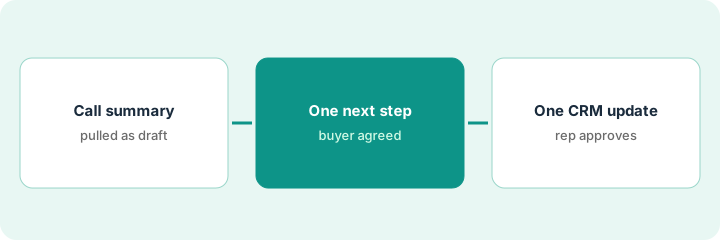
1. Step 1 — Pull the call summary
What it is: Start from what was said, in one place, within an hour of the call.
- Open the call summary in Salesloft if your plan has one. If not, write five lines of notes right after you hang up.
- Find the part where you and the buyer talked about what happens next. Usually it's the last few minutes.
- Copy the buyer's own words about the next step, word for word.
- If recording isn't allowed for this call, don't record. Notes are enough for this routine.
The summary runs 14 bullets. Near the end the buyer says, "If you can send the security documents, I'll get them to our IT lead this week." That's the line that matters.
Before you close the call page, write: "Buyer said about next steps: [exact words]."
2. Step 2 — Pick one next step the buyer agreed to
What it is: One next step, owned by one person, with a date the buyer agreed to or the rep chose and labeled as such.
- Pick the step the buyer agreed to, not the one you wish they'd agreed to.
- Write it with an owner and a date: "Rep sends security documents by Wednesday."
- If the buyer agreed to nothing, the next step is "Rep asks for a next step," and that goes in as a cadence task.
- If AI drafts the next step, check it against the buyer's words from Step 1. Delete anything the buyer didn't say, like a demo, a pricing call, or a decision date.
The AI suggests "Schedule technical demo with IT lead next week." The buyer never asked for a demo. The rep changes it to "Rep sends security documents by Wednesday; buyer forwards to IT lead," and adds a task in the Salesloft cadence for Wednesday.
Prompt: "From this call summary, write the single next step the buyer agreed to, with owner and date. Quote the buyer's line. If they agreed to nothing, say so."
3. Step 3 — Make one CRM update, rep approves
What it is: One field changes in the CRM after the call, and the rep is the one who saves it.
- Pick the one field this call changed most: usually next step, stage, or a contact role like "IT lead: [name]."
- If AI suggests field updates, read each one. Save only what the buyer said. Leave amount and close date alone unless the buyer gave them.
- If nothing changed, update the next step field only.
- Managers can check once a week that every call last week has a next step in the CRM.
The AI suggests three updates: stage to Evaluation, amount to a number the buyer never mentioned, and close date to end of quarter. The rep saves only the next step text and adds the IT lead as a contact. Stage, amount, and close date stay as they were.
Weekly manager check: "Calls last week: [count]. Calls with a next step in the CRM: [count]. Deals with an AI-suggested amount saved: [count, should be zero]."
Pricing context (October 2026)
This how-to isn't a price sheet. Salesloft is usually sold through sales-assisted plans, and when our Salesloft AI review checked in September 2026 it didn't list exact prices; which AI features come with which package can change. Confirm seats, recording, and AI features with your Salesloft rep and admin. Dated October 2026.
Checked Oct 12, 2026 on the vendor’s own pricing page: Salesloft shows no public list price. Salesloft’s pricing path routes to talk-to-sales. This page quotes no Salesloft dollar figure; confirm seats, recording and AI summary features with your Salesloft rep and admin. If call summaries are not on your plan, paste your own notes into the same one-next-step template.
Uncertainty: Call recording consent rules vary by state and country. Your legal owner sets the rule. The only prices this site sells here are the optional $9 AI toolkit spreadsheet and $19 AI toolkit audit.
When this helps (honest take)
Useful when reps have lots of calls, CRM next-step fields are often blank, and AI summaries exist but nobody uses them.
Not useful when you run a few long, complex deals where each call needs a full written recap. Use a longer follow-up routine there.
Related options (educational)
| Need | Where to look | Why |
|---|---|---|
| Salesloft features | Salesloft AI | Primary path on this page |
| Calling teams on Close | Close CRM AI | Wrap-up fields split between AI and rep |
| Coaching across calls | Gong · Gong coaching bullets | Review and live how-to |
| Full follow-up email | Follow-up email from a call | Live how-to |
| Sales ops stack | Stack map for sales ops | Job, tool, and owner in one view |
Free: seat-waste calculator if two notetakers are summarizing the same calls.
FAQ
Why only one next step?
Reps actually do one next step. A list of five usually turns into none. If there really are more, the extra ones go in the notes, not the next step field.
What if the AI summary gets the buyer's words wrong?
The rep's memory and notes win. Fix the next step, and if it happens often, tell your admin.
Where do current prices live?
With Salesloft. The Salesloft AI review notes what its public pages showed. This page doesn't invent prices. Our Oct 12, 2026 check of the vendor’s own pricing page is summarized in the pricing section above.
Why only one next step?
Multiple invented follow-ups create fake commitments. One buyer-agreed step is enough to update the CRM honestly.
Optional next step
Free reviews stay free. If Salesloft, a separate notetaker, and a chat seat are all summarizing the same calls, the $9 AI toolkit spreadsheet helps you see the overlap, or the $19 AI toolkit audit gets you a written memo.