How-to · Restaurants · Restaurant365 · Oct 16, 2026
Let Restaurant365 suggest a purchase order, and have the GM approve every one (bookkeeper owns accounts payable)
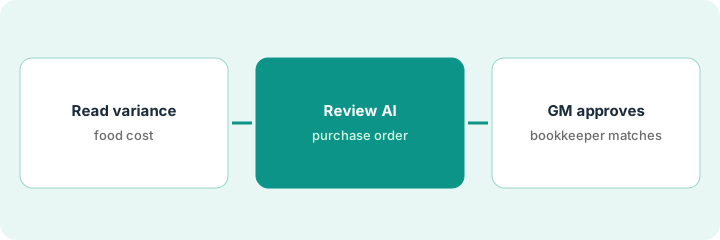
Restaurant365 AI can flag food-cost variance and suggest purchase orders. Orders that skip the GM still overbuy; accounts payable that skip the bookkeeper still miscode. This page shows how to read a variance alert, review an AI purchase-order suggestion, and keep GM approval with bookkeeper accounts payable ownership. AI Advisor is early access.
Who this is for
Multi-unit controllers, GMs, or kitchen leads on Restaurant365. For MarginEdge Tom invoice coding — a different job — see MarginEdge Tom invoice bookkeeper approve. For SpotOn Profit Assist — another different job — see SpotOn Profit Assist bookkeeper read.
How to do it
This is a how-to, not a ranking. Per the Restaurant365 AI review, R365 AI includes dashboards, food-cost variance alerts, accounts payable matching, and AI purchase-order suggestions; AI Advisor is early access. Restaurant365 is quote-only.
1. Read a food-cost variance alert
What it is: Open one food-cost variance alert and confirm the locations and date range.
- Pick one alert, not the whole company.
- Confirm POS and invoice timing.
- Label AI Advisor answers as early access if you use them.
- Name the GM who will approve purchase orders.
Alert shows two stores high on poultry. GM does not order yet.
Write alert summary and stores before opening the suggested purchase order.
2. Review AI purchase-order suggestion
What it is: Review the suggested purchase order against counts and the event calendar.
- Compare lines to on-hand.
- Cut speculative volume.
- Do not approve from this step alone if counts are stale.
- Loop the kitchen manager for high-value proteins.
AI suggests three cases; cooler has one unused. Suggestion cut to one case.
List each line as keep / cut / ask kitchen.
3. GM approves purchase order; bookkeeper handles accounts payable match
What it is: The GM approves the purchase order; the bookkeeper owns accounts payable invoice matching afterward.
- GM approves the purchase order in writing.
- Send the order.
- Bookkeeper matches invoices in accounts payable — not the GM.
- Close the variance note when delivery posts.
GM approves the trimmed poultry order. Bookkeeper matches the invoice two days later.
Log: alert, purchase order id, GM, bookkeeper match date.
Pricing context (October 2026)
This how-to isn't a price sheet. Per the Restaurant365 AI review, Restaurant365 publishes modules without public dollar amounts — contact sales for a quote. AI Advisor and some scheduling AI features are early access or beta. Dated October 2026.
Checked Oct 16, 2026 on the vendor’s own pricing page: Restaurant365 shows no public dollar amounts on Restaurant365’s pricing page; modules are quote-only. AI Advisor and some scheduling AI features are early access or beta per our review. This page quotes no Restaurant365 dollar figure; confirm what your contract includes with Restaurant365 or your admin.
Uncertainty: The only prices this site sells here are the optional $9 AI toolkit spreadsheet and $19 AI toolkit audit.
When this helps (honest take)
Useful when you use R365 purchasing and can split GM purchase-order approval from bookkeeper accounts payable.
Not useful when you only need invoice OCR coding — see MarginEdge — or POS profit chat — see SpotOn.
Related options (educational)
| Need | Where to look | Why |
|---|---|---|
| Restaurant365 AI | Restaurant365 AI | Primary path |
| MarginEdge Tom invoices | MarginEdge Tom approve | A different job |
| SpotOn Profit Assist | SpotOn Profit Assist | A different job |
| Restaurant stack map | Stack map: restaurant ops | Where R365 fits |
FAQ
Is AI Advisor generally available?
Per our review, AI Advisor is early access through R365 Chef's Table. Treat answers as drafts.
Who owns accounts payable matching?
The bookkeeper in this routine — the GM owns purchase-order approval only.
Does Restaurant365 publish prices?
No public dollar amounts on the pages we and the review checked. Our Oct 16, 2026 check of the vendor’s own pricing page is summarized in the pricing section above.
Is AI Advisor generally available?
Per our review, AI Advisor is early access. Treat answers as drafts.
Optional next step
If you want a one-page toolkit map for the tools you already pay for, use the optional $9 AI toolkit spreadsheet. If you want a short review of seat waste and unused tools, use the optional $19 AI toolkit audit. Neither is required to follow this how-to.