How-to · Restaurants · SpotOn · Oct 16, 2026
Answer one profit-and-loss question with SpotOn Profit Assist, and have the bookkeeper verify the explanation
SpotOn Profit Assist and Profit AI (open beta) can explain profit-and-loss swings. Acting on an explanation before the bookkeeper checks it still creates bad menu cuts. This page shows how to ask one food-cost question, read the answer, and verify it against the books.
Who this is for
Restaurant owners or bookkeepers on SpotOn who want Profit Assist answers verified before menu changes. For Restaurant365 AI purchase-order approval — a different job — see Restaurant365 AI purchase order GM approve.
How to do it
This is a how-to, not a ranking. Per the SpotOn AI review, Profit Assist and Profit AI (open beta) plus AI Menu Assistant support profit questions. The review's ground rule: the bookkeeper checks every profit explanation before anyone changes the menu.
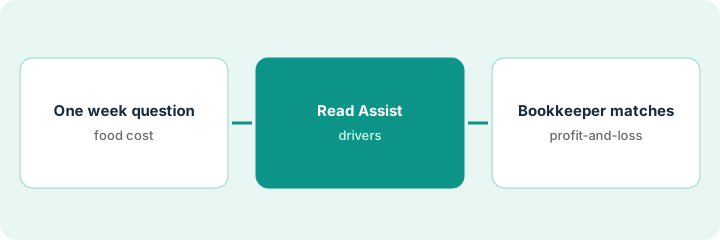
1. Ask one week's food-cost question
What it is: Pick one week and one food-cost question with a clear date range.
- Choose last week or a closed week only.
- Ask about food cost, not a whole annual plan.
- Name the bookkeeper who verifies.
- Label Profit AI as open beta if you use it.
Owner asks why food cost rose three points last week. No menu change is planned until the bookkeeper answers.
Write the week dates and the question before you open Profit Assist.
2. Read the Profit Assist answer
What it is: Read the explanation and list the vendors, dishes, or variances it cites.
- Copy the cited drivers into your notes.
- Do not edit recipes or prices yet.
- Flag any figure that looks like a void or transfer issue.
- Keep AI Menu Assistant suggestions parked.
Profit Assist blames two produce invoices and a high-waste protein. Owner forwards the note to the bookkeeper.
List each cited driver as confirm / investigate before the books check.
3. Bookkeeper matches it to the profit-and-loss
What it is: The bookkeeper matches the explanation to the profit-and-loss and invoice detail before any menu change.
- Match sales, invoices, and waste to the Assist story.
- Correct coding errors first.
- Only then allow a menu or portion discussion.
- Owner does not cut an item from Assist alone.
One invoice was miscoded to food. After recode, food cost is flat; no menu cut. Bookkeeper initials the sheet.
Keep a log: week, Assist claim, books verdict, action (or none).
Pricing context (October 2026)
This how-to isn't a price sheet. Per the SpotOn AI review, SpotOn lists Profit Assist around $100 per location on materials we and the review checked; Profit AI is open beta; full SpotOn restaurant suites are often quote-led. Confirm on your contract. Dated October 2026.
Checked Oct 16, 2026 on the vendor’s own pricing page: SpotOn materials summarized in our SpotOn AI review cite Profit Assist around $100 per location; Profit AI is open beta. Full SpotOn restaurant suites are often quote-led — confirm on your contract.
Uncertainty: The only prices this site sells here are the optional $9 AI toolkit spreadsheet and $19 AI toolkit audit.
When this helps (honest take)
Useful when you close weeks on time and a bookkeeper will verify every Assist story.
Not useful when you would change the menu from a beta profit chat without opening the profit-and-loss.
Related options (educational)
| Need | Where to look | Why |
|---|---|---|
| SpotOn AI | SpotOn AI | Primary path |
| Restaurant365 AI | Restaurant365 AI | Related back office |
| Restaurant365 purchase orders | R365 AI purchase order | A different job |
| Restaurant stack map | Stack map: restaurant ops | Where SpotOn fits |
FAQ
Is Profit AI generally available?
Per our review, Profit AI is open beta. Treat explanations as drafts until the bookkeeper agrees.
Should the owner cut a dish from Profit Assist alone?
No. The bookkeeper matches the story to the profit-and-loss first.
Where do SpotOn prices live?
Profit Assist is cited around $100 per location in our review; confirm your suite and beta access on the quote. Our Oct 16, 2026 check of the vendor’s own pricing page is summarized in the pricing section above.
Is Profit AI generally available?
Per our review, Profit AI is open beta. Treat explanations as drafts until the bookkeeper agrees.
Optional next step
If you want a one-page toolkit map for the tools you already pay for, use the optional $9 AI toolkit spreadsheet. If you want a short review of seat waste and unused tools, use the optional $19 AI toolkit audit. Neither is required to follow this how-to.