How-to · Networked notes · Reflect · Oct 22, 2026
Run a weekly review in Reflect with backlinks and one AI prompt
Reflect is a networked notes app: notes link to each other with backlinks, and Reflect AI can propose links and draft a weekly review prompt. This page shows how to link a handful of notes to one project, keep one standing review prompt, and keep the decisions about next actions with you.
Who this is for
Ops leads and individuals whose personal notes sprawl and who want linked notes plus a weekly review habit, not another shared wiki. For keeping priorities and waiting-on lists in Mem — a different job (personal lists, not linked notes) — see Mem priorities and waiting-on lists. For turning a five-bullet procedure into a Craft AI outline — a different job (writing a shared document) — see Craft AI procedure outline.
How to do it
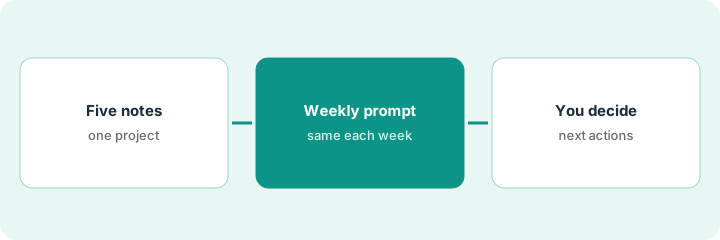
This is a how-to, not a ranking of notes apps. Per the Reflect AI review, Reflect AI can propose backlinks between related notes from a short list of titles, and draft a standing weekly prompt: which new links matter, which notes stayed orphans, and what to promote to the team wiki. Output is a suggestion list a person accepts or rejects. The review’s guardrails: propose links only from titles and snippets you provide, never invent meetings, owners, personal data, or vendor terms, and promote to Notion or Coda only after a human edit. The ground rule: you keep the ritual and decide the next actions.
1. Link five notes to one project
What it is: Pick one active project and five notes that relate to it. Ask Reflect AI to propose backlinks from the note titles, then accept or reject each.
- Pick one project and five related notes.
- Ask for backlink suggestions from the titles only.
- Accept or reject each suggestion yourself.
- Reject any link that implies a meeting or owner not in the notes.
The ops lead picks the volunteer onboarding project and five notes. Reflect AI suggests seven links; she accepts five and rejects two that tie the project to a board meeting that never discussed it.
Pick one project and five related notes, ask Reflect AI for backlink suggestions from the titles, and accept or reject each one yourself.
2. Run one standing weekly review prompt
What it is: Keep one short prompt you reuse every week, run against notes touched that week only.
- Write the prompt: three link suggestions, two orphan notes, one candidate to promote to the team wiki.
- Add: use only notes touched this week; never invent meetings or owners; flag missing context as Unknown.
- Run it at the same time each week.
- Save the prompt as a note so it stays the same.
Every Friday the chief of staff runs the same prompt. This week it suggests linking a pricing note to a renewal note, flags two orphan notes from a cancelled project, and proposes promoting a vendor decision to the wiki.
Write one weekly review prompt covering link suggestions, orphans, and one promotion candidate from this week’s notes only, save it as a note, and run it at the same time each week.
3. You decide the next actions, then promote with an edit
What it is: The review output is a suggestion list. You decide the next actions and edit anything before it moves to the team wiki.
- Read the review output and write your own next actions.
- Archive or link orphan notes yourself.
- Edit any promotion candidate before it goes to Notion or Coda.
- Ask: is this a networked-notes job, or wiki sprawl that belongs in the team space?
The manager writes three next actions from the review, archives one orphan, and rewrites the vendor decision as a short wiki entry before posting it to the team’s Notion page.
Write your own next actions from the weekly review, tidy orphans yourself, and edit any promotion candidate before it moves to the team wiki.
Pricing context (October 2026)
This how-to quotes no Reflect dollar figure. Per the Reflect AI review, Reflect’s packaging lives on its own site and the review states no seat prices; Reflect’s pricing address did not load for us on Oct 22, 2026. Confirm plan features, AI availability, and sync settings on Reflect’s site and your bill. Dated October 2026.
Checked Oct 22, 2026 on the vendor’s own site: Reflect’s pricing address (reflect.app/pricing) returned not found; plans are described on Reflect’s site. Our review states no price. This page quotes no Reflect dollar figure; see our review for what is known and Reflect’s own site before you budget.
Uncertainty: The only prices this site sells here are the optional $9 AI toolkit spreadsheet and $19 AI toolkit audit.
When this helps (honest take)
Useful when your personal notes sprawl, linked notes help you think, and you will keep a weekly review habit.
Not useful when the team already lives in Notion or Coda for the same notes, or you would publish AI suggestions without editing.
Related options (educational)
| Need | Where to look | Why |
|---|---|---|
| Networked notes and a weekly review | Reflect AI | Primary path |
| Personal priorities and waiting-on lists | Mem priorities and waiting-on lists | A different job |
| A shared procedure outline | Craft AI procedure outline | A different job |
| Team wiki and docs-as-apps | Notion AI vs Coda AI | Team source of record |
| Where notes tools fit | Stack map: knowledge ops | Broader map |
FAQ
What is Reflect good for in ops?
Networked personal and ops notes: proposing backlinks and keeping a weekly review. It is not a team wiki replacement when Notion or Coda is the source of record.
Can Reflect AI decide my next actions?
No. It suggests links, orphans, and promotion candidates; you write the next actions.
Does Reflect replace a meeting notetaker?
No. Our review points to Granola for meeting capture.
How much does Reflect cost?
Our review states no price; check Reflect’s own site (checked Oct 22, 2026).
Optional next step
If you want a one-page toolkit map for the tools you already pay for, use the optional $9 AI toolkit spreadsheet. If you want a short review of seat waste and unused tools, use the optional $19 AI toolkit audit. Neither is required to follow this how-to.