How-to · Personal notes · Mem · Oct 22, 2026
Keep a priorities list and a waiting-on list in Mem, and leave the team’s source of record in Notion
Mem is an AI notes product for personal capture and retrieval: dump scraps, then ask for structured lists. For an ops individual, that job is making sense of your own notes this week, not being the company wiki. This page shows how to turn a week of scraps into two lists and keep team facts where the team can find them.
Who this is for
Individuals in ops roles whose decisions, reminders, and “waiting on finance” notes are scattered across copied Slack messages and sticky notes. The job here is two personal lists and a clear line to the team wiki. For running a weekly review in Reflect with backlinks — a different job (linking notes, not building lists) — see Reflect backlinks weekly review. For turning a five-bullet procedure into a Craft AI outline — a different job (writing a shared document) — see Craft AI procedure outline.
How to do it
This is a how-to, not a ranking of notes apps. Per the Mem review, Mem’s value starts when you actually dump notes, and its asks work over your own notes, such as “what am I waiting on?” The review draws an honest boundary: Mem helps you remember; Notion helps the team share one source of record; Claude Projects hold a scoped file set for recurring work; meeting capture is a different job (Granola). The ground rule: keep prompts grounded in your notes, leave unknown owners blank, and do not move team truth into a personal-only tool.

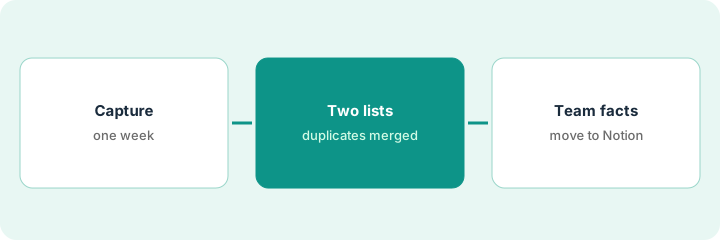
1. Capture scattered notes for a week
What it is: For one week, put every scrap into Mem: copied messages, decisions, reminders, and things you are waiting on.
- Add every scrap the same day you get it.
- Include who said it and when, if you know.
- Do not tidy notes as you go.
- Keep secrets and personal data out of notes that sync broadly.
The coordinator adds 37 scraps in a week: renewal reminders, two decisions from hallway chats, and several “waiting on IT” notes. Some reminders appear twice from different messages.
Put every work scrap into Mem the day you get it for one week, with who and when if known, without tidying as you go.
2. Build the two lists and mark duplicates
What it is: Ask Mem for a weekly priorities list (yours) and a waiting-on list (others), each item citing the note it came from, with duplicates merged.
- Ask for two lists from only your notes: priorities and waiting-on.
- Ask for the source note next to each item.
- Ask for duplicates to be marked and merged.
- Leave owner blanks where the note does not say.
The lists come back with 9 priorities and 7 waiting-on items. Two renewal reminders are merged as duplicates. One waiting-on item has no owner in the notes, so it stays blank until the office manager asks who has it.
Ask Mem for a priorities list and a waiting-on list from only your notes, each item citing its source note, with duplicates merged and unknown owners left blank.
3. Decide what moves to the team’s Notion source of record
What it is: Classify each note as personal-only, team source of record, or project files. Move team facts to Notion so others can find them.
- Mark each note personal-only (stays in Mem), team source of record (Notion), or project files (a Claude Project).
- Move decisions that affect others to the team’s Notion page.
- Write one line explaining each move.
- Repeat weekly; do not let team truth live only in Mem.
Of 37 notes, 26 stay personal, 8 are team decisions that move to the Notion ops page, and 3 are client files for a project. The ops lead does this each Friday in ten minutes.
Classify each note as personal-only, team source of record, or project files, and move team decisions to Notion every week.
Pricing context (October 2026)
This how-to quotes no Mem dollar figure. Per the Mem review, Mem plans, seat limits, and AI feature gates change, and the review states no prices; treat any dollar figures seen elsewhere as unverified until you check Mem’s own site. Dated October 2026.
Checked Oct 22, 2026 on the vendor’s own site: Mem publishes plans on its pricing page; our review states no price, so this page does not repeat one. This page quotes no Mem dollar figure; see our review for what is known and Mem’s own site before you budget.
Uncertainty: The only prices this site sells here are the optional $9 AI toolkit spreadsheet and $19 AI toolkit audit.
When this helps (honest take)
Useful when your notes are scattered, you will actually capture for a week, and you want two clear lists for yourself.
Not useful when the team needs a shared source of record, you will not capture consistently, or the job is meeting transcription.
Related options (educational)
| Need | Where to look | Why |
|---|---|---|
| Personal capture and lists | Mem | Primary path |
| Weekly review with backlinks | Reflect backlinks weekly review | A different job |
| A shared procedure outline | Craft AI procedure outline | A different job |
| Team wiki and docs-as-apps | Notion AI vs Coda AI | Team source of record |
| Where notes tools fit | Stack map: knowledge ops | Broader map |
FAQ
What is Mem good for in ops?
Personal ops memory: capture scattered notes and ask for priorities, waiting-on lists, and duplicates. It is not a shared team wiki.
When should I use Notion or Claude Projects instead?
Per our review, Notion when the team needs one shared source of record; Claude Projects when a scoped file set for recurring work matters more.
Does Mem replace a meeting notetaker?
No. Meeting capture is a different job; our review points to Granola.
How much does Mem cost?
Our review states no price; check Mem’s own site (checked Oct 22, 2026).
Optional next step
If you want a one-page toolkit map for the tools you already pay for, use the optional $9 AI toolkit spreadsheet. If you want a short review of seat waste and unused tools, use the optional $19 AI toolkit audit. Neither is required to follow this how-to.