How-to · Docs · Craft · Oct 22, 2026
Turn a 5-bullet procedure into a Craft AI section outline, and have a person own the final publish
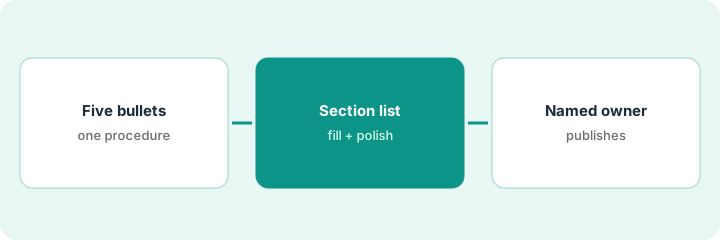
Craft AI can turn a short outline into a draft section list and polish it: tighter headings, unclear steps flagged, missing owners marked Unknown. This page shows how to go from five bullets to a finished procedure document while a named person owns the final publish and who can edit.
Who this is for
Small ops teams that write short procedures and runbooks in a lightweight doc tool. The job here is one procedure, from five bullets to a published document with a named owner. For keeping priorities and waiting-on lists in Mem — a different job (personal capture) — see Mem priorities and waiting-on lists. For a weekly review with backlinks in Reflect — a different job (personal linked notes) — see Reflect backlinks weekly review.
How to do it
This is a how-to, not a ranking of doc tools. Per the Craft AI review, Craft AI proposes a draft section list from a short outline without inventing owners, access rights, response times, or dates, then tightens tone, fixes headings, and flags vague steps. The human owns publishing, sharing links, and who can edit. The review’s guardrails: draft only from the outline you provide, never invent personal data, employment status, or vendor terms, never auto-publish, and move to Notion or Coda only after a human edit. The ground rule: a named owner publishes.

1. Write five bullets for one procedure
What it is: Pick one procedure people ask about often and write it as five plain bullets with the facts you know.
- Pick one procedure, such as opening the office or onboarding a contractor.
- Write five bullets in order.
- Include the owner and tools where you know them.
- Leave anything you do not know out rather than guessing.
The office manager writes five bullets for issuing a new building access card: request form, manager approval, card printing, activation, and handing it over. She knows who prints cards but not who activates them after hours.
Write one procedure as five plain bullets with the owners and tools you know, and leave out anything you would be guessing.
2. Generate a section list, fill it in, and polish
What it is: Ask Craft AI for a section list from only your bullets, fill in each section, then run one polish pass that flags unclear steps and marks missing owners Unknown.
- Ask for a section list using only the five bullets.
- Fill each section yourself from what you know.
- Run a polish pass: tighten headings, list unclear steps, mark missing owners Unknown.
- Answer each Unknown before publishing, or leave it visibly marked.
Craft AI returns six sections. The coordinator fills them in. The polish pass flags two unclear steps and marks the after-hours activation owner Unknown; she asks the security lead and fills it in.
Ask Craft AI for a section list from only your bullets, fill each section yourself, and run one polish pass that flags unclear steps and missing owners.
3. A named owner publishes and shares
What it is: Name one person who publishes the document, sets who can edit, and owns updates. Nothing is published automatically.
- Name the owner on the document itself.
- Have the owner read the full document before publishing.
- Set sharing and edit rights deliberately.
- If the team wiki is the source of record, move it there after the owner’s edit.
The ops lead is named owner of the access-card procedure, reads it end to end, fixes one step order, and publishes it with view-only sharing. The final version moves to the team’s Notion page, linked from the front desk checklist.
Name one owner who reads the whole procedure, sets sharing and edit rights, and publishes it, and move it to the team wiki if that is the source of record.
Pricing context (October 2026)
This how-to quotes no Craft dollar figure. Per the Craft AI review, Craft’s packaging lives on its own site and the review states no seat prices. Confirm plan features, AI availability, and sharing settings on Craft’s site and your bill. Dated October 2026.
Checked Oct 22, 2026 on the vendor’s own site: Craft publishes plans on its pricing page; our review states no price, so this page does not repeat one. This page quotes no Craft dollar figure; see our review for what is known and Craft’s own site before you budget.
Uncertainty: The only prices this site sells here are the optional $9 AI toolkit spreadsheet and $19 AI toolkit audit.
When this helps (honest take)
Useful when a small team writes short procedures in a lightweight doc tool and a named person will own each one.
Not useful when the team wiki already holds procedures in Notion or Coda and Craft would add a second copy, or nobody will own publishing.
Related options (educational)
| Need | Where to look | Why |
|---|---|---|
| Outline and polish for short documents | Craft AI | Primary path |
| Personal priorities and waiting-on lists | Mem priorities and waiting-on lists | A different job |
| Weekly review with backlinks | Reflect backlinks weekly review | A different job |
| Team wiki and docs-as-apps | Notion AI vs Coda AI | Team source of record |
FAQ
Does Craft AI publish documents on its own?
No. Per our review, a person owns publishing, sharing links, and edit rights.
What if the outline is missing an owner?
Craft AI should mark it Unknown. Find the real owner before publishing, or leave it visibly marked.
Craft or Notion?
Per our review, Craft suits lightweight personal and small-team documents; Notion suits a team wiki that is already the source of record.
How much does Craft cost?
Our review states no price; check Craft’s own site (checked Oct 22, 2026).
Optional next step
If you want a one-page toolkit map for the tools you already pay for, use the optional $9 AI toolkit spreadsheet. If you want a short review of seat waste and unused tools, use the optional $19 AI toolkit audit. Neither is required to follow this how-to.