How-to · Shipment visibility · project44 · Oct 21, 2026
Ask project44’s Mo AI analyst (beta) about late loads, and have the transportation manager approve every booking rule
project44’s Mo is an AI analyst you can ask about your own shipment data in plain language; project44 says it shows its work and flags low confidence. project44’s 12 August 2026 release says Mo “is available in beta for all project44 customers.” An answer about late loads can easily turn into a routing-guide change or a booking agent turned loose. This page shows how to ask Mo three real questions, check the answers, and keep every booking rule with the transportation manager.
Who this is for
Transportation managers, logistics analysts, and supply chain leads at shippers on project44. The job here is analysis that leads to booking rules. For putting FourKites’ Tracy on shipment status with a coordinator checking what customers see — a different job — see FourKites Tracy coordinator check. For checking Uber Freight Insights AI numbers before a carrier review — also a different job — see Uber Freight Insights AI KPI check.
How to do it
This is a how-to, not a ranking of visibility platforms. Per the project44 AI review, Mo (announced 23 July 2026, in beta) answers from your shipment history and business rules, shows which shipments, time window, and on-time definition it used, and at launch covers truckload, less-than-truckload, and ocean data. The Agentic Workflow Manager sets when agents start, by carrier, lane, or reason code; the AI Freight Procurement Agent books “within the guardrails your team defines”; and Theft Prevention watches truckload shipments for route deviation and idle stops. project44’s savings figures are its claims. The ground rule: the transportation manager approves every booking rule, rate guardrail, and routing-guide change.
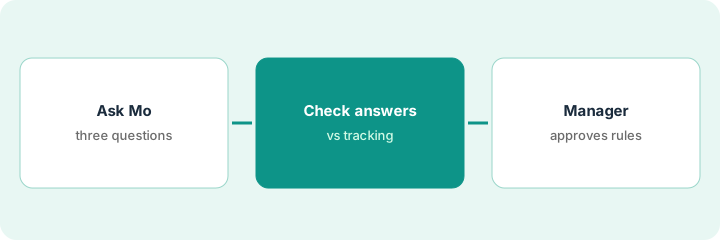
1. Ask Mo three real questions
What it is: Pick three questions you already have a rough answer to, so you can tell when Mo is off. Note that Mo is in beta.
- Ask which ten lanes had the worst on-time rate last month.
- Ask which carriers missed pickup most often on one lane.
- Ask where dwell time rose at one facility.
- Write down the on-time definition, time window, and shipments Mo says it used.
- Note any answer Mo flags as low confidence.
The analyst asks Mo the three questions. Mo answers each and shows the window and definition it used. For the lane question it uses arrival within the appointment window as on time, while the carrier contracts measure against the original requested date.
Ask Mo three questions you can check, and write down the definition, window, and shipments it says it used for each.
2. Check each answer against shipment data and carrier tracking
What it is: Before anything changes, the transportation manager checks part of each answer by hand and makes sure Mo’s definitions match your contracts.
- Check three of the lanes against carrier tracking.
- Teach Mo your contract on-time definition and rerun the question if it differs.
- Check carrier names and lane boundaries match your routing guide.
- Keep answers flagged low confidence out of any decision.
- Record what you checked and what changed.
After teaching Mo the contract definition and rerunning, two lanes drop off the list and one new one appears. The manager checks three lanes against carrier tracking; all three match. She records the change before discussing the routing guide.
Check three lanes from each answer against carrier tracking, and rerun with your contract’s on-time definition before anyone acts on the ranking.
3. Transportation manager approves every booking rule and workflow trigger
What it is: Before any booking agent or workflow acts on what you learned, the transportation manager writes the limits and approves each trigger. High-value lanes get Theft Prevention with an escalation path.
- Write three booking limits: largest rate over contract, carriers never to use, loads that always need a person.
- Enter them before turning on any booking agent, and approve every booking by hand for two weeks.
- Set one Agentic Workflow Manager trigger for a single lane and exception type.
- Read every carrier conversation the agent has for two weeks before adding a lane.
- For high-value lanes, set risky zones in Theft Prevention and write who the night shift calls.
The manager writes three booking limits and approves every booking for two weeks; she rejects two that use a carrier the team had stopped using on that lane and adds it to the never-use list. She sets one workflow trigger for missing proofs of delivery on one lane, and adds Theft Prevention zones for electronics loads with a written night escalation path.
Write three booking limits and one narrow workflow trigger, have the transportation manager approve each, and approve every booking by hand for two weeks.
Pricing context (October 2026)
This how-to isn’t a price sheet. Per the project44 AI review, project44 does not publish prices. When we checked on Oct 21, 2026, project44.com/pricing returned not found and the site lists no prices. Treat it as quote-only and ask whether Mo, the agents, the Agentic Workflow Manager, and Theft Prevention are in your contract. Dated October 2026.
Checked Oct 21, 2026 on the vendor’s own site: project44 publishes no prices; project44.com/pricing returned not found and project44’s site lists no prices. This page quotes no project44 dollar figure; ask project44 for a written quote and see our review for what is known.
Uncertainty: The only prices this site sells here are the optional $9 AI toolkit spreadsheet and $19 AI toolkit audit.
When this helps (honest take)
Useful when you ship with project44 visibility, analysts spend hours on late-load reports, and the transportation manager will approve every booking rule.
Not useful when your on-time definitions are not written down, you want booking agents running before limits exist, or nobody will read agent conversations.
Related options (educational)
| Need | Where to look | Why |
|---|---|---|
| Mo, AI agents, Agentic Workflow Manager | project44 AI | Primary path; quote only |
| Customer-facing status checks | FourKites Tracy coordinator check | A different job |
| KPI checks before a carrier review | Uber Freight Insights AI KPI check | A different job |
| Choosing between visibility platforms | project44 vs FourKites | Side-by-side explainer |
FAQ
Is Mo generally available?
Per our review, project44’s 12 August 2026 release says Mo is available in beta for all project44 customers; we did not find a general-availability date.
Can project44’s agents book freight on their own?
Per our review, project44 says its procurement agent books within guardrails your team defines. Set those limits yourself and approve bookings by hand until you trust them.
How much does project44 cost?
project44 publishes no prices. Treat it as quote-only (checked Oct 21, 2026).
Optional next step
If you want a one-page toolkit map for the tools you already pay for, use the optional $9 AI toolkit spreadsheet. If you want a short review of seat waste and unused tools, use the optional $19 AI toolkit audit. Neither is required to follow this how-to.