How-to · Shipper transportation · Uber Freight · Oct 21, 2026
Use Uber Freight Insights AI to prep a carrier review, and have the transportation manager check every number first
Uber Freight’s Insights AI answers plain-language questions about your freight data, keeps an AI-generated KPI dashboard, and offers proactive recommendations. Cost per mile depends on which miles and charges are counted. This page shows how to use Insights AI to prep a carrier review while the transportation manager checks every number before it reaches a carrier.
Who this is for
Transportation managers, logistics analysts, and freight procurement leads at shippers using Uber Freight’s TMS or managed transportation. The job here is prepping a carrier review with numbers you can defend. For asking project44’s Mo about late loads and approving booking rules — a different job — see project44 Mo booking rule approval.
How to do it
This is a how-to, not a ranking of freight platforms. Per the Uber Freight AI review, Insights AI answers questions from your freight data, the KPI dashboard ranks insights, proactive recommendations suggest actions, Uber Freight says “more than 30 AI agents” work across the shipment lifecycle, and Uber Freight Exchange added scenario analysis for contract procurement at Deliver 2025. The review found no public software prices and could not confirm whether Insights AI is offered without the TMS. Uber Freight’s savings figures are its claims. The ground rule: the transportation manager checks every lane cost and carrier figure against invoices before a carrier review, and the procurement lead decides every award.

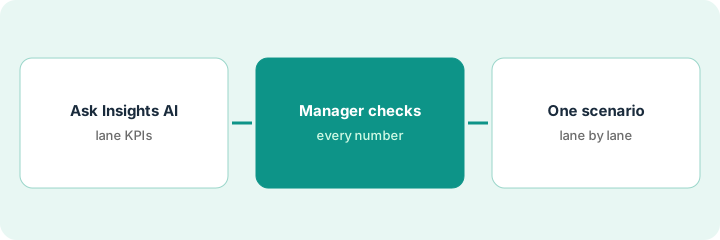
1. Ask Insights AI for lane KPIs
What it is: Ask for the numbers you plan to bring to the carrier review, and note how each one is defined.
- Ask for last quarter’s five most expensive lanes per mile.
- Ask for on-time performance by carrier on those lanes.
- Ask whether accessorials and fuel are included in cost per mile.
- Note the time window and shipments each answer covers.
- Save each answer with the question you asked.
The analyst asks for the five most expensive lanes per mile and carrier on-time rates. Insights AI answers both. She notes that cost per mile includes fuel but she cannot tell whether detention is included, and flags that for the manager.
Ask Insights AI for the lane costs and carrier on-time numbers you plan to use, and note how each number is defined.
2. Transportation manager checks every number before the review
What it is: Before any number reaches a carrier, the transportation manager checks it against invoices and your own records.
- Check at least two of the five lanes against invoices.
- Confirm which charges are in cost per mile.
- Check carrier on-time numbers against the carrier’s own tracking and your contract definition.
- Remove any number you cannot trace to source.
- Write which KPIs come from your own systems and which from Uber Freight.
Checking two lanes against invoices, the manager finds one lane’s cost per mile includes a one-off detention dispute that was later credited. She corrects it, keeps the other as is, and removes one on-time figure she cannot trace before the review.
Have the transportation manager trace every number in the carrier-review deck to invoices or your own records, and remove anything that cannot be traced.
3. Use one recommendation or procurement scenario after a lane check
What it is: If Insights AI recommends a mini-bid, or you run an Uber Freight Exchange scenario, check each lane against your own data before inviting carriers or awarding.
- Take one recommendation, such as a mini-bid on an underperforming lane.
- Check each lane against your own on-time and cost data.
- Run two Exchange award scenarios and compare cost, service, and carrier mix.
- Review every lane that moves to a carrier with no history on it.
- Have the procurement lead decide the award.
Insights AI recommends a mini-bid on three lanes. Two are underperforming in the team’s own data; one only looks expensive because of the credited detention charge. The procurement lead runs the mini-bid on two lanes and reviews the one lane where a scenario moved freight to a new carrier before awarding.
Before acting on an Insights AI recommendation or Exchange scenario, check each lane against your own data, and have the procurement lead decide the award.
Pricing context (October 2026)
This how-to isn’t a price sheet. Per the Uber Freight AI review, Uber Freight does not publish software prices. When we checked on Oct 21, 2026, uberfreight.com/en-US/pricing returned not found; the instant freight quote on the site prices loads, not the software. Treat the TMS, Insights AI, and managed transportation as quote-only. Dated October 2026.
Checked Oct 21, 2026 on the vendor’s own site: Uber Freight publishes no software prices; uberfreight.com/en-US/pricing returned not found and Uber Freight’s site lists no software prices. This page quotes no Uber Freight dollar figure; ask Uber Freight for a written quote and see our review for what is known.
Uncertainty: The only prices this site sells here are the optional $9 AI toolkit spreadsheet and $19 AI toolkit audit.
When this helps (honest take)
Useful when you ship on Uber Freight’s TMS or managed transportation, carrier reviews take days to prep, and the transportation manager will check every number.
Not useful when your invoices and shipment data do not reconcile, you plan to present AI numbers unchecked, or you are not sure Insights AI is in your contract.
Related options (educational)
| Need | Where to look | Why |
|---|---|---|
| Insights AI, KPI dashboard, Exchange scenarios | Uber Freight AI | Primary path; quote only |
| Analyst questions and booking rules | project44 Mo booking rule approval | A different job |
| Load audit proof of concept | Loadsmart load audit proof of concept | A different job |
| Where freight tools fit | Stack map: logistics ops | Broader map |
FAQ
What is Uber Freight Insights AI?
Per our review, Uber Freight’s generative AI assistant for shippers: it answers questions about your freight data, builds a ranked KPI dashboard, and offers proactive recommendations.
Do you need Uber Freight’s TMS to use Insights AI?
Per our review, Uber Freight describes Insights AI helping shippers using its TMS, and its site does not say it is sold separately. Ask in writing.
How much does Uber Freight cost?
Uber Freight publishes no software prices. Treat it as quote-only (checked Oct 21, 2026).
Optional next step
If you want a one-page toolkit map for the tools you already pay for, use the optional $9 AI toolkit spreadsheet. If you want a short review of seat waste and unused tools, use the optional $19 AI toolkit audit. Neither is required to follow this how-to.